
Control & Presets
Three subcategories in the Guitar section handle performance control and preset-level settings: Expression Pedal A assigns what the expression pedal does for the guitar in this preset, ButtonMap assigns the physical footswitches to guitar effect functions, and Preset stores the per-preset guitar level trim and pan. These are the parameters that connect the hardware to the guitar effects chain for live use.
Expression Pedal A
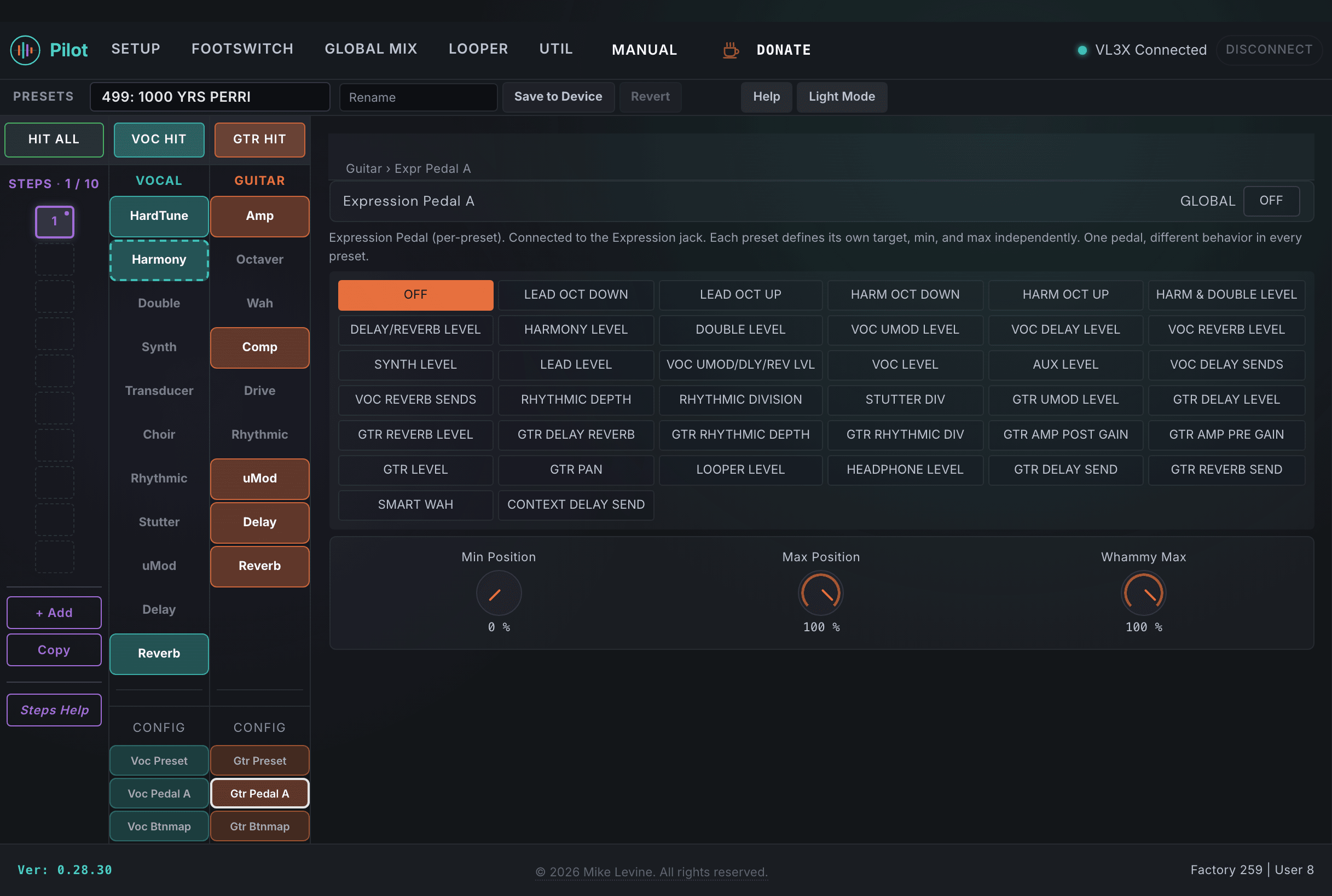
Expression Pedal A is the guitar-side expression pedal assignment. The VL3/x rear panel has two expression pedal jacks (Pedal A and Pedal B), and each stores its own function assignment and range per preset. The Guitar section's EXPR PEDAL A subcategory stores the assignment for Pedal A as it applies to the guitar effects and parameters.
| Parameter | Range | What it does |
|---|---|---|
| EXPRESSION PEDAL | 0-37 (enum: expr_pedal_function) | The parameter controlled by Expression Pedal A in this preset. 38 possible assignments covering guitar effect parameters, volume, whammy, and more. Set this to the parameter you want to sweep live with the expression pedal: wah frequency, amp gain, delay level, and similar real-time controls are all assignable here. |
| EXP MINPOS | 0-100% | The value of the assigned function when the pedal is at its heel-down (minimum) position. This is the parameter value at 0% pedal travel. Scaling MINPOS and MAXPOS independently lets you restrict the pedal sweep to a useful range within the parameter's full span. |
| EXP MAXPOS | 0-100% | The value of the assigned function when the pedal is at its toe-down (maximum) position. Setting MAXPOS below MINPOS reverses the pedal direction. Setting them equal effectively disables the pedal sweep for this assignment. |
| GLOBAL | On / Off | When On, this preset uses the device-level global expression pedal assignment for Pedal A rather than the per-preset values stored here. When Off, the settings in this preset are active and override the global assignment. |
ButtonMap
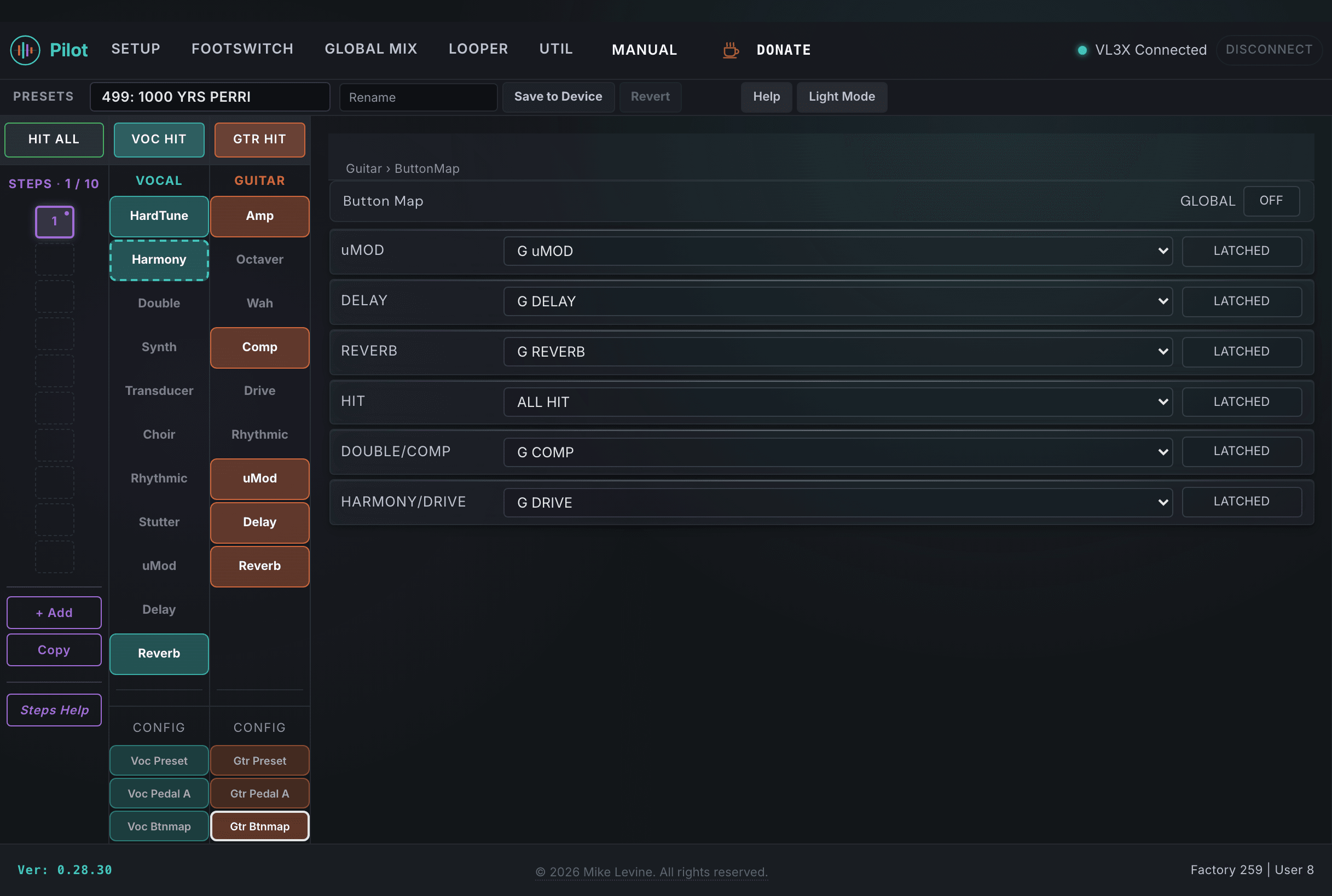
The guitar ButtonMap section contains 28 parameters that assign functions to the physical performance footswitches and control their behavior. This includes the standard six vocal-side button assignments (HIT, DOUBLE/COMP, HARMONY/DRIVE, uMOD, DELAY, REVERB) plus a separate set of guitar-specific mode parameters for the guitar effect blocks. Pilot surfaces all 28 parameters including the PARM1 and PARM2 advanced behavior fields.
Because ButtonMap is per-preset, each preset in your setlist can have completely different footswitch assignments. One preset can have a footswitch toggle guitar delay; the next can have that same button engage the wah. Pilot makes this easy to configure and verify before a gig.
Vocal Button Assignments
The first group of ButtonMap parameters assigns the six vocal-side performance buttons. These are shared between vocal and guitar control and appear in both the Guitar and Vocal Control sections.
| Parameter | Range | What it does |
|---|---|---|
| HIT | 0-37 (enum: button_function) | Function assigned to the HIT footswitch for this preset. 38 possible functions. HIT is the main performance trigger on the VL3/x and is commonly used to toggle multiple effects simultaneously or engage a preset-level action. |
| HIT MODE | 0-1 (enum: button_modifier) | Trigger behavior: Momentary (active only while held) or Latching (toggles on each press). Momentary works well for effects you want only while pressing; latching is better for hands-free sustained control. |
| HIT STATE | On / Off | The saved on/off state of the HIT-controlled effect when this preset is recalled. If HIT STATE is Off, the HIT-controlled effect starts bypassed when you load the preset. If On, it starts active. |
| HARMONY/DRIVE | 0-37 (enum: button_function) | Function assigned to the Harmony/Drive footswitch. Commonly used to toggle the Drive pedal or the Harmony effect, but assignable to any of the 38 button functions. |
| HARMONY/DRIVE MODE | 0-1 (enum: button_modifier) | Trigger mode for the Harmony/Drive button. |
| DOUBLE/COMP | 0-37 (enum: button_function) | Function assigned to the Double/Comp footswitch. Commonly toggles the compressor or guitar doubling, but assignable to any function. |
| DOUBLE/COMP MODE | 0-1 (enum: button_modifier) | Trigger mode for the Double/Comp button. |
| uMOD | 0-37 (enum: button_function) | Function assigned to the uMod footswitch. Typically toggles the uMod effect on vocal or guitar side. |
| uMOD MODE | 0-1 (enum: button_modifier) | Trigger mode for the uMod button. |
| DELAY | 0-37 (enum: button_function) | Function assigned to the Delay footswitch. Typically toggles vocal or guitar delay. |
| DELAY MODE | 0-1 (enum: button_modifier) | Trigger mode for the Delay button. |
| REVERB | 0-37 (enum: button_function) | Function assigned to the Reverb footswitch. Typically toggles vocal or guitar reverb. |
| REVERB MODE | 0-1 (enum: button_modifier) | Trigger mode for the Reverb button. |
| GLOBAL | On / Off | When On, this preset uses the device-level global ButtonMap assignments rather than the per-preset values stored here. |
Guitar Effect Button Modes
The guitar-specific mode parameters control the behavior of the guitar effect footswitches (uMOD, DELAY, REVERB, HIT, COMP, DRIVE) independently from the vocal-side button assignments above. These are separate parameters that govern how the guitar-specific effect buttons behave in this preset.
| Parameter | Range | What it does |
|---|---|---|
| GTR UMOD MODE | 0-1 (enum: button_mode) | Button mode for the guitar uMOD effect footswitch in this preset. Controls whether the button latches or momentarily activates the guitar uMod effect. |
| GTR DELAY MODE | 0-1 (enum: button_mode) | Button mode for the guitar DELAY effect footswitch in this preset. |
| GTR REVERB MODE | 0-1 (enum: button_mode) | Button mode for the guitar REVERB effect footswitch in this preset. |
| GTR HIT MODE | 0-1 (enum: button_mode) | Button mode for the guitar HIT effect footswitch in this preset. |
| GTR COMP MODE | 0-1 (enum: button_mode) | Button mode for the guitar COMP effect footswitch in this preset. |
| GTR DRIVE MODE | 0-1 (enum: button_mode) | Button mode for the guitar DRIVE effect footswitch in this preset. |
Preset Parameters
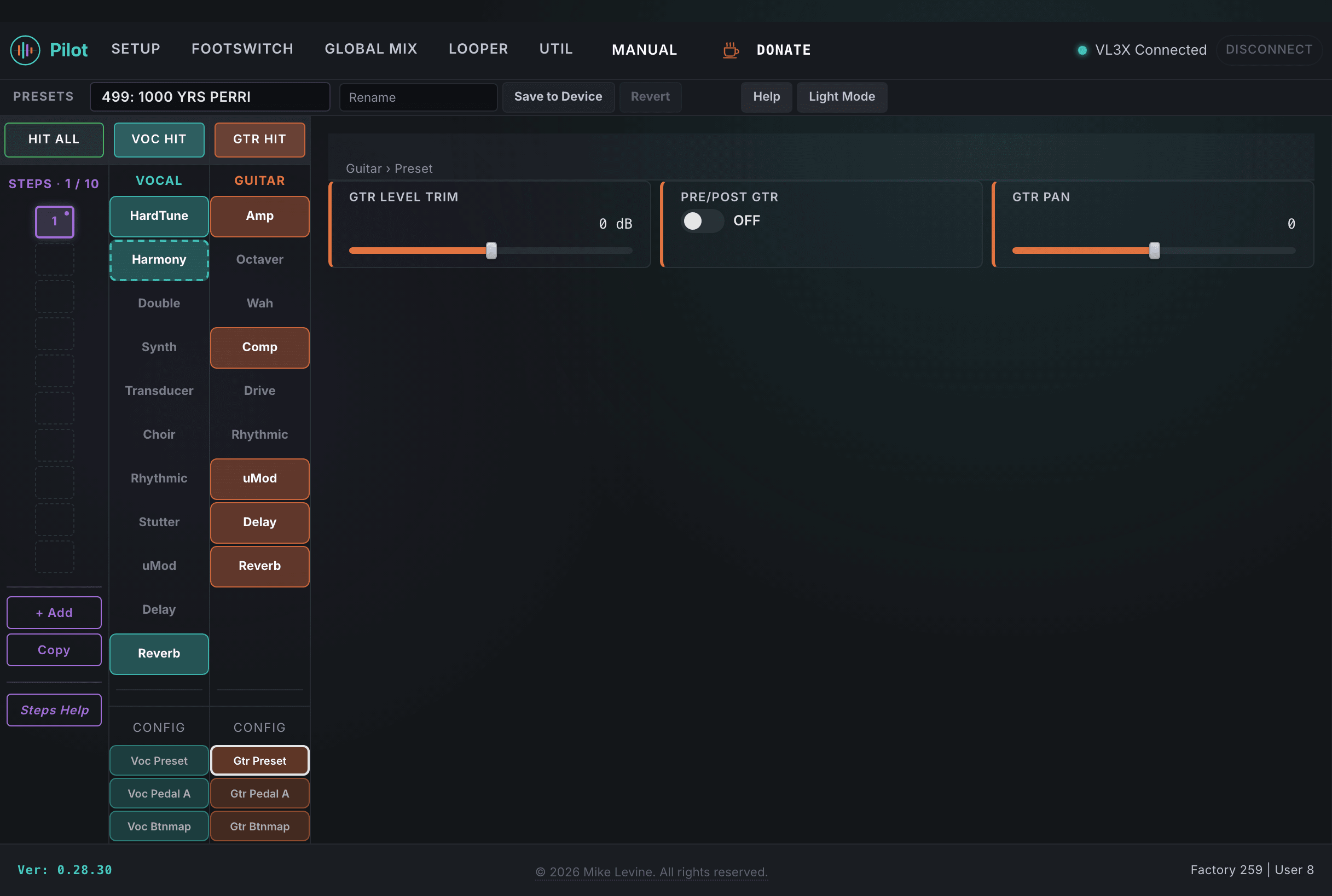
The PRESET subcategory stores three per-preset parameters that affect the overall guitar signal at the preset level: a level trim to match loudness across presets, a pan position for the guitar in the stereo field, and a routing toggle that places guitar processing before or after the vocal chain.
| Parameter | Range | What it does |
|---|---|---|
| GTR LEVEL TRIM | -6 to +6 dB | Per-preset output level trim for the guitar signal. Use this to match loudness between presets across your setlist without adjusting individual effect levels. A clean fingerpicking preset and a high-gain lead preset will naturally be at different loudness levels; use this trim to even them out. The range is intentionally narrow: it is a fine adjustment, not a gain stage. |
| GTR PAN | -100 to +100 | Stereo pan position for the guitar signal. -100 is hard left, +100 is hard right, 0 is center. In a dual-performer setup (singer-guitarist with a separate bass player, for example) a slight guitar offset left can create stereo separation from the vocal at center. |
| PRE/POST GTR | On / Off | Routing toggle for where the guitar processing sits relative to the vocal chain in this preset. When On, guitar processing is placed before the vocal block; when Off, it runs after. This affects how the guitar component interacts with vocal effects that can use guitar chord detection (such as HardTune and Harmony key source). |