
Pedals
The Pedals section covers four distinct guitar processing blocks: Octaver for pitch shifting, Wah for swept filter effects (with expression pedal or auto-sweep), Comp for dynamic control, and Drive for overdrive and distortion. Each runs as an independent block in the guitar signal path. Pilot exposes all parameters for all four, including hit control assignments and global flags that are not accessible from the device screen.
Octaver
The Octaver generates a pitch-shifted copy of the guitar signal and blends it with the dry signal. Six styles cover different pitch-shifting algorithms and octave characters.
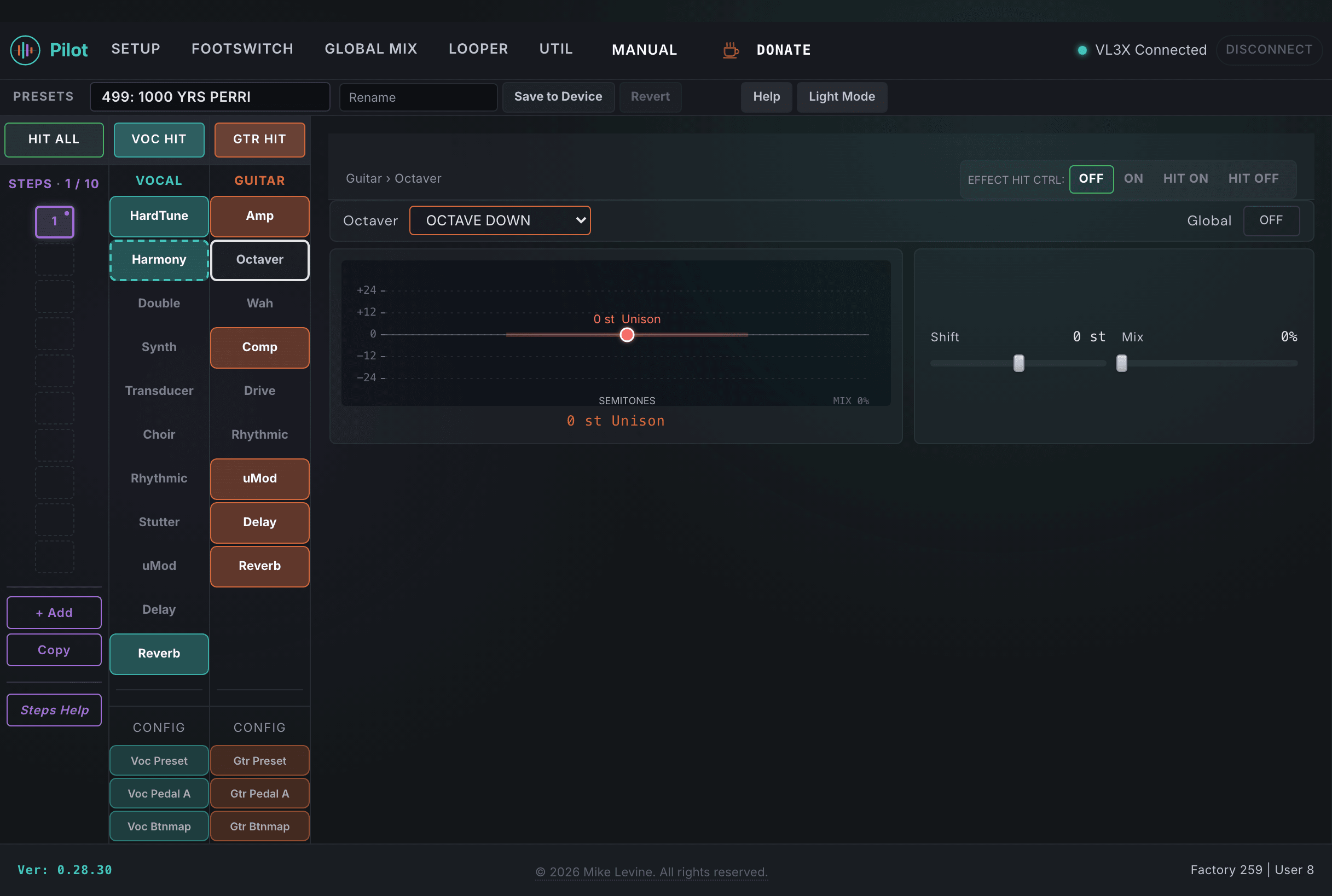
| Parameter | Range | What it does |
|---|---|---|
| TYPE | 0-5 (enum: octaver_style) | Selects the pitch-shifting algorithm. Six octaver styles with different tracking behavior and tonal character. Some styles have a more vintage, synth-like sound; others track more cleanly and transparently. Experiment with type if the default feels glitchy on your guitar or playing style. |
| MIX | 0-100 | Blend between the dry guitar signal and the pitch-shifted signal. At 0, only dry signal passes. At 100, the output is entirely the pitch-shifted signal. Most octave effects sound best with a blend that keeps some of the original attack character in the dry signal. |
| SHIFT | -24 to +24 semitones | Pitch shift amount in semitones. Negative values shift down (sub octave is -12); positive values shift up. The most common setting is -12 (one octave down) for a bass octave effect, but fractional and larger values are available for more unusual pitch-shifting applications. |
| HIT CONTROL | 0-3 (enum: hit_control) | Assigns the octaver footswitch to a Hit button (1-4) or disables Hit control for this block. |
| GLOBAL | On / Off | When On, locks the octaver to global settings shared across all presets. |
Wah
The Wah is a wah filter effect that can be controlled by the expression pedal or by an auto-sweep LFO. Pilot exposes all 15 parameters, including the resonance and sweep shape controls that the device screen never shows. The wah ORDER parameter lets you place the wah before or after other guitar effects in the signal chain.
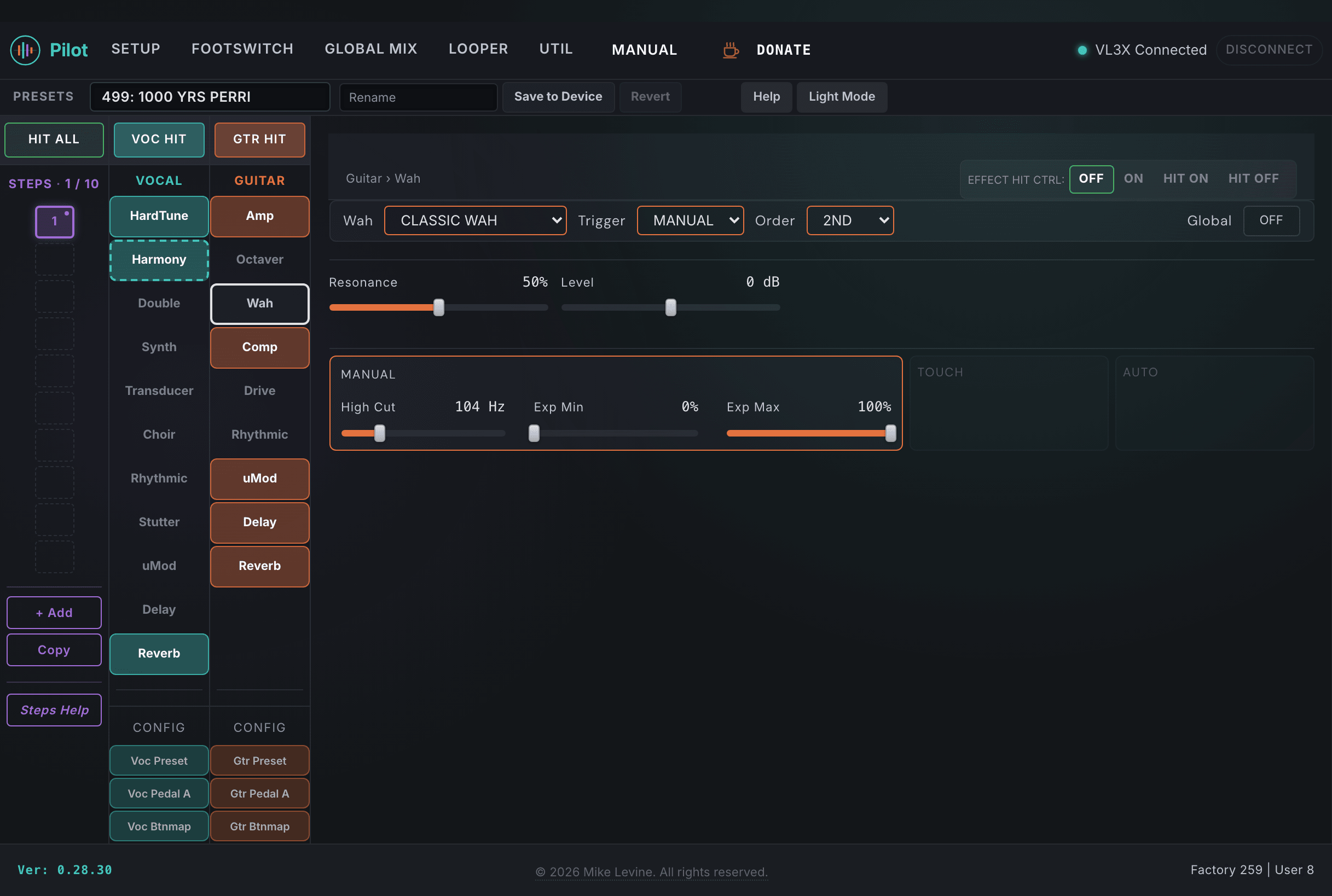
| Parameter | Range | What it does |
|---|---|---|
| TYPE | 0-9 (enum: wah_style) | Selects the wah filter style. 10 options covering different filter characters and sweep curves. The type defines the fundamental tonal character of the wah: some are pronounced and nasal, others are subtle and smooth. This is the first thing to dial in when building a wah sound. |
| SUBTYPE | 0-2 (enum: wah_subtype) | Tonal variation within the selected wah type. Adjusts the character of the filter curve without changing the fundamental type. Typically provides a tighter, standard, or wider sweep character. |
| ORDER | 0-1 (enum: wah_order) | Chain position of the wah effect relative to other guitar effects. Wah before drive creates a classic wah-into-distortion sound where the filter frequency shift gets saturated. Wah after drive filters the distorted signal, which can sound more pronounced and present in the mix. |
| SENSITIVITY | 0-10 | How aggressively the filter responds to pedal movement or auto-sweep depth. Higher sensitivity makes the filter sweep feel more reactive and pronounced. If the wah feels sluggish or too subtle, raise sensitivity first. |
| RESPONSE | 0-11 | Speed of the filter tracking. Controls how quickly the filter follows pedal movement. Fast response tracks every small movement; slow response smooths out rapid changes and gives the sweep a more gradual, liquid feel. |
| FMAX | 0-240 | Maximum frequency (toe-down position) of the filter sweep. Sets the upper limit of how far up the filter travels at full pedal. Lowering FMAX keeps the wah sound more contained in a specific frequency range; raising it extends the sweep into brighter territory. |
| HIGH CUT | 0-240 | High-cut filter on the wah output. Rolls off high frequencies to control harshness at the top of the sweep. A subtle high cut helps the wah sit better in a full-band live mix. |
| RESONANCE | 0-100 | Filter Q (sharpness) of the wah peak. Higher resonance creates a more pronounced, nasal wah peak with a sharper frequency emphasis. Lower resonance gives a broader, smoother filter sweep. This is one of the parameters the device screen never exposes; Pilot makes it directly editable. |
| BPM | 20-600 | Auto-sweep rate in BPM when the wah is in auto-sweep mode. Sets the speed of the automatic LFO-driven wah cycling instead of expression pedal control. |
| SHAPE | 0-1 | Auto-sweep waveform shape. Selects the LFO shape for automatic wah cycling: triangle (smooth, even sweep) or other waveform options depending on the device firmware. |
| LEVEL | -12 to +12 | Output level trim for the wah effect. Adjust to match the wah output level to the bypassed signal. If the wah sounds louder when engaged, reduce LEVEL here rather than compensating with amp gain. |
| EXP MINPOS | 0-100 | Expression pedal minimum position mapping for wah control. Sets the heel-down (minimum) sweep start point. Raising this limits the bottom of the sweep range, keeping the wah filter above a specific frequency even at full heel-down position. |
| EXP MAXPOS | 0-100 | Expression pedal maximum position mapping for wah control. Sets the toe-down (maximum) sweep end point. |
| HIT CONTROL | 0-3 (enum: hit_control) | Assigns the wah footswitch to a Hit button or disables Hit control for this block. |
| GLOBAL | On / Off | When On, locks the wah to global settings shared across all presets. |
Comp
The guitar compressor gives you dynamic control over the guitar signal before it hits the amp. Five compressor styles cover different character and response behaviors. Pilot exposes all eight parameters including the threshold, attack, release, and makeup gain controls that are not accessible from the device screen.
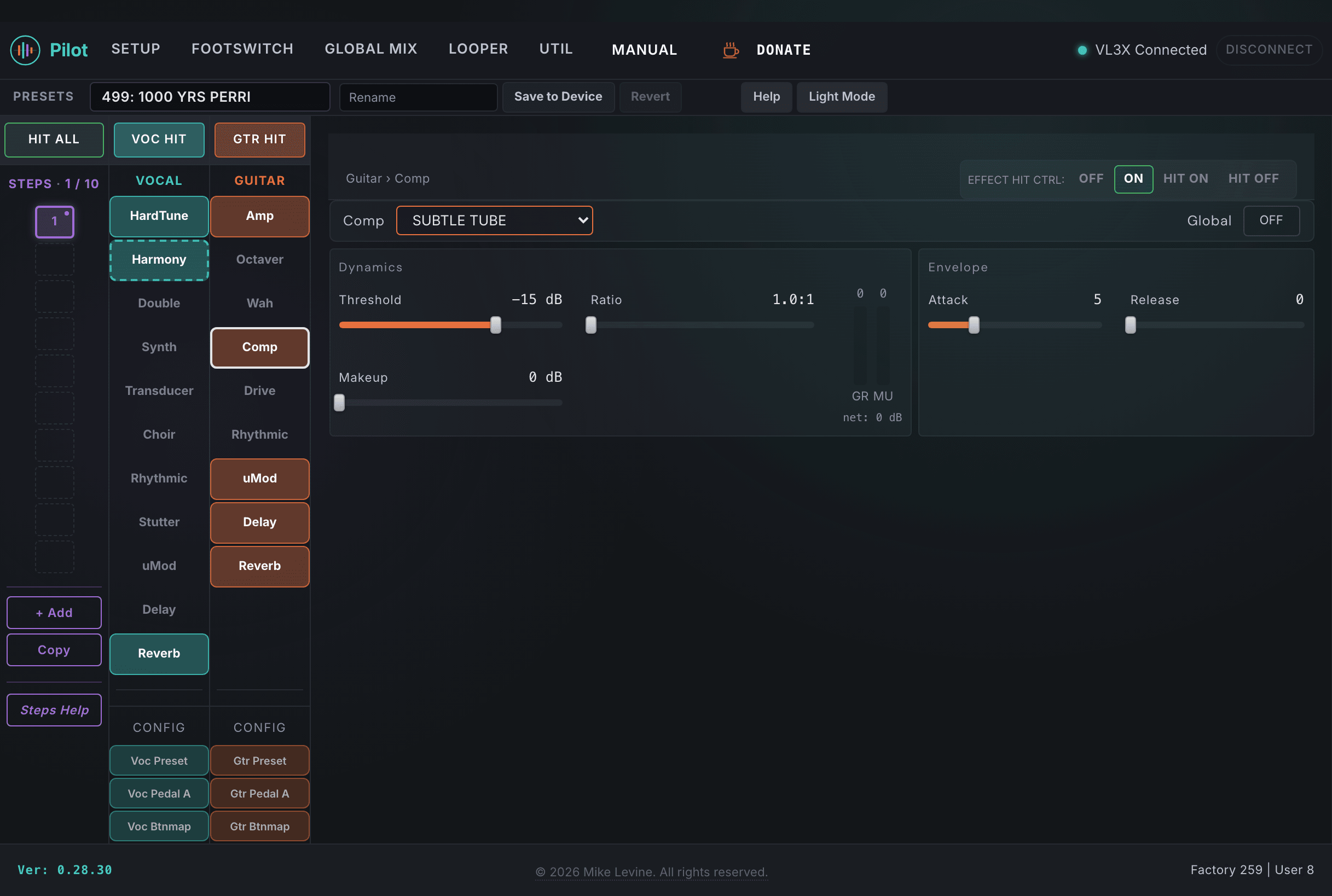
| Parameter | Range | What it does |
|---|---|---|
| TYPE | 0-4 (enum: guitar_comp_style) | Selects the compression algorithm. Five compressor styles with different character: some emulate classic optical or FET compressors; others are more transparent. The type affects the knee behavior, the feel of the attack, and the tonal coloration added by compression. |
| RATIO | 0-14 (enum: comp_ratio) | Compression ratio, selected from a fixed list of values that runs from 1.0:1 up through 30:1 and Inf:1 (limiting). Higher ratios reduce dynamic range more aggressively. Low ratios (2:1, 3:1) give gentle gain riding; higher ratios limit more heavily. The useful range for guitar is typically 3:1 to 6:1 for sustain and pick leveling; the top of the list moves toward hard limiting. |
| THRESHOLD | -50 to 0 dB | Level above which compression engages. Signals below the threshold pass through uncompressed. Setting a lower threshold means more of the signal gets compressed; a higher threshold only catches peaks. Adjust by ear: start with the threshold at a point where you can just hear the compressor engaging on your loudest notes. |
| ATTACK | 0-19 | How quickly compression engages after the signal exceeds the threshold. Faster attack values clamp down on transients immediately; slower attacks let the initial pick attack through before the compressor kicks in. Slower attack times preserve the percussive character of picking and add punch. |
| RELEASE | 0-19 | How quickly compression releases after the signal falls below the threshold. Shorter release times create a more transparent, pumping-free response; longer releases let the gain ride longer. For guitar sustain, a moderate-to-long release helps maintain level through the decay of each note. |
| MAKEUP GAIN | 0-30 dB | Gain applied after compression to compensate for the level reduction caused by the compressor. As you increase ratio and lower threshold, the average output level drops; makeup gain brings it back up. Set this until the compressed signal matches the bypassed signal level. |
| HIT CONTROL | 0-3 (enum: hit_control) | Assigns the compressor footswitch to a Hit button or disables Hit control for this block. |
| GLOBAL | On / Off | When On, locks the compressor to global settings shared across all presets. |
Drive
The Drive block adds gain and saturation before the amp stage. Three styles cover the main character options: BOOST, DRIVE, and DRIVE & BOOST. Unlike the amp's PREGAIN, the Drive block is a separate processing stage you can engage independently of the amp model. This lets you stack drive on top of the amp's own gain staging.
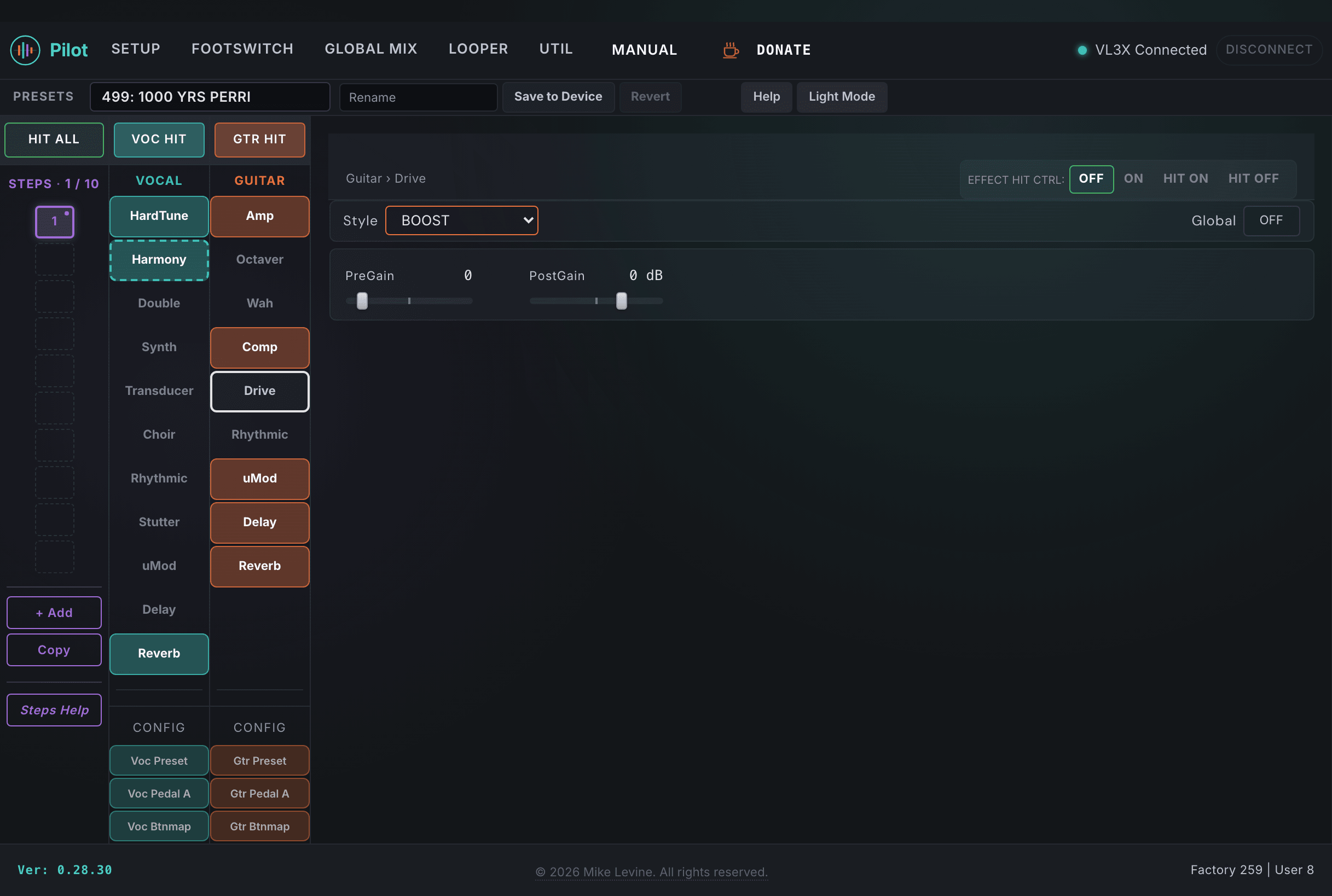
| Parameter | Range | What it does |
|---|---|---|
| STYLE | 0-2 (enum: drive_style) | Selects the drive character: BOOST, DRIVE, or DRIVE & BOOST. These are the three modes of the drive block, each providing a different gain staging and saturation character. |
| PREGAIN | -9 to 60 | Input drive level before the clipping stage. This is the primary gain control: higher values saturate the drive circuit more heavily, increasing distortion intensity. The useful range is style-dependent: fuzz may only need moderate pregain where distortion benefits from higher settings. |
| POST GAIN | -40 to +18 dB | Output level trim after the drive stage. Use this to match the driven signal level to the bypassed signal so that engaging drive does not cause a volume jump. Does not affect distortion character. |
| HIT CONTROL | 0-3 (enum: hit_control) | Assigns the drive footswitch to a Hit button or disables Hit control for this block. |
| GLOBAL | On / Off | When On, locks the drive block to global settings shared across all presets. |