The Creative Effects section covers two guitar processing blocks that add movement and texture beyond standard tone shaping: Rhythmic applies tempo-locked chopping and gating patterns, and uMod provides a 14-type modulation engine covering chorus, flanger, tremolo, and more. Both blocks are fully exposed in Pilot, including stereo width, cross-feedback, and LFO controls that the device screen keeps hidden.
Tip: Guitar Rhythmic and guitar uMod have output level and stereo width parameters (GTR UMOD LEVEL, GTR UMOD WIDTH) that control how each block sits in the final mix. Use these to blend modulation at a send level rather than adjusting the main amp output.
Rhythmic
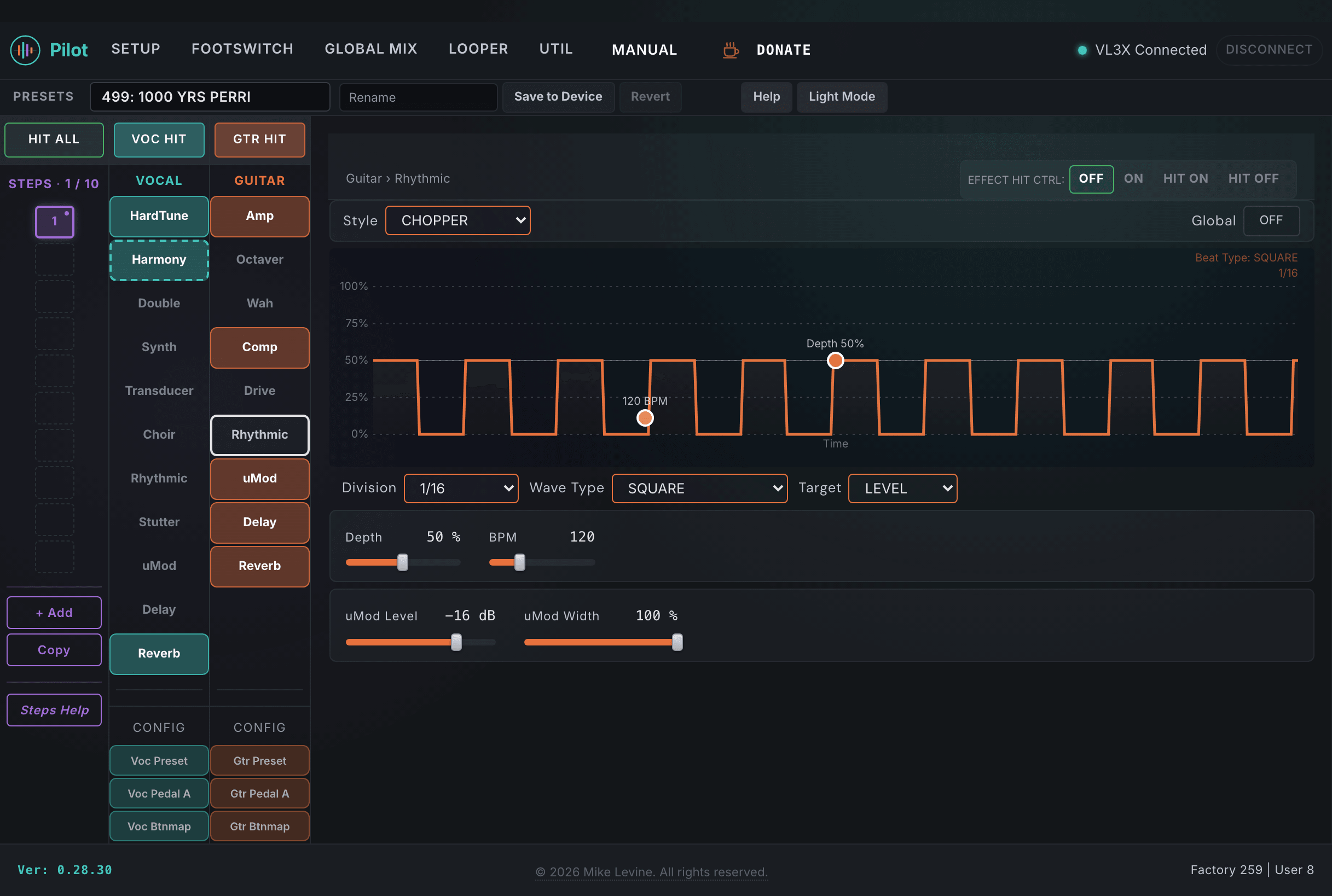
Rhythmic applies a tempo-synchronized chopping or gating pattern to the guitar signal. Seven styles cover different pattern types from simple chop to more complex tremolo variants. The TARGET parameter selects what the pattern modulates (LEVEL or PAN). The effect canvas in Pilot visualizes the current pattern in real time.
Pilot's guitar Rhythmic view. Pattern visualization at top, controls below.
Parameter
Range
What it does
TYPE
0-6 (enum: rhythm_style_guitar)
Selects the rhythmic chopping pattern style. Seven options covering simple on/off chops, panning chops, tremolo-style patterns, and more complex gate shapes. The type determines the fundamental character of the rhythmic effect before DEPTH and WAVEFORM shape it further.
DIVISION
0-19 (enum: note_division)
Note division for the rhythmic pattern relative to the preset tempo. Quarter, eighth, sixteenth, triplet, and dotted note values are available. Setting this to match the song's subdivisions keeps the rhythmic effect locked musically to the track.
DEPTH
0-100
How much the signal is attenuated during the "off" phase of the rhythmic pattern. At 0 there is no chopping; at 100 the signal cuts completely during the gate-off phase. Moderate depth values (50-70) create a tremolo-like effect; full depth creates hard gating.
TREM BPM
45-300
Tremolo/rhythmic rate in BPM when not using note-division sync. Allows the rhythmic effect to run at a specific BPM independent of the preset tempo, useful for effects that intentionally drift against the song tempo or for use without a defined tempo in the preset.
WAVEFORM
0-4 (enum: waveform)
The envelope shape used for the rhythmic pattern: square (hard gate), triangle (smooth ramp), sine (soft pulse), sawtooth (ramp up or down), or other shapes depending on the TYPE. Square gives percussive choppy cuts; sine and triangle give smoother tremolo-like pulses.
TARGET
0-1 (enum: rhythmic_target_guitar)
Selects what the guitar rhythmic pattern modulates. The two options are LEVEL (amplitude chopping/tremolo) and PAN (panning the signal across the stereo field in time with the pattern).
HIT CONTROL
0-3 (enum: hit_control)
Hit button behavior for the Rhythmic effect footswitch in this preset.
GLOBAL
On / Off
When On, the rhythmic block state is shared across all presets via global settings.
uMod
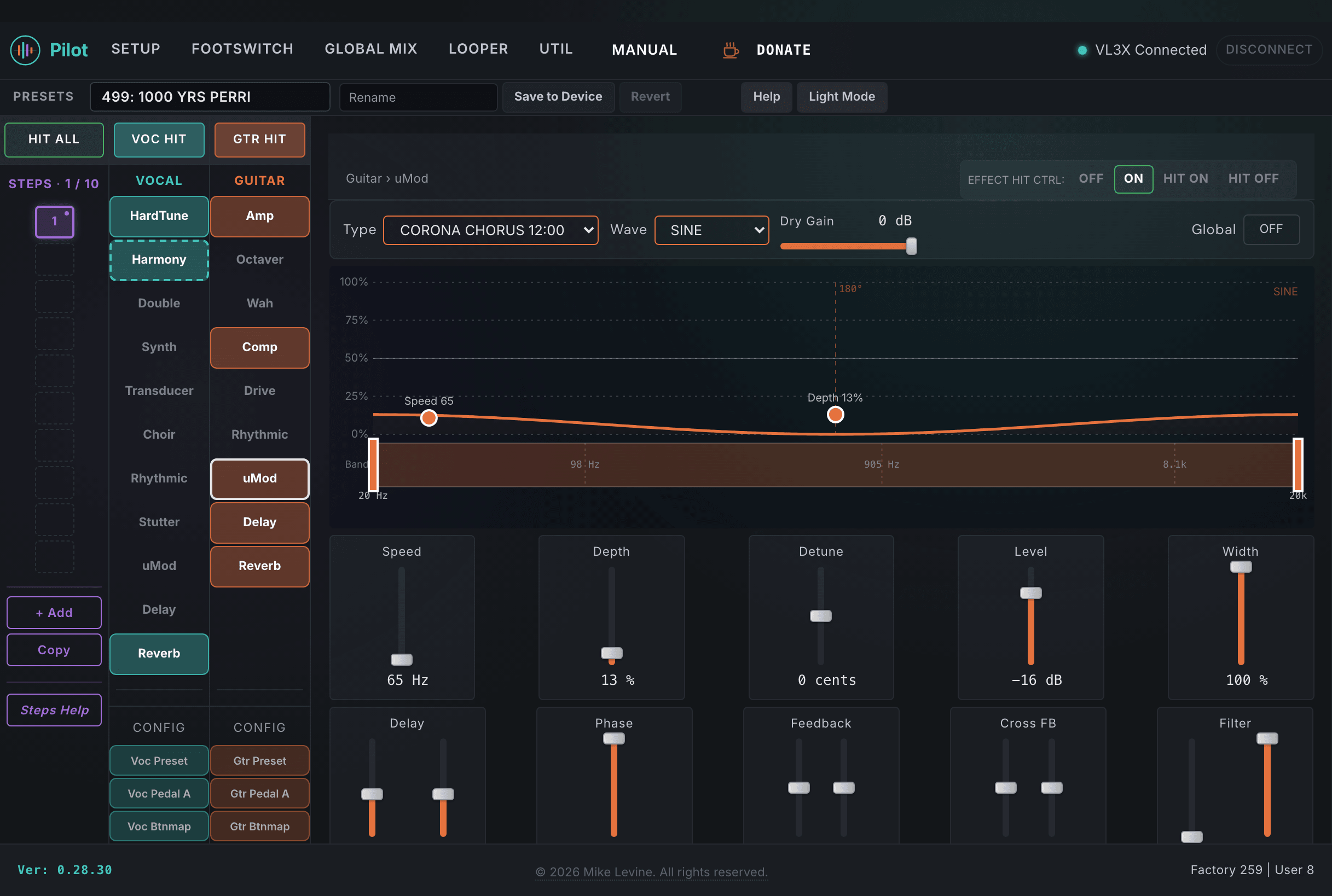
Guitar uMod is a 14-type modulation engine. Types range from standard chorus, flanger, and tremolo to more exotic combinations. The full parameter set in Pilot includes independent left and right delay times, LFO phase and wave, left/right feedback, and cross-feedback between channels, all of which are hidden from the device screen. The output level and stereo width parameters sit at the end of the uMod block and control how it fits into the overall guitar mix.
Pilot's guitar uMod view. Type and speed at top, modulation engine parameters in the middle, output level and width at the bottom.
Modulation Engine
Parameter
Range
What it does
TYPE
0-13 (enum: micromod_style_guitar)
Selects the modulation algorithm. 14 types covering chorus, flanger, tremolo, phaser, pitch vibrato, and specialized combinations. The type determines the fundamental modulation character: chorus creates pitch detuning spread, flanger adds comb-filter sweep, tremolo creates amplitude variation, and phaser adds phase cancellation movement.
SPEED
5-1000 Hz
LFO rate driving the modulation. The range covers very slow sweeps (near 5 Hz) to fast vibrato and tremolo. For chorus and flanger, lower speeds create wide, slow sweeps; higher speeds produce more animated, vibrato-like movement.
DETUNE
-25 to +25
Pitch detuning amount of the wet signal relative to the dry. Creates chorus-style pitch spread by shifting the modulated signal off the fundamental pitch. Positive and negative values allow asymmetric detuning relationships between wet and dry signals.
DEPTH
0-100%
Intensity of the LFO modulation on the wet signal. Higher depth creates more pronounced modulation movement. For tremolo this directly controls amplitude variation; for chorus and flanger it controls how much the pitch or phase shifts on each LFO cycle.
DRY GAIN
-61 to 0 dB
Level of the unprocessed dry signal passing through the uMod block. At 0 dB the dry signal is unity; reducing this creates more of a wet-only modulated sound. Fully reducing DRY GAIN gives a pure modulation effect without the original signal.
PHASE
0-180 degrees
LFO phase offset between the left and right channels. Creates stereo width by having the modulation on each side peak at different times. At 0 both channels modulate in phase (mono); at 180 they are fully out of phase, creating maximum stereo spread.
WAVE
0-2 (enum: waveform_guitar)
LFO waveform shape: sine, triangle, or other. Sine creates smooth, continuous modulation; triangle creates a linear ramp up and down; other shapes create more abrupt or asymmetric movement.
INV PHASE
0-3 (enum: inv_phase)
Phase inversion setting for the uMod output channels. Inverts the polarity of one or both channels, which combined with delay offsets can create comb filtering or stereo widening artifacts intentionally.
Delay and Feedback
Parameter
Range
What it does
DELAY LEFT
0-230
Left channel delay time offset for the modulated signal. Short delay times combined with the LFO create the comb-filtering sweep characteristic of flangers; longer delays move toward chorus territory. Setting left and right delay times differently creates stereo width asymmetry.
DELAY RIGHT
0-230
Right channel delay time offset for the modulated signal.
LOW CUT
0-240 Hz
High-pass filter applied to the modulated signal. Removes low frequencies from the wet output, keeping the modulation from muddying the low end of the guitar tone.
HIGH CUT
0-240 Hz
Low-pass filter applied to the modulated signal. Rolls off high frequencies from the wet output for a warmer, darker modulation character.
FEEDBACK L
-100 to +100%
Left channel feedback amount. Controls how much of the left modulated output feeds back into the left input. Positive feedback reinforces the modulation resonance; negative feedback creates phase-cancellation feedback. High positive values on a flanger create the characteristic resonant metallic sweep.
FEEDBACK R
-100 to +100%
Right channel feedback amount. Works identically to FEEDBACK L for the right channel.
XFB L
-100 to +100%
Cross-feedback from the left channel to the right channel input. Routes a portion of the left modulated output into the right processing path, creating stereo interaction between the two delay lines. Setting XFB L and XFB R to opposite values can create a bouncing stereo modulation pattern.
XFB R
-100 to +100%
Cross-feedback from the right channel to the left channel input.
Output Level and Width
Parameter
Range
What it does
GTR UMOD LEVEL
-61 to 0 dB
Master output level for the guitar uMod block before it reaches the final mix. Use this to set how present the modulation effect is relative to the dry guitar signal. Treating this as a send level lets you blend modulation without touching the amp or other effect levels.
GTR UMOD WIDTH
0-100%
Stereo width of the uMod output. At 0 the output is mono; at 100 the full stereo separation between left and right modulation paths is preserved. Narrowing width can prevent the modulation from competing with other stereo elements in the mix.
HIT CONTROL
0-3 (enum: hit_control)
Hit button behavior for the uMod effect footswitch in this preset.
GLOBAL
On / Off
When On, the uMod block state is shared across all presets via global settings.
Note: The guitar uMod block has 20 parameters. The device screen shows a small subset of these. Most of the delay, feedback, cross-feedback, and filter controls are DSP-only and only accessible through Pilot. The cross-feedback parameters (XFB L, XFB R) in particular create effects that are impossible to achieve from the front panel.