
Amp
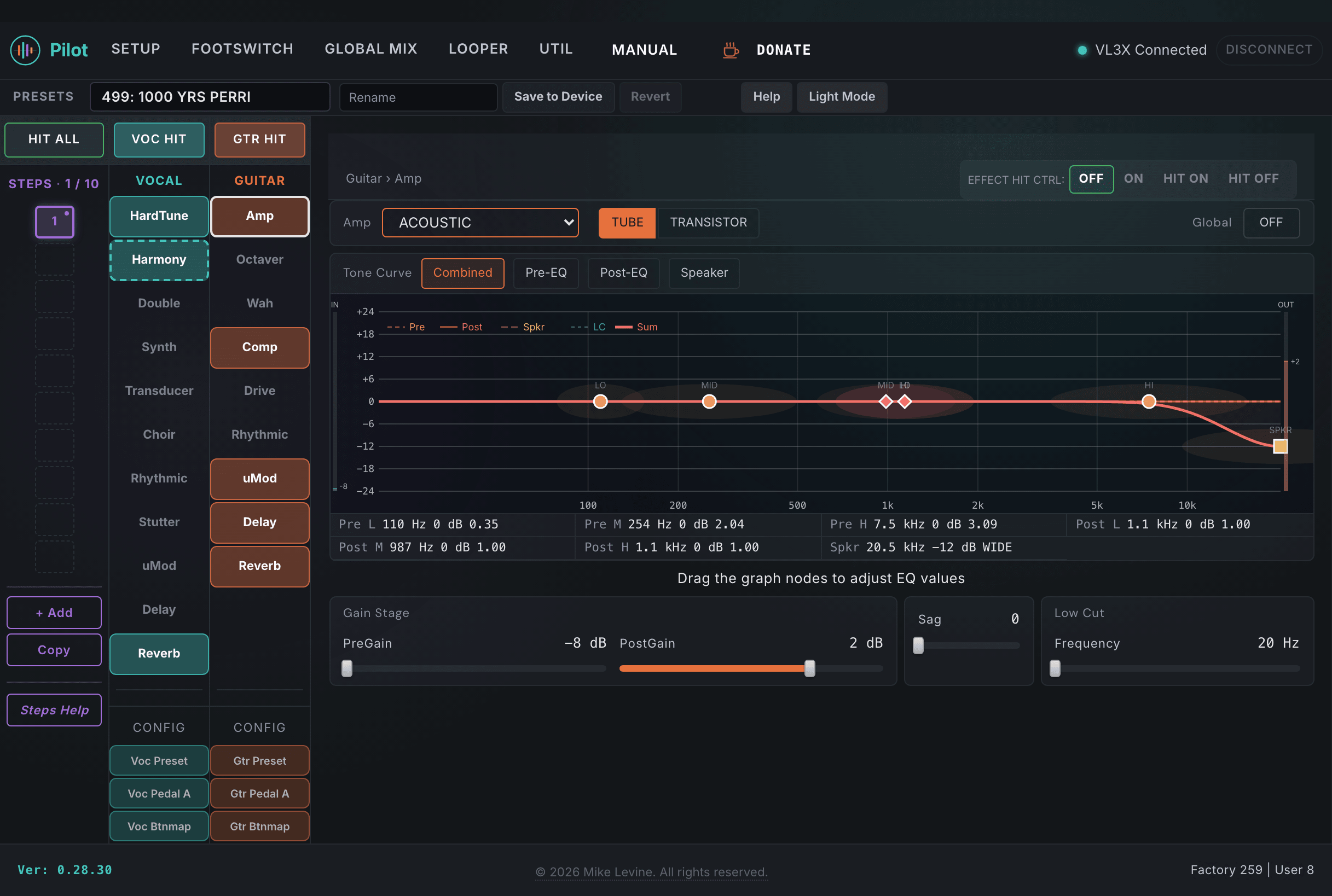
The Amp block is the core of the VL3/x guitar signal path. It provides amp modeling with 30 styles, a pre-amp EQ stage (applied before the amp core), a post-amp EQ stage (applied after the speaker simulator), and a separate speaker simulator. Pilot surfaces all 30 amp parameters including everything the device screen keeps hidden: the full three-band pre and post EQ with independent frequency and bandwidth controls, speaker simulator gain and shape, low-cut filtering, and power supply sag simulation.
When you open the Amp view in Pilot, you see an interactive EQ canvas that draws the combined frequency response of both EQ stages in real time. Drag the band handles to set gain; click a band to edit its frequency and bandwidth directly. This is a Pilot-only visualization; the device screen has no equivalent.
Amp Type and Gain
TYPE selects the amp model and defines the fundamental character of the distortion and tone shaping. PREGAIN controls how hard you drive the front end of that amp model. POSTGAIN trims the output level after the amp stage so you can match loudness between bypassed and active states. MODE switches between two tonal characters within the selected amp model.
| Parameter | Range | What it does |
|---|---|---|
| TYPE | 0-29 (enum: amp_style) | Selects the amp model. 30 styles covering clean, crunch, high-gain, and specialized characters. Changing TYPE resets EQ, speaker sim, and gain to that model's defaults. This is the first decision to make: find a model close to what you want, then shape it with EQ and gain. |
| MODE | 0-1 (enum: amp_mode) | Switches between two tonal variations within the selected amp model. Some models have a clean/crunch split; others use mode to change the voicing of the input stage. Mode is not available on all amp types. |
| PREGAIN | -9 to 60 | Input drive going into the amp stage. Higher values saturate the model more heavily and increase distortion. Range is wide: negative values clean up the input; values above 30 push into heavy saturation. The useful range varies significantly by amp type. |
| POSTGAIN | -40 to +18 dB | Output level trim after the amp stage and speaker simulator. Use this to match the amplified signal level to the dry signal, or to set the overall amp block output level in the mix. This does not affect distortion character. |
| AMP SAG | 0-10 | Simulates power supply sag. Range is 0 to 10. At 0 there is no sag; higher values add compression and dynamic response that reacts to how hard you pick. |
| HIT CONTROL | 0-3 (enum: hit_control) | Assigns the Hit button behavior for the amp block in this preset. |
| GLOBAL | On / Off | When On, the amp block uses device-level global amp settings shared across all presets. When Off, the settings in this preset are active. |
Pre-Amp EQ
The pre-amp EQ is a three-band parametric applied before the amp core and distortion stage. Because it sits before the saturation, changes to this EQ affect the character of the distortion itself, not just the tone. A mid-frequency boost before the amp creates more focused, aggressive distortion; cutting lows before the amp cleans up the low-end saturation. The EQ canvas in Pilot visualizes this stage with draggable band handles.
| Parameter | Range | What it does |
|---|---|---|
| LO PRE | -18 to +18 dB | Low band gain in the pre-amp EQ. Cutting lows before the amp reduces muddy low-end saturation; boosting adds warmth and body to the distortion character. |
| LO F PRE | 0-240 | Center frequency for the pre-amp low band. The 0-240 scale maps to actual frequency via the device's internal EQ curve. Pilot displays the frequency label in Hz. |
| LO BW PRE | 0-24 | Bandwidth (Q) for the pre-amp low band. Wider values affect a broader frequency range; narrower values create a more surgical peak or cut. |
| MID PRE | -18 to +18 dB | Mid band gain in the pre-amp EQ. The most powerful EQ band for shaping distortion character: a mid boost before the amp adds focused aggression and presence; a mid cut creates a scooped, heavier sound. |
| MID F PRE | 0-240 | Center frequency for the pre-amp mid band. |
| MID BW PRE | 0-24 | Bandwidth for the pre-amp mid band. |
| HIGH PRE | -18 to +18 dB | High band gain in the pre-amp EQ. Boosting highs before the amp adds treble bite and presence to the distortion. Cutting reduces harshness in the high-frequency saturation. |
| HIGH F PRE | 0-240 | Center frequency for the pre-amp high band. |
| HI BW PRE | 0-24 | Bandwidth for the pre-amp high band. |
EQ and Low Cut
The post-amp EQ is a three-band parametric applied after the speaker simulator. Changes here affect the tone but not the distortion character, since they sit outside the saturation stage. This is the right place for tonal balance adjustments to fit the guitar in the mix. The low-cut filter (LOCUT FC) sits before the amp and removes low-frequency content before it enters the amp stage.
| Parameter | Range | What it does |
|---|---|---|
| LOW POST | -18 to +18 dB | Low band gain in the post-amp EQ. Adjust after the amp stage for overall tonal balance without affecting distortion character. |
| LO F POST | 0-240 | Center frequency for the post-amp low band. |
| LO BW POST | 0-24 | Bandwidth for the post-amp low band. |
| MID POST | -18 to +18 dB | Mid band gain in the post-amp EQ. Useful for presence adjustments and final tonal shaping after all the distortion processing. |
| MID F POST | 0-240 | Center frequency for the post-amp mid band. |
| MID BW POST | 0-24 | Bandwidth for the post-amp mid band. |
| HIGH POST | -18 to +18 dB | High band gain in the post-amp EQ. Trim the top end of the final amp output here. |
| HI F POST | 0-240 | Center frequency for the post-amp high band. |
| HI BW POST | 0-24 | Bandwidth for the post-amp high band. |
| LOCUT FC | 0-72 | Low-cut (high-pass) filter applied before the amp stage. Removes rumble and low-frequency content before saturation. Cutting below the fundamental frequency of the guitar keeps the amp from distorting mud and sub frequencies. A value around 20-30 is a good starting point for most guitar types. |
Speaker Simulator
The speaker simulator models a guitar cabinet response by applying frequency shaping after the amp stage. It is the main reason a direct guitar signal through amp modeling sounds like a miked cabinet rather than a bare amplifier. SPKR GAIN, SPKR FC, and SPKR BW give you direct control over the cabinet coloration.
| Parameter | Range | What it does |
|---|---|---|
| SPKR GAIN | -20 to +20 dB | Output level of the speaker simulator. Use to trim the cabinet stage output level independently of the pre and post EQ stages. This sets how prominent the cabinet coloration is relative to the amp output. |
| SPKR FC | 0-240 | Center frequency of the speaker simulator filter. The cabinet shapes the frequency response around this point to model how a real guitar speaker colors the amp output. Adjusting this frequency moves the primary coloration peak of the simulated cabinet. |
| SPKR BW | 0-16 | Bandwidth of the speaker simulator filter. Narrower bandwidths create a more focused, resonant cabinet response; wider bandwidths give a more open, transparent coloration. |
Output and Pan
GTR PAN appears in both the Amp subcategory and the Preset subcategory. The Amp subcategory version is the amp block's pan position. This sets where the guitar sits in the stereo field at the amp level.
| Parameter | Range | What it does |
|---|---|---|
| GTR PAN | -100 to +100 | Stereo pan position of the guitar amp output. 0 is center; negative values pan left, positive values pan right. In a dual-performer setup where guitar and vocal occupy different stereo positions, this is the primary control for placing the guitar in the field. |