Guitar Delay and Reverb are the spatial effects at the end of the guitar signal chain. Delay creates echoes from the guitar signal with full control over timing, feedback, modulation, cross-feedback, filter shaping, and ducking. Reverb places the guitar in an acoustic space with 52 algorithm types ranging from tight rooms to vast halls, plus full color and ducking controls. Pilot exposes all 26 Delay and 20 Reverb parameters, including the output level and stereo width controls that the device screen never shows.
Tip: Guitar delay and reverb use separate output level parameters (GTR DELAY LEVEL, GTR DELAY WIDTH) at the block level. This means you can set a block's effective level as a send without touching the amp or other effect levels. Think of these as your wet bus faders.
Delay
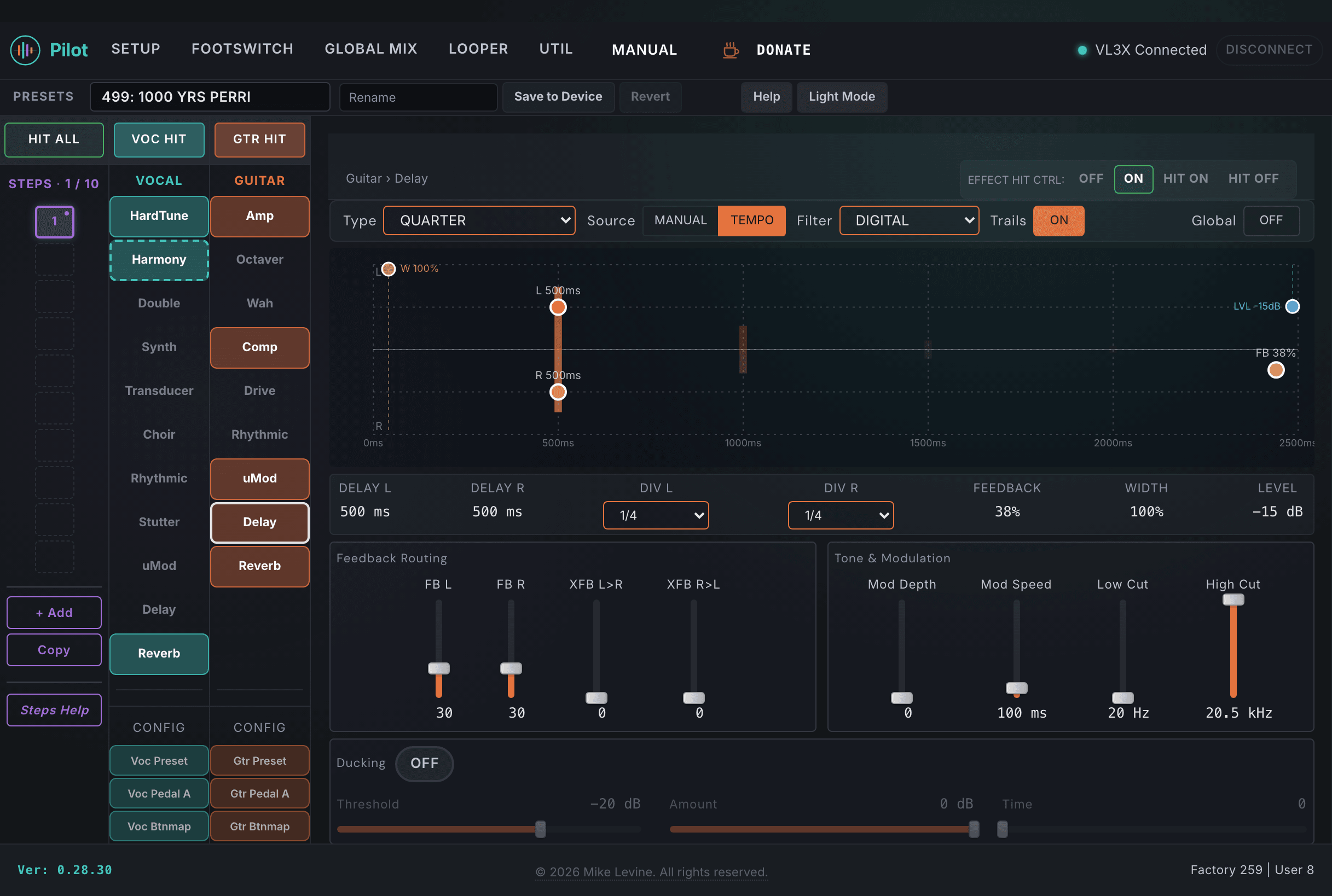
The guitar Delay block covers 15 algorithm types with independent left and right delay times, modulation, cross-feedback between channels, filter shaping across 13 styles, and full ducking control. Pilot also visualizes the ducking response in a canvas that shows the threshold and attenuation curve in real time.
Pilot's guitar Delay view. Type and source at top, delay times and feedback in the middle, ducking and output at the bottom.
Delay Engine
Parameter
Range
What it does
TYPE
0-14 (enum: delay_style_guitar)
Selects the delay algorithm. 15 styles covering mono, stereo, ping-pong, tape, analog, and specialized delay types. The type determines how the delay engine handles feedback, whether it has stereo separation, and the fundamental character of each repeat.
SOURCE
0-1 (enum: delay_source)
Determines whether the delay time is set by the preset TEMPO (tempo-synced using note divisions) or by direct millisecond values. Set to Tempo for rhythmic locked-to-the-song delay; set to Manual for time-based values.
TEMPO
45-300 BPM
Preset tempo used by the delay when SOURCE is set to Tempo. The note divisions (DIV L / DIV R) are calculated against this TEMPO, so changing TEMPO retimes the synced repeats. When SOURCE is Manual this value is ignored in favor of the millisecond DELAY L / DELAY R times.
DIV L
0-19 (enum: note_division)
Note division for the left channel delay time when tempo-synced. Quarter, eighth, sixteenth, triplet, and dotted note values. Setting DIV L and DIV R to different values creates rhythmically interesting ping-pong relationships.
DELAY L
0-2500 ms
Left channel delay time in milliseconds. Up to 2.5 seconds of delay range for the left channel.
DIV R
0-19 (enum: note_division)
Note division for the right channel delay time when tempo-synced.
DELAY R
0-2500 ms
Right channel delay time in milliseconds.
FEEDBACK
0-100
Global feedback amount controlling how many repeats occur. Low values give one or two clean echoes; high values create long, decaying trails. Approaching 100 creates near-infinite sustain.
FEEDBACK L
0-100
Independent feedback level for the left channel. When set differently from FEEDBACK R, the two channels decay at different rates.
FEEDBACK R
0-100
Independent feedback level for the right channel.
XFB L TO R
0-100
Cross-feedback from the left delay channel into the right. Routes a portion of the left output back into the right input, causing repeats to bounce between channels. This is the core mechanism of ping-pong delay behavior.
XFB R TO L
0-100
Cross-feedback from the right delay channel into the left. Setting both XFB parameters together produces true stereo ping-pong bounce.
MODDEPTH
0-100
Modulation depth applied to the delay time. Introducing slight pitch variation to repeats simulates tape wow and flutter, adds analog character, and prevents the sterility of pure digital delay. At moderate values it adds subtle warmth; at high values it creates obvious pitch variation on each repeat.
MODSPEED
10-1000 ms
Rate of the delay time modulation LFO. Longer values create a slower, more gradual pitch variation on repeats; shorter values create faster flutter. Works with MODDEPTH to define the character of the modulation.
TRAILS
On / Off
When On, delay repeats continue to decay naturally after the effect is bypassed or the preset changes. When Off, the delay cuts immediately on bypass.
Filter and Ducking
Parameter
Range
What it does
FILTERSTYLE
0-12 (enum: delay_filter_style)
Filter applied to the delay feedback path. 13 options including high-pass, low-pass, bandpass, and combinations. Filtering the feedback shapes the tonal character of subsequent repeats: warm low-pass filtering creates a tape-like effect where each repeat gets progressively darker.
LOW CUT
0-240
High-pass filter on the delay output. Removes low-frequency content from the delayed signal, preventing delay repeats from muddying the low end of the guitar mix.
HIGH CUT
0-240
Low-pass filter on the delay output. Rolling off highs on repeats gives a warmer, more tape-like character and helps repeats sit behind the dry signal.
DUCKING
On / Off
When On, the delay level automatically reduces while the guitar is playing and returns in the spaces between notes or phrases. Keeps delay from cluttering the mix during active playing while allowing echoes to fill the gaps.
DUCK THRES
-61 to 0 dB
Threshold for the ducking detector. When the input signal exceeds this level, the delay ducks. Set to just above the guitar signal floor so ducking engages during playing and releases during pauses.
DUCK AMT
-61 to 0 dB
How much the delay level reduces when ducking is active. A value of -20 dB keeps delay audible but recessed during playing. Deeper cuts (-40 dB or more) make the delay nearly inaudible while you're playing.
DUCK TIME
100 ms - 2000 ms
Recovery time after ducking: how quickly the delay returns to full level after you stop playing. Shorter times snap back quickly; longer times let the delay fade back in gradually, which feels more natural in ambient or reverb-heavy mixes.
Output Level and Width
Parameter
Range
What it does
GTR DELAY LEVEL
-61 to 0 dB
Master output level for the entire guitar Delay block before it reaches the final mix. This is the primary level control for how prominent the delay is in the mix. Treat it like a send-return fader for the delay bus.
GTR DELAY WIDTH
0-100
Stereo width of the delay output. At 0 the delay is mono; at 100 the full stereo separation of left and right delay lines is preserved. Narrowing width helps in mono PA situations or when the delay needs to stay more centered in the mix.
HIT CONTROL
0-3 (enum: hit_control)
Hit button behavior for the Delay effect footswitch in this preset.
GLOBAL
On / Off
When On, the Delay block state is shared across all presets via global settings.
Reverb
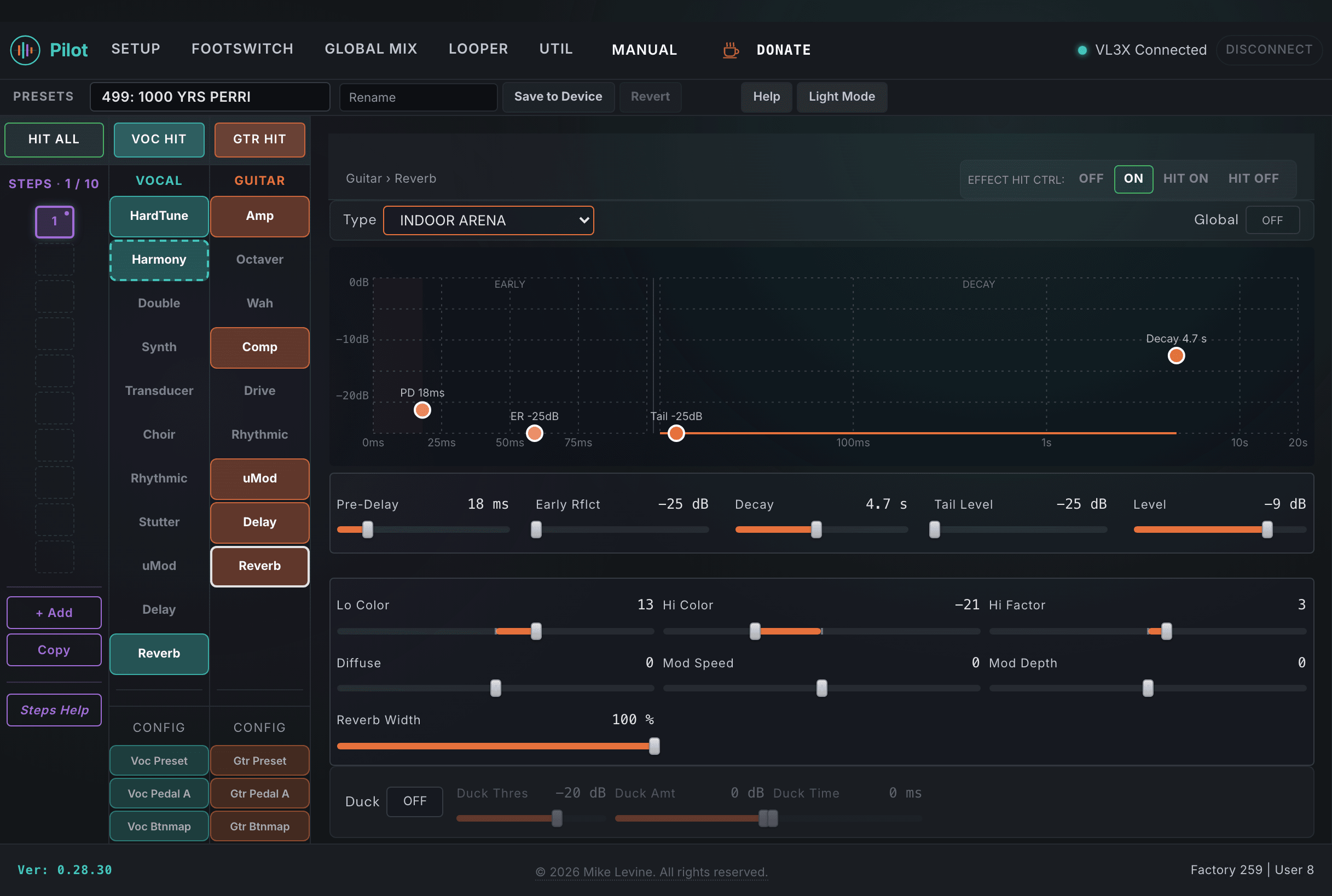
The guitar Reverb block provides 52 algorithm types across 14 categories, from small rooms and plates to sprawling halls and ambient textures. Beyond the type and decay, Pilot exposes the full color and diffusion controls (LO COLOR, HICOLOR, HIFACTOR, DIFFUSE), internal modulation parameters, and ducking controls that are all hidden from the device screen.
Pilot's guitar Reverb view. Type and decay at top; tone and ducking controls below.
Reverb Engine
Parameter
Range
What it does
TYPE
0-51 (enum: reverb_style_guitar)
Selects the reverb algorithm. 52 options covering rooms, halls, plates, springs, ambient, shimmer, and specialized guitar reverb types. The type defines the fundamental character of the space.
CATEGORY
0-13
Filters the available reverb types by category for quicker selection. Categories group types by character (Room, Hall, Plate, Spring, Ambient, etc.). Using CATEGORY first narrows the list before selecting a specific TYPE.
DECAY
1-290
Reverb tail length. This is the primary control for how long the reverberation lasts. Short decays (1-30) give tight rooms and ambiences; longer decays (100-290) create halls and spatial washes. Match the decay to the sonic character set by TYPE.
LEVEL
-61 to +6 dB
Wet level of the reverb output. Sets the overall output level of the reverb effect relative to the dry signal passing through. The range runs from -61 dB (effectively silent) up to +6 dB of boost.
PREDELAY
0-100 ms
Delay before the reverb tail begins after the input signal. Even 20-30 ms of predelay keeps the attack of each note clear and the guitar presence intact in the mix, preventing the reverb from washing over the attack of each note.
DIFFUSE
-50 to +50
Controls the density and smoothness of the reverb tail. Lower values create a more sparse, textured reflection pattern; higher values create a smoother, denser reverb.
EARLY RFLCT
-25 to 0 dB
Level of the initial room reflections before the diffuse reverb tail develops. Raising this adds a sense of room walls and physical space; reducing it creates a more abstract, purely diffuse reverb without clear early echoes.
TAIL LEVEL
-25 to 0 dB
Level of the late reverb tail separately from early reflections. Lets you balance early reflections against the tail: a strong early reflection combined with a quieter tail can give a sense of space without a long, obvious reverb wash.
Color and Modulation
Parameter
Range
What it does
LO COLOR
-50 to +50
Low-frequency content of the reverb tail. Negative values roll off lows from the reverb, keeping it from competing with the bass end of the guitar tone. Positive values add low-end warmth and weight to the reverb tail.
HICOLOR
-50 to +50
High-frequency content of the reverb tail. Negative values create a darker, warmer reverb that trails off toward the lows. Positive values keep high-frequency sparkle in the tail. Darker reverbs tend to sit better behind guitar in a live mix without adding harshness.
HIFACTOR
-25 to +25
Controls how quickly high frequencies fade in the reverb tail relative to the overall decay. Negative values make highs damp faster. Positive values extend the high-frequency tail, creating a brighter, more sustained reverb texture.
MODSPEED
-25 to +25
Speed of internal modulation applied to the reverb tail. Modulation breaks up the metallic coloration that some reverb algorithms develop by adding slight pitch movement to the reflections. Positive values add modulation; zero is flat.
MODDEPTH
-25 to +25
Depth of the internal modulation. At moderate values it smooths the reverb resonance; at high values it creates an audible chorus-like shimmer in the tail that works well for ambient and texture-oriented reverb applications.
WIDTH
0-100 %
Stereo width of the reverb output. At 0 the reverb collapses to mono; at 100 the full stereo spread of the reverberant field is preserved. Narrowing width keeps the reverb more centered, which helps in mono PA situations or when the dry guitar needs to stay focused in the middle of the mix.
Ducking
Parameter
Range
What it does
DUCKING
On / Off
Enables reverb ducking. When On, the reverb level reduces while you're playing and returns to full level in the pauses between phrases. Keeps reverb from accumulating during active playing while preserving the sense of space in the gaps.
DUCK THRES
-61 to 0 dB
Level above which the reverb begins to duck. Set just above your guitar signal noise floor to avoid false triggering from low-level noise or hum.
DUCK AMT
-61 to 0 dB
How much the reverb reduces when ducking. Moderate values (-15 to -25 dB) keep reverb present but recessed during playing; deeper values (-40 dB and beyond) make it nearly inaudible while the guitar is active.
DUCK TIME
100 ms - 2000 ms
How quickly the reverb returns to full level after the input signal drops below the threshold. Shorter times snap back quickly; longer times create a gradual bloom of reverb that appears naturally as you stop playing.
Global and Hit
Parameter
Range
What it does
HIT CONTROL
0-3 (enum: hit_control)
Hit button behavior for the Reverb effect footswitch in this preset.
GLOBAL
On / Off
When On, the Reverb block state is shared across all presets via global settings.
Note: Guitar Reverb has 52 TYPE options versus 43 for vocal Reverb. The 9 additional guitar types are 8 Hall of Fame reverbs (AMB, TILE, ROOM, LOFI, SPRING, PLATE, HALL, CHURCH) plus SHIMMER MOD, based on TC Electronic's Hall of Fame pedal algorithms. LO COLOR, HICOLOR, HIFACTOR, DIFFUSE, MODSPEED, and MODDEPTH are hidden parameters: the device screen never exposes them, but they are stored in presets and travel with preset exports and imports.