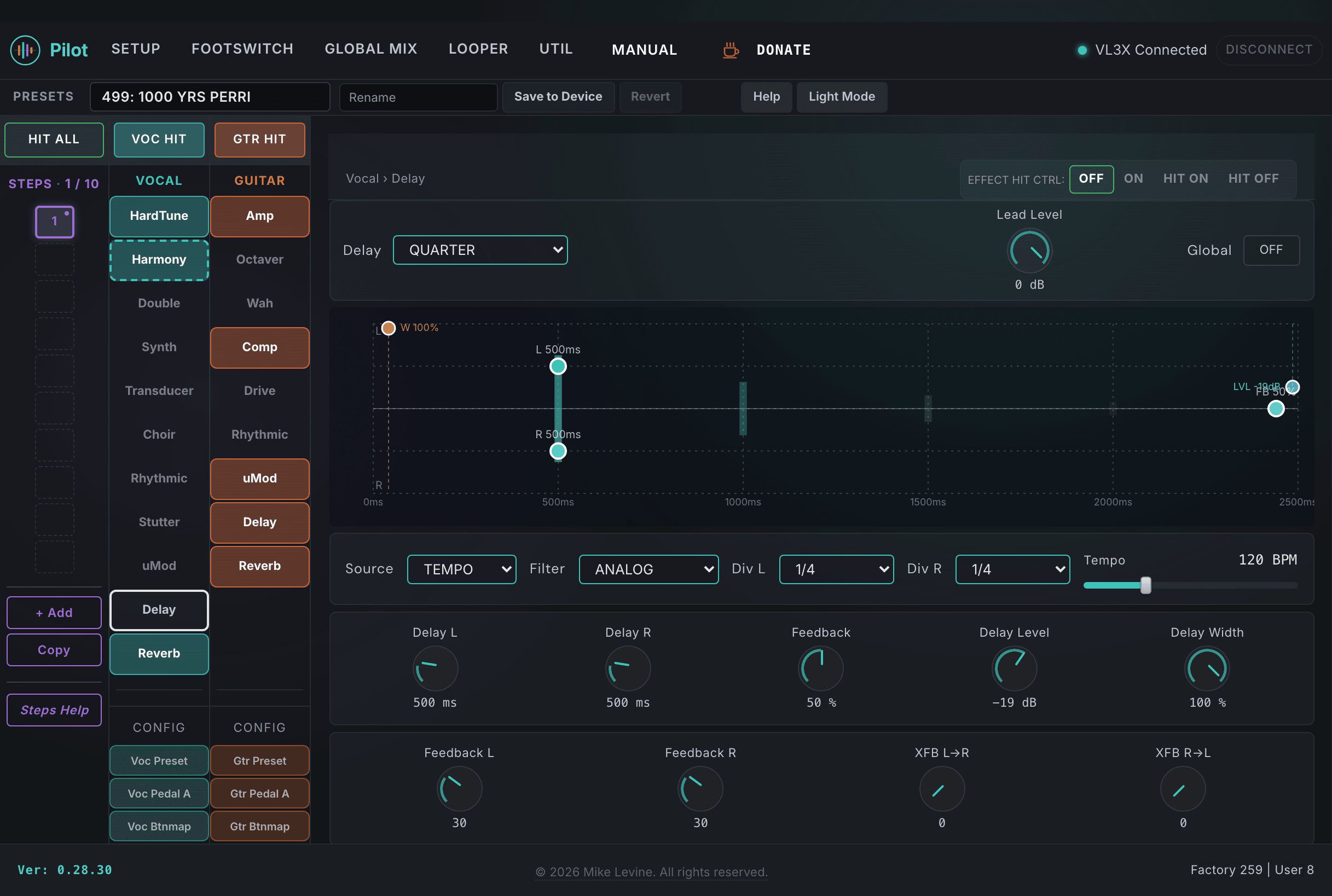
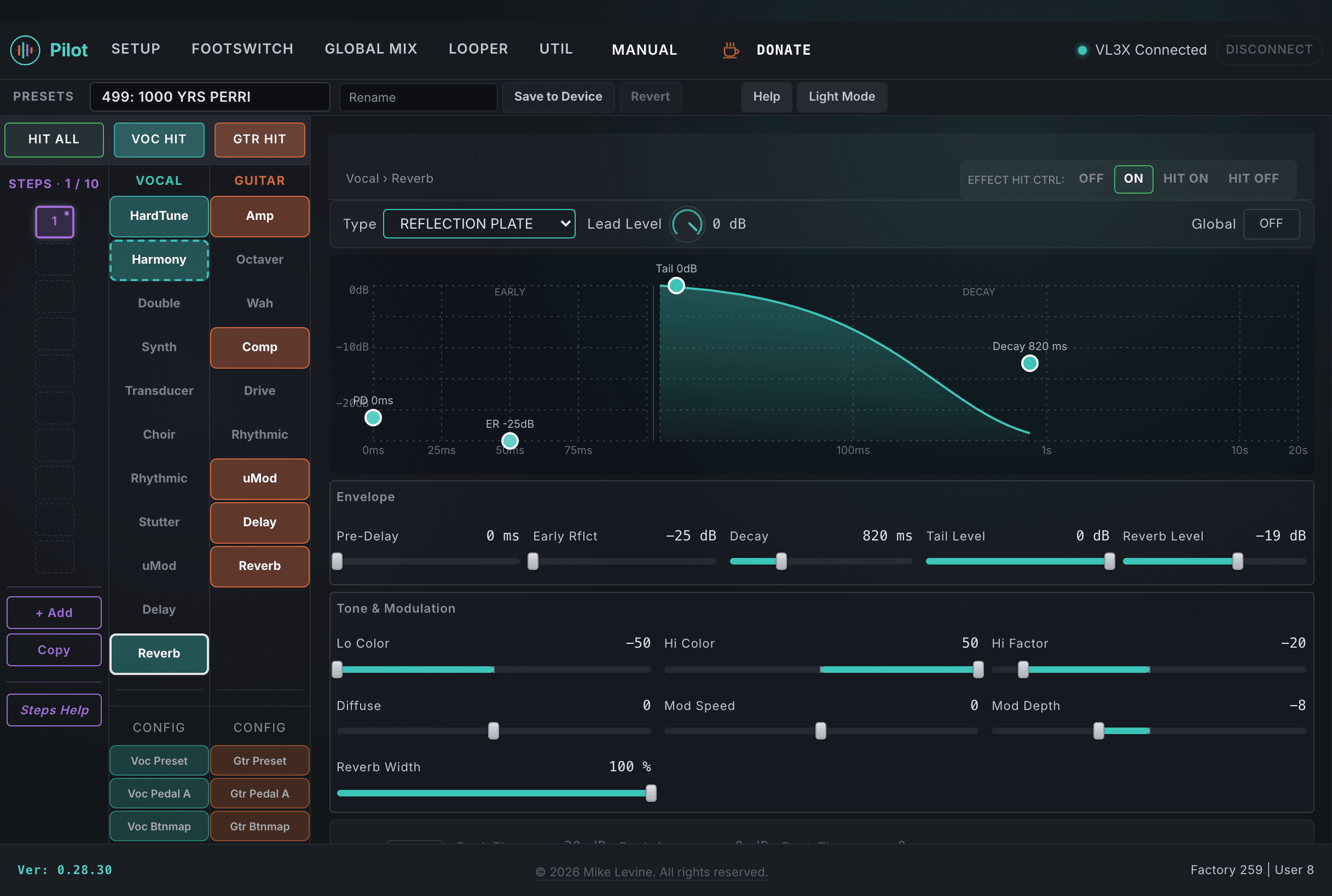
Delay and Reverb sit at the end of the vocal effects chain and handle spatial placement. Delay creates rhythmic, tempo-locked echoes; Reverb creates the acoustic space around the voice. Pilot surfaces both effects in full, including all the send routing, ducking, and feedback parameters that the device screen keeps hidden.
Tip: The vocal send parameters (LEAD LEVEL, HARM TO DELAY, CHOIR TO DELAY, etc.) let you route each voice component into Delay and Reverb independently. You can have harmonies hit the reverb at a different level than the lead, or keep uMod completely dry while the lead floats in reverb.
Delay
The vocal Delay section handles the full architecture of the delay engine: type, tempo sync, separate left and right delay times, cross-feedback, filter shaping, and ducking. It also exposes all the send routing levels for lead, harmony, choir, and uMod going into the delay, plus the final output level and stereo width.
Pilot's vocal Delay view. Type and source at top, delay times and feedback in the middle, send routing at the bottom.
Delay Engine
Parameter
Range
What it does
TYPE
0-18 (enum: delay_style_voice)
Selects the delay algorithm and character. 19 options including note-division types (Half, Quarter, Eighth, Triplet, Dotted, Sixteenth), Ping Pong (3 variants), Multitap (6 variants), Classic Slap, and Set Time. The type determines the basic behavior of the delay engine: how it handles feedback, whether it has stereo separation, and what filtering it applies to repeats.
SOURCE
0-1 (enum: delay_source)
Determines whether the delay time is set by the preset TEMPO (tempo-synced using note divisions) or by direct millisecond values. Set to Tempo for rhythmic locked-to-the-song delay; set to Manual for time-based values.
TEMPO
45-300 BPM
The preset tempo used to calculate note-division delay times when SOURCE is set to Tempo. This tempo is also shared with Stutter and Rhythmic effects in the same preset. Setting the correct tempo here is the first step to getting delay that locks to the song.
DIV L
0-19 (enum: note_division)
Note division for the left channel delay time when SOURCE is Tempo. Quarter, eighth, sixteenth, triplet, and dotted note values available. Setting DIV L and DIV R to different values creates ping-pong patterns with rhythmically interesting relationships between the two repeats.
DIV R
0-19 (enum: note_division)
Note division for the right channel delay time.
DELAY L
0-2500 ms
Left channel delay time in milliseconds when SOURCE is Manual. 0 to 2.5 seconds of range.
DELAY R
0-2500 ms
Right channel delay time in milliseconds when SOURCE is Manual.
FEEDBACK
0-100
Global feedback amount: how much of the delayed signal feeds back into the input to create subsequent repeats. Low values give one or two clean echoes; high values create long, decaying trails. Approaching 100 creates near-infinite sustain.
FEEDBACK L
0-100
Independent feedback level for the left channel. When left and right feedback are set differently, the two sides decay at different rates.
FEEDBACK R
0-100
Independent feedback level for the right channel.
XFB L TO R
0-100
Cross-feedback from the left channel into the right channel's input. Creates stereo interaction between the two delay lines, causing repeats to bounce between channels. This is the mechanism behind ping-pong delay.
XFB R TO L
0-100
Cross-feedback from the right channel into the left. Setting both XFB parameters produces true stereo ping-pong bounce.
TRAILS
On / Off
When On, delay repeats continue to decay naturally after the effect is bypassed or the preset changes. When Off, the delay cuts immediately on bypass.
Filter and Ducking
Parameter
Range
What it does
FILTERSTYLE
0-12 (enum: delay_filter_style)
Selects the filter applied to the delay feedback path. 13 options: Digital, Tape, Analog, Radio, Mega Phone, Cell Phone, Lo-Fi, Hi Cut 1-3, and Lo Cut 1-3. Each applies a different character to the repeats, from clean digital to degraded lo-fi. The character presets (Radio, Cell Phone) shape the frequency range of the feedback, while the Hi Cut and Lo Cut options provide direct high-pass or low-pass filtering.
LOW CUT
0-240
High-pass filter cutoff for the delay output. Removes low-frequency content from the delayed signal. Useful for keeping delay repeats from muddying the low end of the mix.
HIGH CUT
0-240
Low-pass filter cutoff for the delay output. Rolling off the highs on delay repeats gives a warmer, more tape-like character.
EQ INSERT
0-1 (enum: eq_insert)
Controls whether the delay feedback path passes through an EQ insert. When enabled, the filter settings color the feedback on each repeat, gradually shaping the tonal character of each successive echo.
DUCKING
0-1
Enables or disables delay ducking. When On, the delay level automatically reduces when you sing and returns when you stop. Keeps delay from cluttering the mix during active singing while letting echoes fill the spaces between phrases.
DUCK THRES
-61 to 0 dB
Threshold for the ducking detector. When the input signal exceeds this level, the delay ducks. Set this to just above your vocal floor level so the ducking engages when you're actively singing but not when you're quiet.
DUCK AMT
-61 to 0 dB
How much the delay level reduces when ducking is active. A value of -20 dB keeps the delay audible but recessed during singing. A deeper cut (-40 dB or more) makes the delay nearly inaudible during phrases.
DUCK TIME
100 ms - 2000 ms
Recovery time after ducking: how quickly the delay returns to full level after you stop singing. Shorter times snap back quickly; longer times let the delay fade back in gradually, which feels more natural in ambient and reverb-heavy mixes.
Send Routing and Output
Parameter
Range
What it does
LEAD LEVEL
-61 to 0 dB
Lead vocal level within the Delay block, independent of the main vocal output level. Works alongside the per-component sends below to set how the lead sits in the delayed signal.
PAN
-100 to +100
Stereo pan position for the delay output. The whole delay bus can be offset left or right, which combined with per-channel delay times creates directional spatial effects.
LEAD TO DLY
-61 to 0 dB
Send level from the lead vocal into the Delay, the lead counterpart to the HARM/CHOIR/uMod sends below. Lets you feed the lead into the delay engine at a level set independently of the harmony and choir sends.
HARM TO DELAY
-61 to 0 dB
Send level from the Harmony voices into the Delay. Setting this independently from LEAD LEVEL lets harmonies sit at a different depth in the delay mix.
CHOIR TO DELAY
-61 to 0 dB
Send level from the Choir output into the Delay.
uMOD TO DELAY
-61 to 0 dB
Send level from the uMod output into the Delay. Routing modulation effects into delay creates complex layered textures where the modulation character is preserved in the echoes.
VOC DELAY LEVEL
-61 to +6 dB
Master output level for the entire vocal Delay bus. Scales all the delay output before it reaches the final mix. Use this to set the overall presence of the delay in the mix.
VOC DELAY WIDTH
0-100
Stereo width of the delay output. Reduces the delay to mono at 0; at 100 the full stereo separation of left and right delay lines is preserved. Narrowing width can prevent delay from competing with a guitar part that occupies the same stereo space.
HIT CONTROL
0-3 (enum: hit_control)
Controls how the HIT button interacts with Delay.
GLOBAL
On / Off
When On, the preset defers to device-level global Delay settings.
Reverb
The vocal Reverb section covers every aspect of the reverb engine: type, decay, predelay, tone shaping, early reflections, ducking, and send routing. The VL3/x uses a DSP-powered reverb engine with 43 reverb type presets and a full complement of decay and diffusion controls. Pilot exposes all of them.
Pilot's vocal Reverb view. Type and Decay at top; tone shaping and ducking follow; send routing at the bottom.
Reverb Engine
Parameter
Range
What it does
TYPE
0-42 (enum: reverb_style_voice)
Selects the reverb algorithm and character preset. 43 options covering rooms, halls, plates, springs, ambient, and specialized vocal reverb types. The type sets the fundamental character of the space: whether it's a small room, a cathedral, a plate, or something more abstract.
REVERB TYPE
0-13
A second reverb type selector that works in combination with TYPE to define the algorithm architecture. This provides finer selection within the broader TYPE categories. Pilot surfaces both selectors; the device screen typically only shows TYPE.
DECAY
1-290
Reverb tail length. Range is 1 to 290. This is the primary control for how long the reverberation lasts. Short decays (1-30) give tight rooms and ambiences; longer decays (100-290) create halls and ambient spaces. Match to the room character set by TYPE.
PREDELAY
0-100 ms
Delay between the direct signal and the start of the reverb tail. Adding predelay helps keep the vocal sounding present and intelligible in heavy reverb by letting the attack of each syllable come through before the reverb washes over it.
DIFFUSE
-50 to +50
Controls the density and smoothness of the reverb tail. Lower diffusion creates a more sparse, discrete reflection pattern; higher diffusion creates a smoother, denser initial build.
Color and Tone Shaping
Parameter
Range
What it does
LOCOLOR
-50 to +50
Low-frequency color of the reverb tail. Negative values roll off low frequencies from the reverb, keeping it from getting muddy. Positive values add low-end richness. For vocal reverb, cutting LOCOLOR slightly (-10 to -20) keeps the reverb from competing with the low end of the mix.
HICOLOR
-50 to +50
High-frequency color of the reverb tail. Negative values create a darker, warmer reverb that trails off into the low frequencies. Positive values keep the high-frequency content bright and present in the tail. Darker reverbs (negative HICOLOR) tend to sit better behind vocals in a live mix.
HIFACTOR
-25 to +25
Controls how quickly high frequencies fade in the reverb tail relative to the overall decay. Negative values make highs decay faster. Positive values extend the high-frequency tail, creating a brighter, more sustained reverb.
MODSPEED
-25 to +25
Speed of modulation applied to the reverb tail. Modulation prevents the metallic coloration that can occur in some reverb algorithms by adding slight pitch movement to the reflection pattern. Positive values add modulation; negative values reduce it.
MODDEPTH
-25 to +25
Depth of the modulation applied by MODSPEED. Higher depth creates more obvious pitch movement in the tail. At moderate values, it smooths out the resonance of the reverb; at high values, it creates an audible chorus-like shimmer in the tail.
Level Controls
Parameter
Range
What it does
DRY LEVEL
-25 to 0 dB
Level of the dry (unprocessed) signal passed through the reverb section. Typically set to 0 dB when the reverb is a parallel send effect. Reducing DRY LEVEL lets more of the wet reverb dominate, useful for special effect or ambient washes.
EARLY RFLCT
-25 to 0 dB
Level of the early reflections component of the reverb. Early reflections are the first distinct echoes that define the acoustic character of the space before the diffuse reverb tail develops. Raising this adds a sense of room walls; reducing it creates a more abstract, diffuse reverb.
TRAIL LEVEL
-25 to 0 dB
Level of the late reverb tail separately from early reflections. Lets you balance early reflections against the tail independently. Longer DECAY settings with a lower TRAIL LEVEL can give the reverb a natural sense of space without overwhelming the mix with a long tail.
Ducking
Parameter
Range
What it does
DUCKING
0-1
Enables reverb ducking. When On, the reverb level reduces while you're actively singing and returns to full level in the pauses between phrases. Critical for live vocal intelligibility: keeps the reverb from piling up during dense, active passages.
DUCK THRES
-61 to 0 dB
Threshold above which the reverb begins to duck. Set to just above your vocal noise floor to avoid false triggering from breath or room noise.
DUCK AMT
-61 to 0 dB
How much the reverb ducks when the threshold is exceeded. Moderate values (-15 to -25 dB) keep the reverb present but recessed; deep values (-40 dB and beyond) make it nearly inaudible during singing.
DUCK TIME
100 ms - 2000 ms
Recovery time for the reverb after ducking releases. Longer times create a more gradual return; shorter times snap the reverb back quickly when you stop singing.
Send Routing and Output
Parameter
Range
What it does
LEAD TO REVERB R
-61 to 0 dB
Send level from the lead vocal into the Reverb. Independent of the dry lead level, this controls how much of the lead feeds the reverb engine.
HARM TO REVERB R
-61 to 0 dB
Send level from the Harmony voices into the Reverb. Setting this lower than LEAD TO REVERB R keeps harmonies tighter and drier while the lead floats in space.
CHOIR TO REVERB R
-61 to 0 dB
Send level from the Choir output into the Reverb.
DELAY TO REVERB REL
-31 to +30
Relative level of the Delay output sent into the Reverb. Feeding delay into reverb creates a "delay into reverb" signal chain where the echoes themselves are placed in the acoustic space. Subtle amounts add depth; higher amounts create washes where the delay and reverb interact. Negative values reduce the delay send; positive values increase it.
VOC REVERB LEVEL
-61 to +6 dB
Master output level for the entire vocal Reverb bus before it reaches the final mix.
VOC REVERB WIDTH
0-100
Stereo width of the reverb output. At 0, the reverb is mono; at 100 it's full stereo. Narrowing reverb width can help in mono live situations or when reverb needs to stay centered.
HIT CONTROL
0-3 (enum: hit_control)
Controls how the HIT button interacts with Reverb.
GLOBAL
On / Off
When On, the preset defers to device-level global Reverb settings.
Note: DELAY TO REVERB REL has a range of -31 to +30, centered around 0. Unlike most send levels which go from -61 dB (nearly silent) to 0 dB (unity), this one is a relative offset. Positive values increase the delay-to-reverb send above its nominal level; negative values reduce it below. Start at 0 and adjust by ear.