
Creative Effects
Six effects that take the vocal beyond natural pitch and timing: Synth turns your voice into a synthesizer, Transducer shapes its frequency character through distortion and filtering, Choir thickens it into a choral ensemble, Rhythmic chops it in time, Stutter creates repeating gate patterns, and uMod adds modulation and spatial width. All six have their own canvas visualizations in Pilot.
Synth
Synth uses your voice to shape a synthesizer signal. The result ranges from subtle electronic texturing to full robotic vocoder tones depending on the type and how you set the carrier and mix. Pilot shows Synth with a canvas visualization and full parameter access.
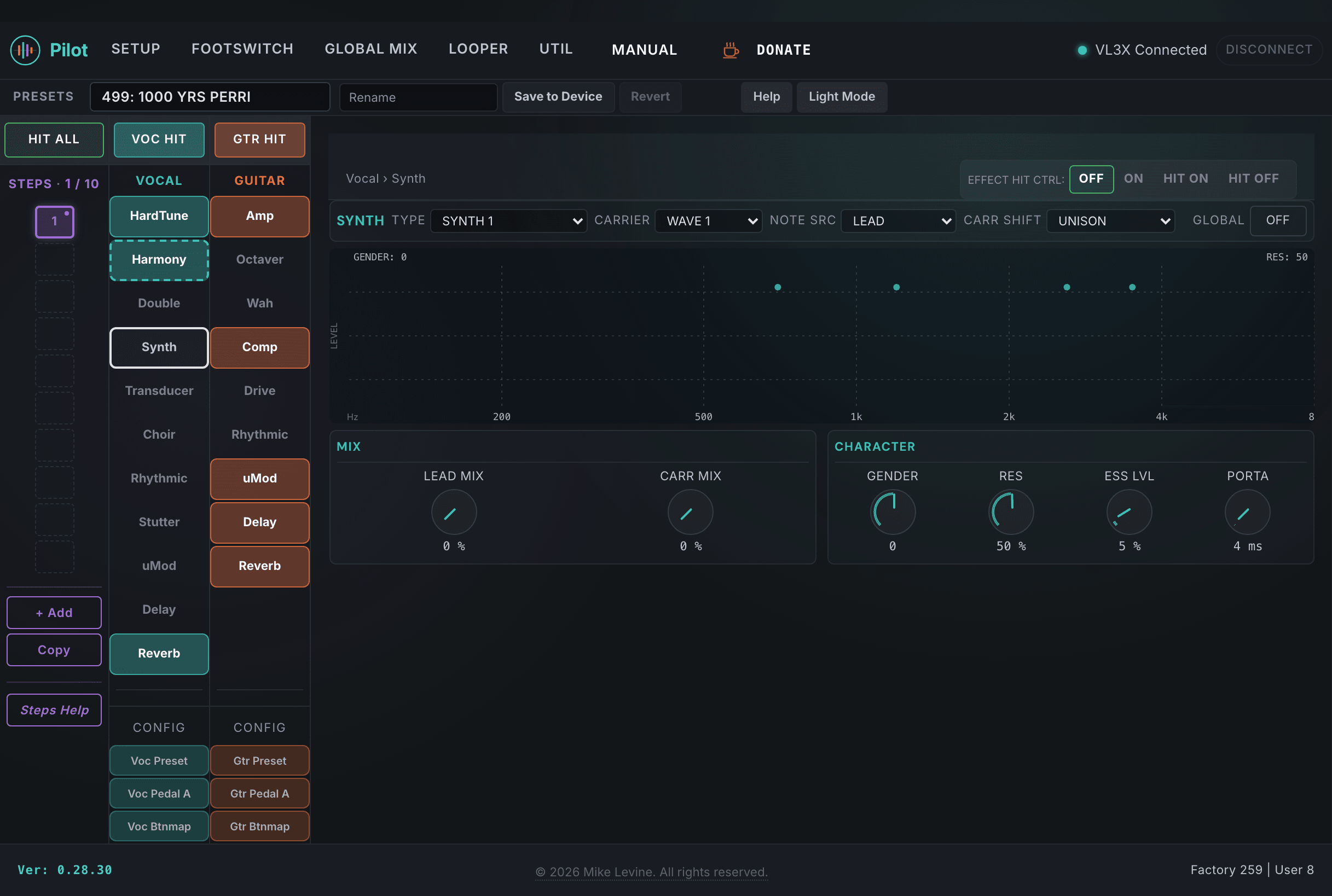
Synth Parameters
| Parameter | Range | What it does |
|---|---|---|
| TYPE | 0-12 (enum: synth_style) | Selects the synthesis engine type. Different types use different carrier waveforms and modulation architectures, from classic vocoder to distorted synth textures and beyond. |
| LEAD MIX | 0-100 | Mix level of the dry lead vocal blended into the Synth output. At 0, only the synthesized signal comes through. Raising this adds back the natural vocal underneath the synth, creating a hybrid effect where both signals coexist. |
| CARRIER | 0-11 | Selects the carrier waveform or source for the synthesis. The carrier is what gets modulated by your voice; different carriers produce very different tonal characters from the same vocal input. |
| CARR SHIFT | 0-3 | Shifts the carrier pitch in octave increments. Useful for pushing the synth voice into a different register while keeping the same voicing character. |
| CARR MIX | 0-100 | Level of the carrier signal in the output mix relative to the vocal modulator. Adjust this along with LEAD MIX to find the right balance between the vocal and synthesized content. |
| NOTE SOURCE | 0-3 | Where the Synth derives pitch information. Can be from the voice, MIDI, guitar, or other sources. MIDI input lets you play notes on a keyboard to control the carrier pitch while using your voice as the modulator. |
| PORTAMENTO | 0-5000 ms | Glide time between notes for the synth carrier. The range goes up to 5 seconds, so you can create very slow pitch sweeps. At 0, note changes are instant. |
| RES | 1-100 | Filter resonance for the synthesis engine. Higher values add a more pronounced peak at the filter cutoff, creating a more nasal or aggressive tonal character. |
| ESS LEVEL | 0-100 | Level of sibilance (high-frequency transient content from "s" and "sh" sounds) preserved through the synthesis engine. The vocoder tends to suppress sibilants naturally; raising this puts them back for intelligibility. |
| HARMONIES | 0-1 | Enables or disables harmony voices being fed through the Synth engine. When On, any active Harmony voices are also processed through the synthesizer, creating a fully synthesized chord from the harmony stack. |
| GENDER | -50 to +50 | Formant shift applied to the synth output. Adjusting gender on a synthetic voice changes the apparent size and character of the source, useful for differentiation from the lead vocal. |
| LEVEL | -61 to +6 dB | Output level of the Synth block. Sets how loud the synthesized signal sits in the vocal mix, from effectively muted (-61 dB) up to +6 dB of boost. |
| HIT CONTROL | 0-3 (enum: hit_control) | Controls how the HIT button interacts with Synth. |
| GLOBAL | On / Off | When On, the preset defers to device-level global Synth settings. |
Transducer
Transducer applies distortion, filtering, and equalization to create the sound of a vocal coming through a telephone, a megaphone, a guitar amp, or similar "lofi" transducer textures. It sits after the vocal in the signal chain and shapes both frequency content and harmonic character. Pilot exposes the full routing and distortion architecture.
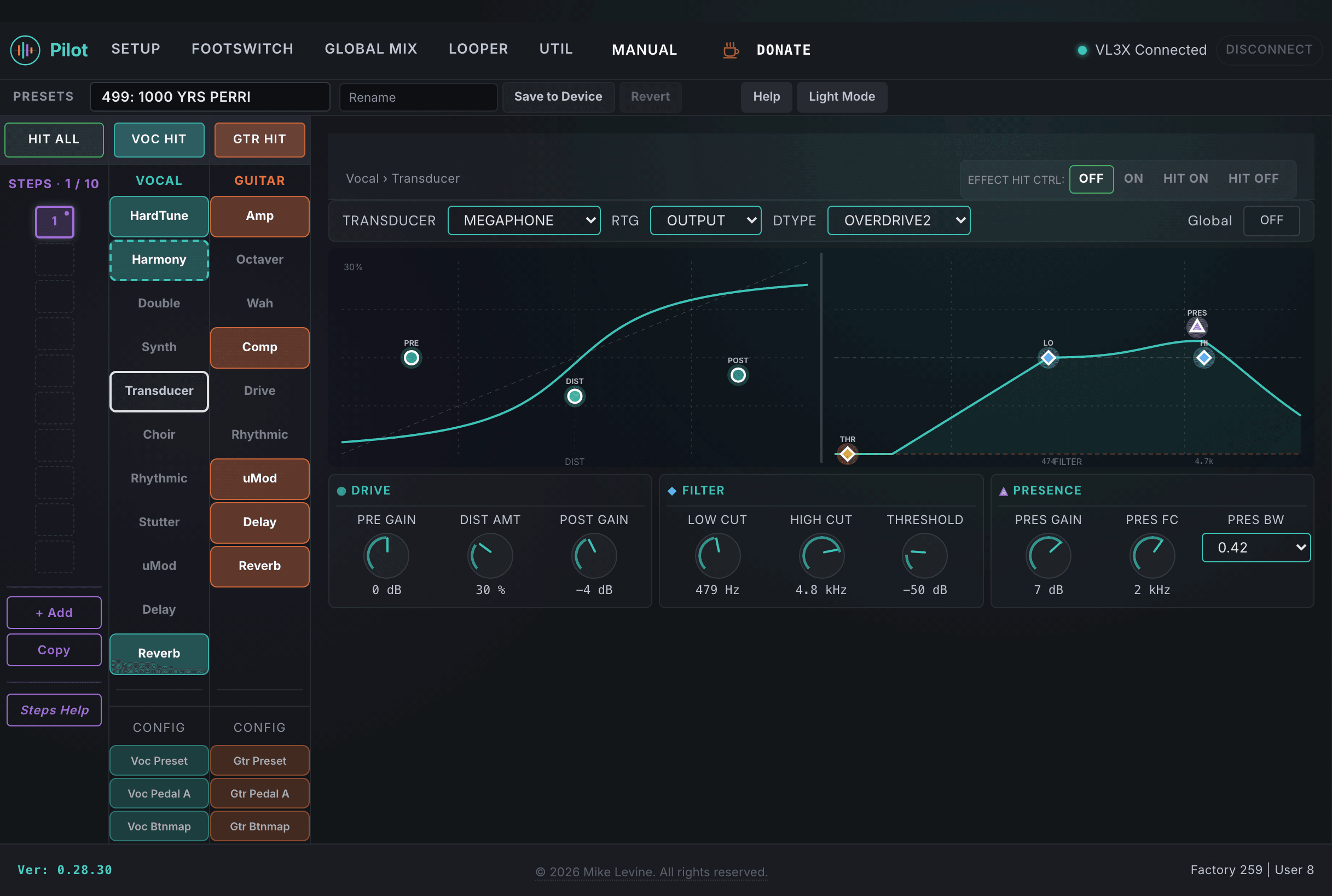
Transducer Parameters
| Parameter | Range | What it does |
|---|---|---|
| TYPE | 0-9 (enum: transducer_style) | Selects the transducer character preset. Options cover telephone, megaphone, tube amp, radio, and similar textures. Each type has its own internal EQ curve and distortion profile. |
| ROUTING | 0-4 | Determines how the Transducer is inserted into the signal chain. Different routing modes put the distortion and filtering before or after other processing stages, affecting the interaction between Transducer and other active effects. |
| PRE GAIN | -20 to +20 dB | Gain applied before the distortion stage. Higher pre gain drives the distortion harder, producing more saturation and harmonics. This is the primary way to control distortion amount independently of the TYPE setting. |
| DISTORTION TYPE | 0-14 | Selects the distortion algorithm. 15 options ranging from clean overdrive to hard clipping and beyond. Combined with DISTORTION AMOUNT, this shapes the harmonic content of the distorted signal. |
| DISTORTION AMOUNT | 0-100 | Amount of distortion applied. Works together with DISTORTION TYPE to determine character. Lower amounts create saturation; higher amounts create harder clipping. |
| LOW CUT | 0-240 | High-pass filter frequency. Removes low-frequency content from the transducer output. Essential for telephone and radio textures where the low end is naturally absent. |
| HIGH CUT | 0-240 | Low-pass filter frequency. Removes high-frequency content. Combined with LOW CUT, this defines the bandwidth of the transducer simulation. |
| POST GAIN | -20 to +20 dB | Gain applied after the distortion and filtering stage. Use this to compensate for the level change introduced by heavy distortion or narrow bandwidth filtering. |
| PRES GAIN | -20 to +20 dB | Presence boost gain applied at the frequency set by PRES FC. Adds a peak boost to enhance the midrange character of the transducer effect, simulating the resonance of physical transducers. |
| PRES FC | 100-195 | Center frequency for the presence peak. The frequency index maps to a range suitable for vocal midrange presence enhancement. |
| PRES BW | 0-16 | Bandwidth (Q) of the presence peak. Narrower values create a more focused boost; wider values create a broader presence lift. |
| ManualThresholdT | -61 to 0 dB | Manual input threshold for the Transducer block. Sets the signal level at which the effect engages. This is a parameter the device screen does not expose. |
| HIT CONTROL | 0-3 (enum: hit_control) | Controls how the HIT button interacts with Transducer. |
| GLOBAL | On / Off | When On, the preset defers to device-level global Transducer settings. |
Choir
Choir creates a lush, multi-voice ensemble from your lead vocal. It's the most streamlined of the creative effects in terms of parameter count, but the results can be dramatic. The TYPE parameter selects from 13 different ensemble configurations. Pilot also exposes the lead and harmony send levels into the choir effect independently.
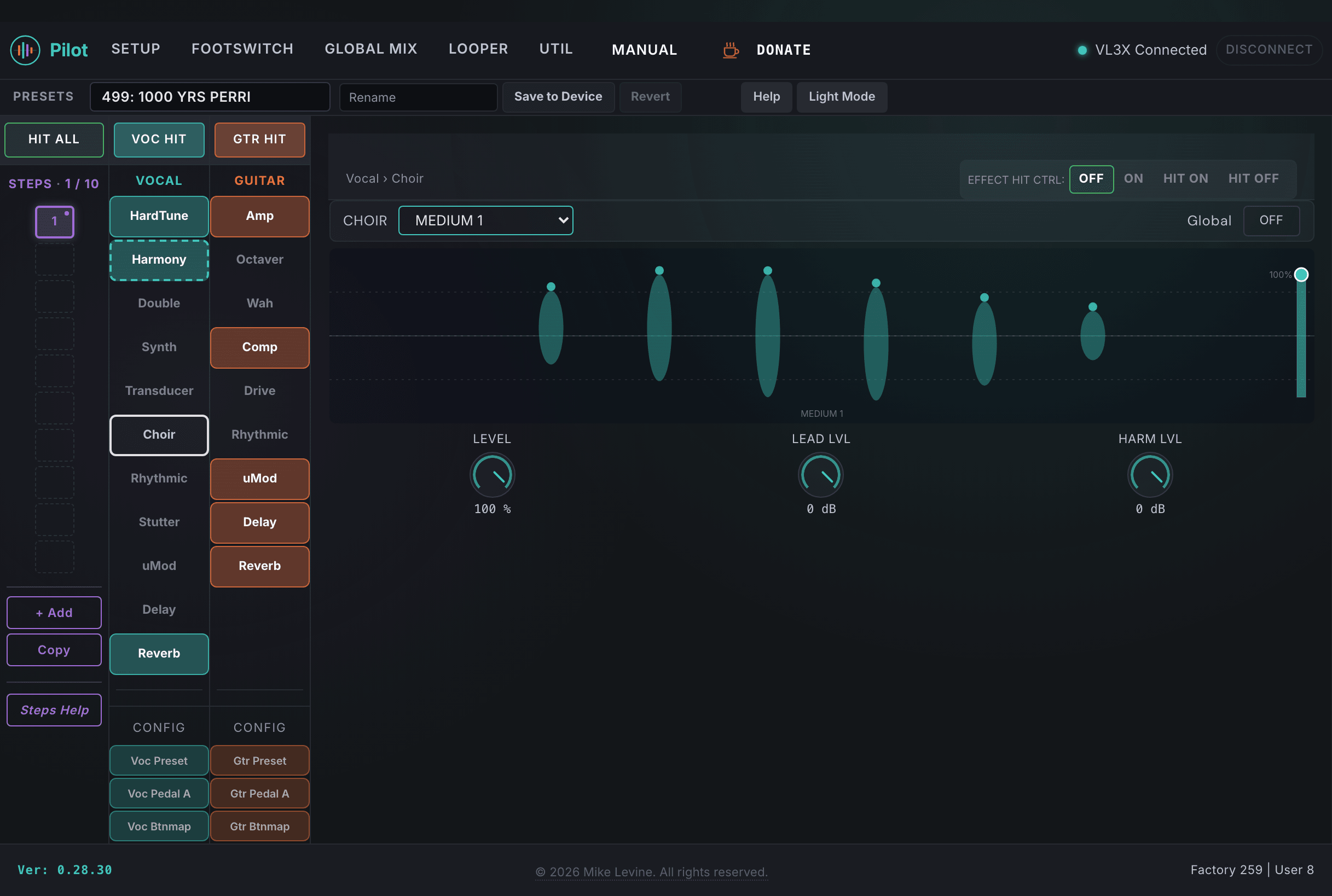
Choir Parameters
| Parameter | Range | What it does |
|---|---|---|
| TYPE | 0-12 (enum: choir_style) | Selects the choir configuration. 13 options covering everything from small tight ensembles to large cathedral-style choir arrangements. Different types vary the number of virtual voices, their spread, and the timing and pitch variation between them. |
| LEVEL | 0-100 | Overall output level of the Choir effect. Sets how loud the choir is relative to the rest of the vocal mix. This is the primary level control for the effect. |
| CHOIR LEAD LVL | -61 to 0 dB | Level of the lead vocal signal sent into the Choir processing. Controls how much of the lead vocal drives the choir engine independently of the main Choir LEVEL output. |
| CHOIR HARM LVL | -61 to 0 dB | Level of the harmony voices sent into the Choir processing. When Harmony is active, this controls how much the harmony voices contribute to the choir texture, independent of the lead contribution. |
| HIT CONTROL | 0-3 (enum: hit_control) | Controls how the HIT button interacts with Choir. |
| GLOBAL | On / Off | When On, the preset defers to device-level global Choir settings. |
Rhythmic
Rhythmic applies a tempo-synced volume or filter modulation to the vocal signal, creating pulsing, rhythmic effects that lock to the preset tempo. It can target the lead vocal, harmony, or both, and supports a wide range of waveform shapes for the modulation.
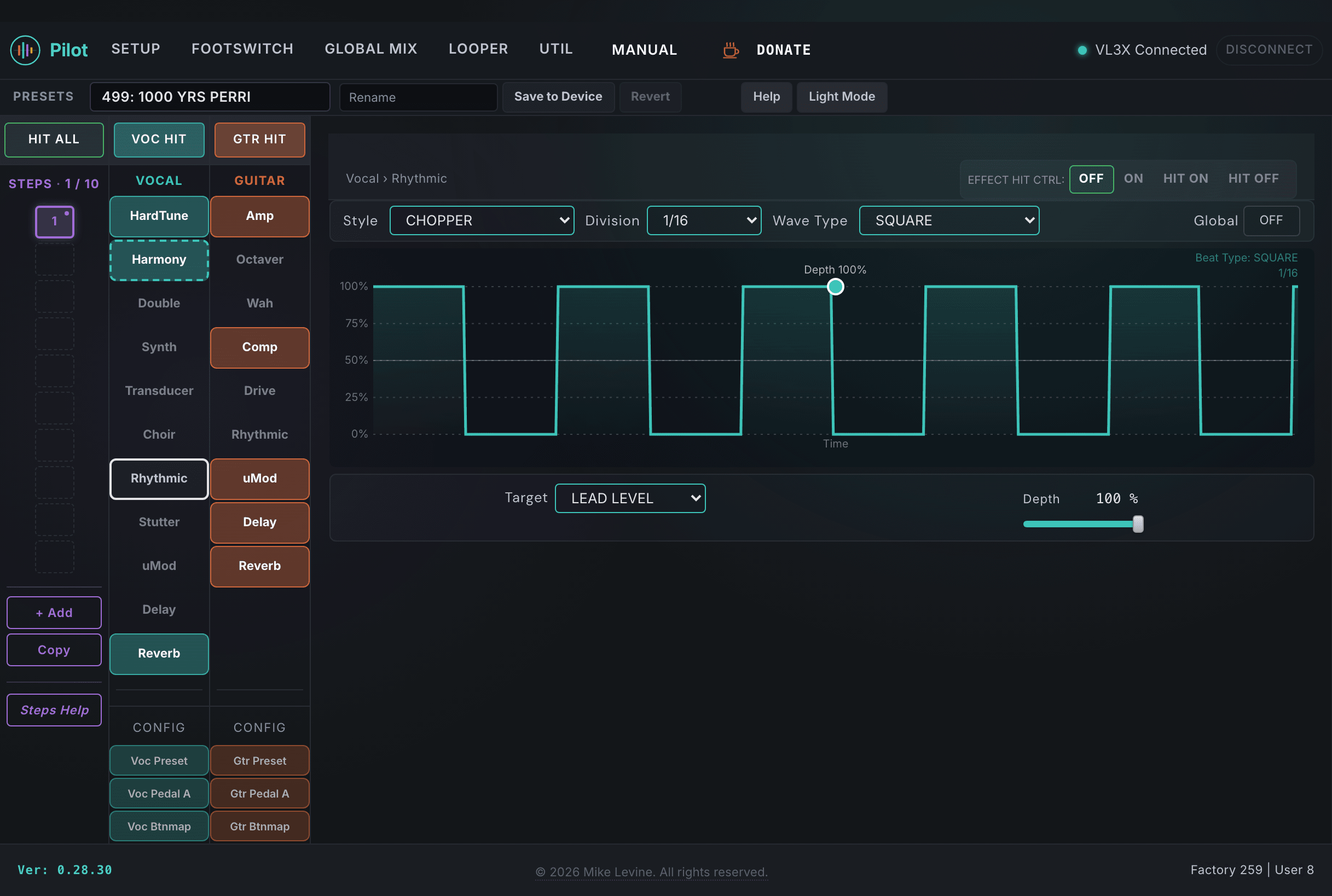
Rhythmic Parameters
| Parameter | Range | What it does |
|---|---|---|
| TYPE | 0-10 (enum: rhythmic_style) | Selects the rhythmic processing type. Different types apply the modulation to different aspects of the signal: volume gating, filter sweeps, or combinations. Each creates a distinctly different rhythmic texture. |
| DIVISION | 0-19 (enum: note_division) | Note value for the rhythmic modulation cycle, synced to the preset tempo. Quarter notes, eighth notes, sixteenth notes, triplets, and dotted values are all available. This sets how fast the effect pulses relative to the song tempo. |
| TARGET | 0-6 (enum: rhythmic_target) | Which part of the vocal signal the rhythmic effect targets. Options include lead only, harmony only, both, or other routing variations. Targeting just the harmonies while leaving the lead continuous creates a very different texture than gating both. |
| DEPTH | 0-100 | Depth of the rhythmic modulation. At 0, the effect is inaudible. At 100, the modulation fully gates or sweeps the signal. Moderate values create subtle pulsing; maximum depth creates hard rhythmic gating. |
| WAVEFORM | 0-22 (enum: umod_waveform) | Shape of the modulation waveform. 23 options, mostly named rhythm patterns (not simple LFO shapes). The waveform determines the rhythmic character of the modulation cycle. |
| LEAD TO uMOD | -61 to 0 dB | Send level from the lead vocal into the uMod processing bus. Controls how much lead vocal is routed through the modulation engine. Pilot surfaces this send alongside the Rhythmic controls because both effects share the vocal modulation routing. |
| HARM TO uMOD | -61 to 0 dB | Send level from the harmony voices into the uMod processing bus. |
| CHOIR TO uMOD | -61 to 0 dB | Send level from the Choir output into the uMod processing bus. |
| VOC UMOD LEVEL | -61 to 0 dB | Overall output level of the vocal uMod/Rhythmic bus. Master level for the processed rhythmic signal before it reaches the final mix. |
| VOC UMOD WIDTH | 0-100 | Stereo width of the vocal uMod/Rhythmic output. Higher values spread the rhythmic effect wider in the stereo field. |
| HIT CONTROL | 0-3 (enum: hit_control) | Controls how the HIT button interacts with Rhythmic. |
| GLOBAL | On / Off | When On, the preset defers to device-level global Rhythmic settings. |
Stutter
Stutter captures a slice of the vocal and repeats it rhythmically, creating the stuttering repeat effect common in electronic and pop production. It's a performance effect: the capture, repetition, and direction of the stutter are all configurable, and it can be triggered live with the HIT button.
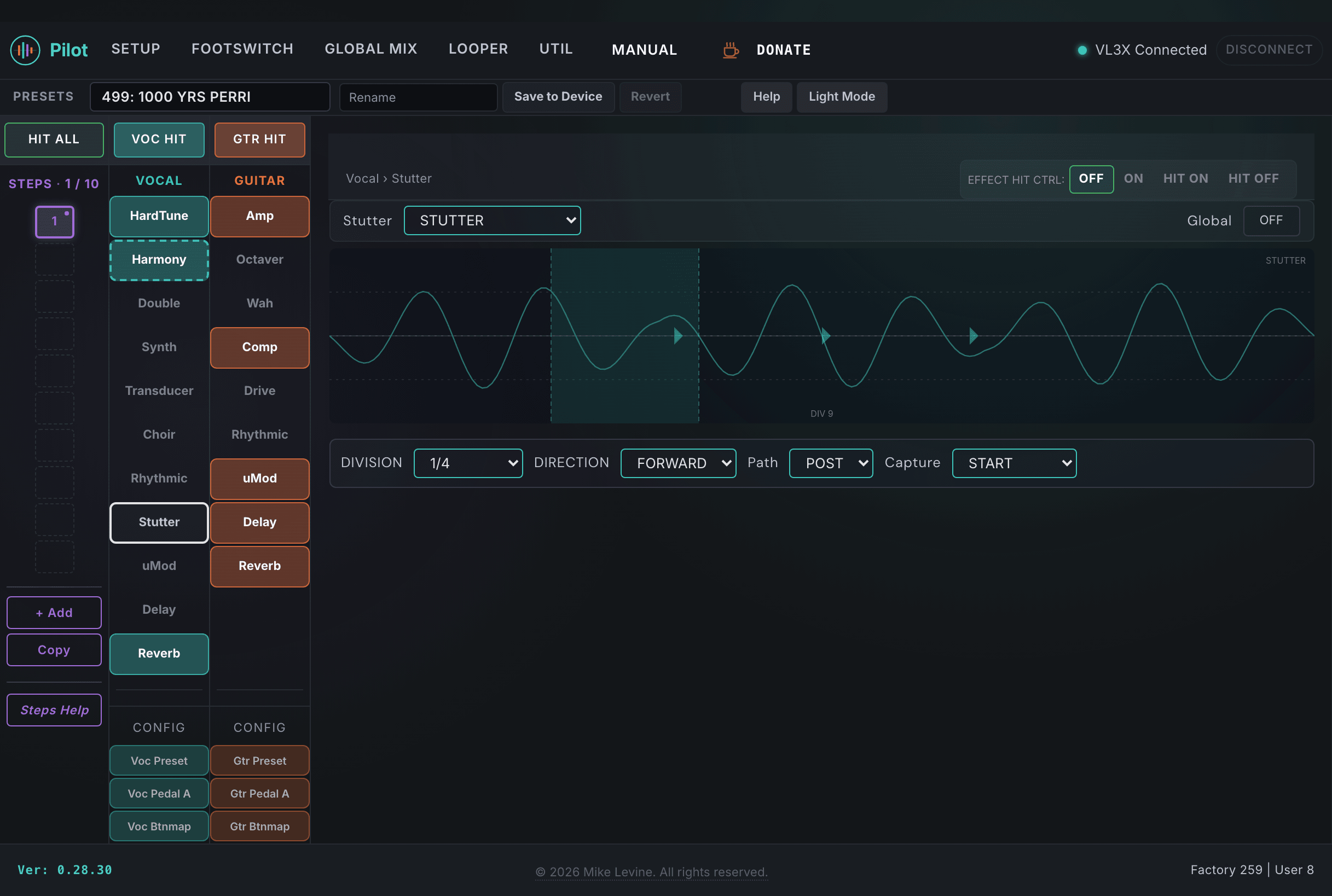
Stutter Parameters
| Parameter | Range | What it does |
|---|---|---|
| TYPE | 0-3 (enum: stutter_style) | Selects the stutter engine type. Options vary in how the captured slice is looped and processed: simple repeat, gated repeat, or more complex patterns. |
| DIVISION | 9-19 (enum: stutter_division) | Note division for the stutter repeat rate, synced to preset tempo. Shorter divisions create faster stutters; longer divisions create slower, more deliberate repeats. The division range starts at 1/4 note and goes down to 1/32 triplet. |
| CAPTURE | 0-2 (enum: stutter_capture) | Determines what audio the Stutter captures and loops. Options control when the capture occurs: on trigger, continuously updated, or a fixed sample. This has a major effect on how the stutter responds to live playing. |
| DIRECTION | 0-1 (enum: stutter_direction) | Forward or reverse playback of the captured slice. Reverse stutter creates a rising, incoming-feel repeat rather than the forward repeat of forward direction. |
| PATH | 0-1 (enum: stutter_path) | Signal routing for the stutter. Determines whether the stuttered signal passes through the effects chain or bypasses it, affecting whether delay and reverb color the stutter repeats. |
| HIT CONTROL | 0-3 (enum: hit_control) | Controls how the HIT button interacts with Stutter. When HIT CONTROL is set appropriately, pressing HIT triggers the stutter capture and repeat live. |
| GLOBAL | On / Off | When On, the preset defers to device-level global Stutter settings. |
uMod
uMod (micro-modulation) applies pitch modulation, chorus, flanging, or spatial delay effects to the vocal. It's the vocal counterpart to Guitar's uMod section and uses the same parameter architecture. Pilot surfaces the full set including per-channel delays, cross-feedback, and filter shaping.
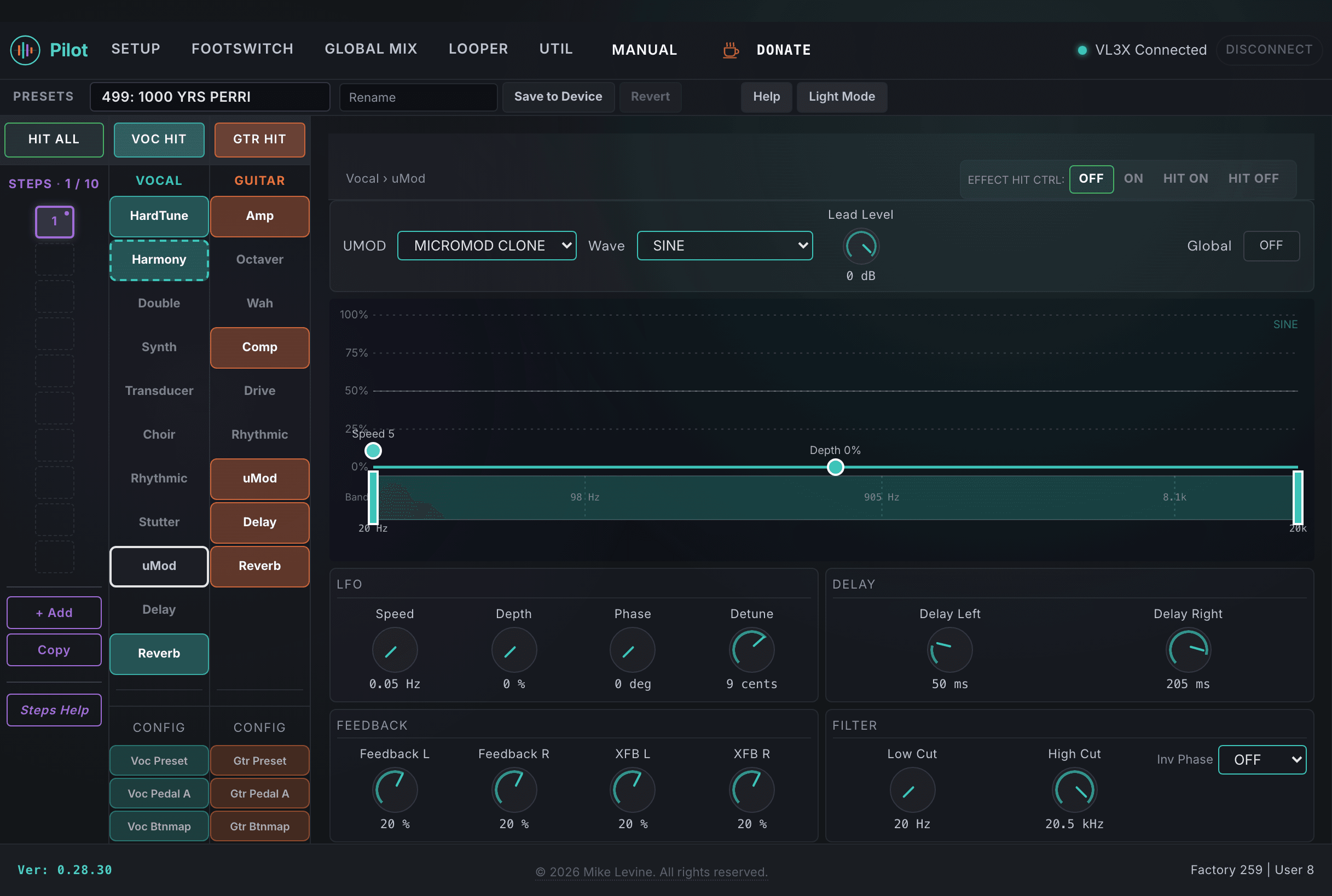
uMod Parameters
| Parameter | Range | What it does |
|---|---|---|
| TYPE | 0-22 (enum: micromod_style_voice) | Selects the modulation effect type. 23 options including various chorus, flanger, tremolo, vibrato, and specialized modulation effects. Each type has its own parameter behavior for the controls below. |
| SPEED | 5-1000 | Modulation rate. The speed of the LFO or modulation source controlling the effect. Slow speeds create languid chorus and vibrato; faster speeds create shimmer and flange effects. |
| DEPTH | 0-100 | Modulation depth. How much the modulation source affects the signal. Low depth creates subtle movement; high depth creates pronounced modulation effects. |
| PHASE | 0-180 | Phase offset between the left and right modulation LFOs. At 0, both channels modulate in unison (mono). At 180, they modulate in opposite phase, creating wide stereo movement. Values between create various degrees of spread. |
| WAVE | 0-2 (enum: waveform) | Waveform shape for the modulation LFO. Sine gives smooth movement, square gives hard transitions, triangle gives linear sweep. The waveform character dramatically affects whether the effect feels smooth or pulsing. |
| DETUNE | -25 to +25 | Static pitch detuning between the left and right channels, in cents. Creates a thickening effect by spreading the pitch slightly between the two channels. Even a few cents of detune creates noticeable stereo width and thickness. |
| DELAY LEFT | 0-230 ms | Time delay applied to the left channel of the uMod effect. Delay-based modulation like chorus and flanger uses this to create the characteristic sweeping effect. Longer delays push toward echo territory. |
| DELAY RIGHT | 0-230 ms | Time delay for the right channel. Setting left and right delays differently creates asymmetric modulation that sounds wider and more complex. |
| FEEDBACK L | -100 to +100 | Feedback amount for the left channel delay. Negative feedback inverts the polarity before feeding back, creating different resonance characteristics than positive feedback. High feedback intensifies the flanging or echo character. |
| FEEDBACK R | -100 to +100 | Feedback amount for the right channel delay. |
| XFB L | -100 to +100 | Cross-feedback from right to left: feeds a portion of the right channel's delayed signal back into the left channel's input. Creates stereo interaction between the two channels. Useful for complex, evolving modulation textures. |
| XFB R | -100 to +100 | Cross-feedback from left to right. |
| LOW CUT | 0-240 | High-pass filter on the uMod output. Removes low frequencies from the modulated signal, useful for keeping the modulation in the midrange without adding low-frequency movement that muddies the mix. |
| HIGH CUT | 0-240 | Low-pass filter on the uMod output. |
| INV PHASE | 0-3 (enum: inv_phase) | Phase inversion options for the uMod output channels. Inverting one channel relative to the other changes how the effect interacts with the direct signal in mono summing situations. |
| LEAD LEVEL | -61 to 0 dB | Level of the lead vocal as it passes through the uMod block. Trims how much dry lead is present in the modulated output relative to the sends from harmony and choir. |
| LEAD PRESET TRIM | -61 to 0 dB | Per-preset trim on the lead level into uMod, used to balance the uMod block against other effects without changing the global lead level. |
| HIT CONTROL | 0-3 (enum: hit_control) | Controls how the HIT button interacts with uMod. |
| GLOBAL | On / Off | When On, the preset defers to device-level global uMod settings. |