
HardTune, Harmony & Double
These are the three core vocal processing effects on the VL3/x. HardTune controls pitch, Harmony generates additional voices from your lead vocal, and Double adds width and thickness without new pitches. Pilot surfaces the full parameter set for all three, including controls the device's own screen never shows you.
HardTune
HardTune is the VL3/x's pitch correction engine. At low settings with a slow rate and wide window it's transparent tuning assistance. Push the style to something aggressive and it becomes the robotic pitch-snapping sound that defined a generation of pop records. Most useful settings are somewhere between those two extremes.
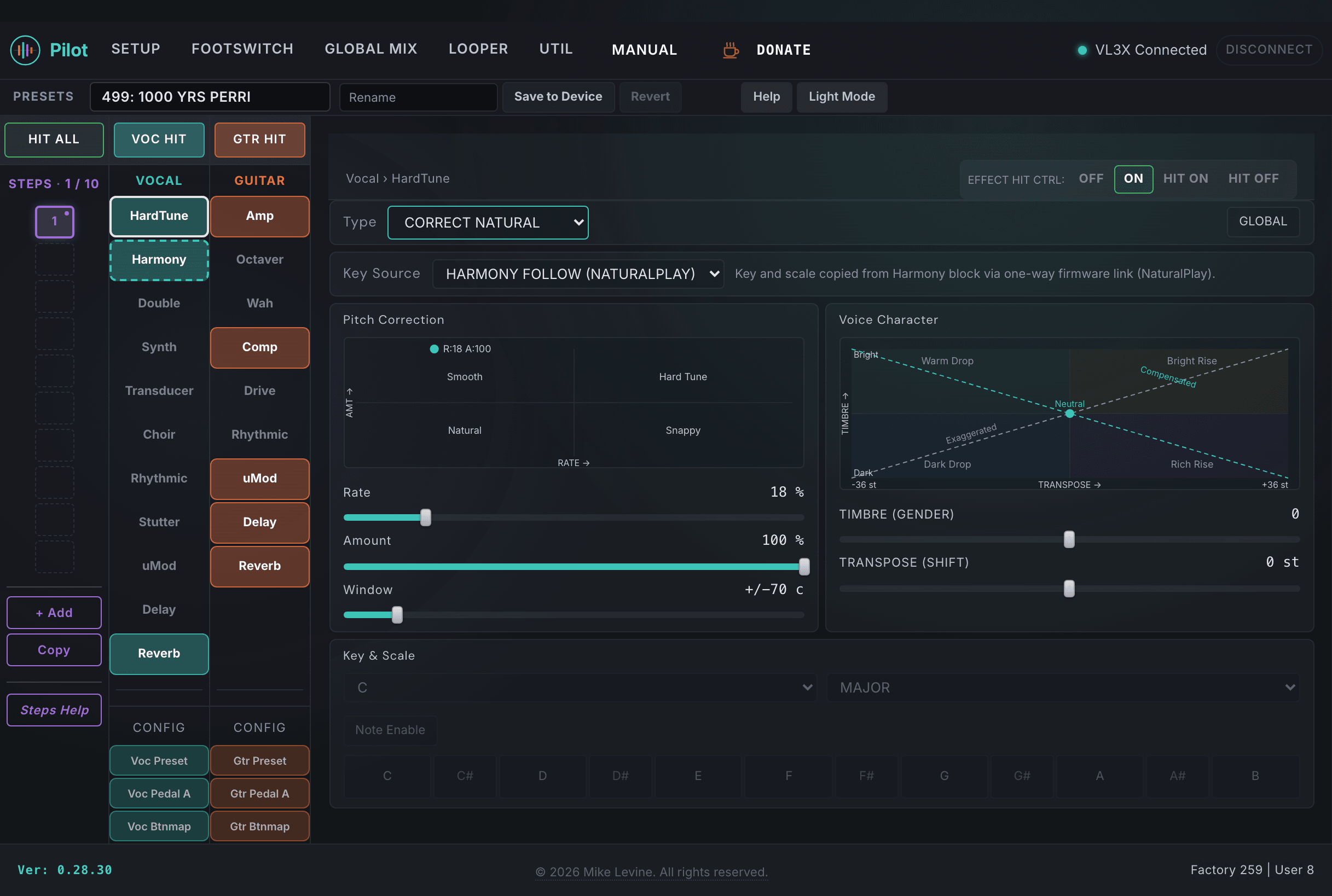
HardTune Parameters
| Parameter | Range | What it does |
|---|---|---|
| TYPE | 0-6 (enum: hardtune_style) | Sets the overall pitch correction style. Options range from natural transparent correction to full robotic quantization. Match the style to your musical context. |
| KEY SOURCE | 0-3 (enum: key_source) | Where HardTune gets the key information to correct to. The four options are: HARMONY FOLLOW (NATURALPLAY), which tracks chords from the NaturalPlay source; MANUAL / CUSTOM, which uses the preset's key and scale settings; ROBOT MODE, for chromatic quantization; and PEDAL MODE, for expression pedal control. |
| AMOUNT | 0-100 | How strongly pitch is corrected toward the target note. Lower values allow expressive bends through; higher values snap more aggressively. Start around 50-70 for natural correction, push to 100 for full robotic effect. |
| WINDOW | 0-60 | How far (in cents) from a target note your pitch must fall before correction kicks in. A wider window lets more pitch variation through before correction engages. Narrow it for tighter control on pitchy singers, widen it to let natural vibrato breathe. |
| RATE | 0-100 | Speed of pitch correction. Low values correct slowly, letting the attack come through naturally before settling. High values snap instantly. The robotic effect comes from high Rate combined with high Amount. |
| SHIFT | -36 to +36 | Pitch shift applied after correction, in semitones. Lets you transpose the corrected vocal up or down. Combined with HardTune correction, this is useful for harmonizing with yourself at a fixed interval. |
| GENDER | -50 to +50 | Shifts the formant content of the vocal without changing pitch. Negative values give a masculine character; positive values move toward a lighter, more feminine character. Subtle amounts add character; large swings are special effects. |
| MANUAL KEY | 0-11 (enum: key) | When Key Source is set to manual, this is the key HardTune corrects to. The 12 chromatic keys from C through B. |
| MANUAL SCALE | 0-5 (enum: correct_scale) | When Key Source is set to manual, this sets the scale (major, minor, etc.) for correction target notes. |
| Note Select | 0-4095 (bitmask) | A 12-bit bitmask selecting which semitones in the octave are valid correction targets. One bit per chromatic note. Lets you define a fully custom scale for correction, independent of the KEY/SCALE presets. Most presets leave this at default. |
| PRE/POST GTR | On / Off | When On, guitar processing is inserted before HardTune in the signal chain. When Off, HardTune runs before guitar processing. This affects how the guitar component influences the vocal correction when Key Source uses guitar chord detection. |
| HIT CONTROL | 0-3 (enum: hit_control) | Controls how the HIT button interacts with HardTune: whether pressing HIT engages it, disengages it, toggles it, or has no effect. |
| GLOBAL | On / Off | When On, this preset uses the device-level global HardTune settings instead of the values stored here. When Off, the per-preset values take effect. |
Harmony
Harmony is the most complex effect in the VL3/x. It generates up to four independent voices from your lead vocal, each with its own pitch, interval, panning, level, and character. Pilot shows this effect as an envelope visualizer plus a full EQ canvas, surfacing 67 parameters total. The device screen shows a small fraction of those.
The key concept is voice modes: each voice (V1-V4) has a mode that determines how its pitch is calculated. Scale-based voices follow a key and scale; interval voices are fixed intervals; fixed-pitch voices hold a specific note; pedal voices are set by an expression pedal or MIDI. Getting the mode right for each voice is the foundation of any harmony patch.
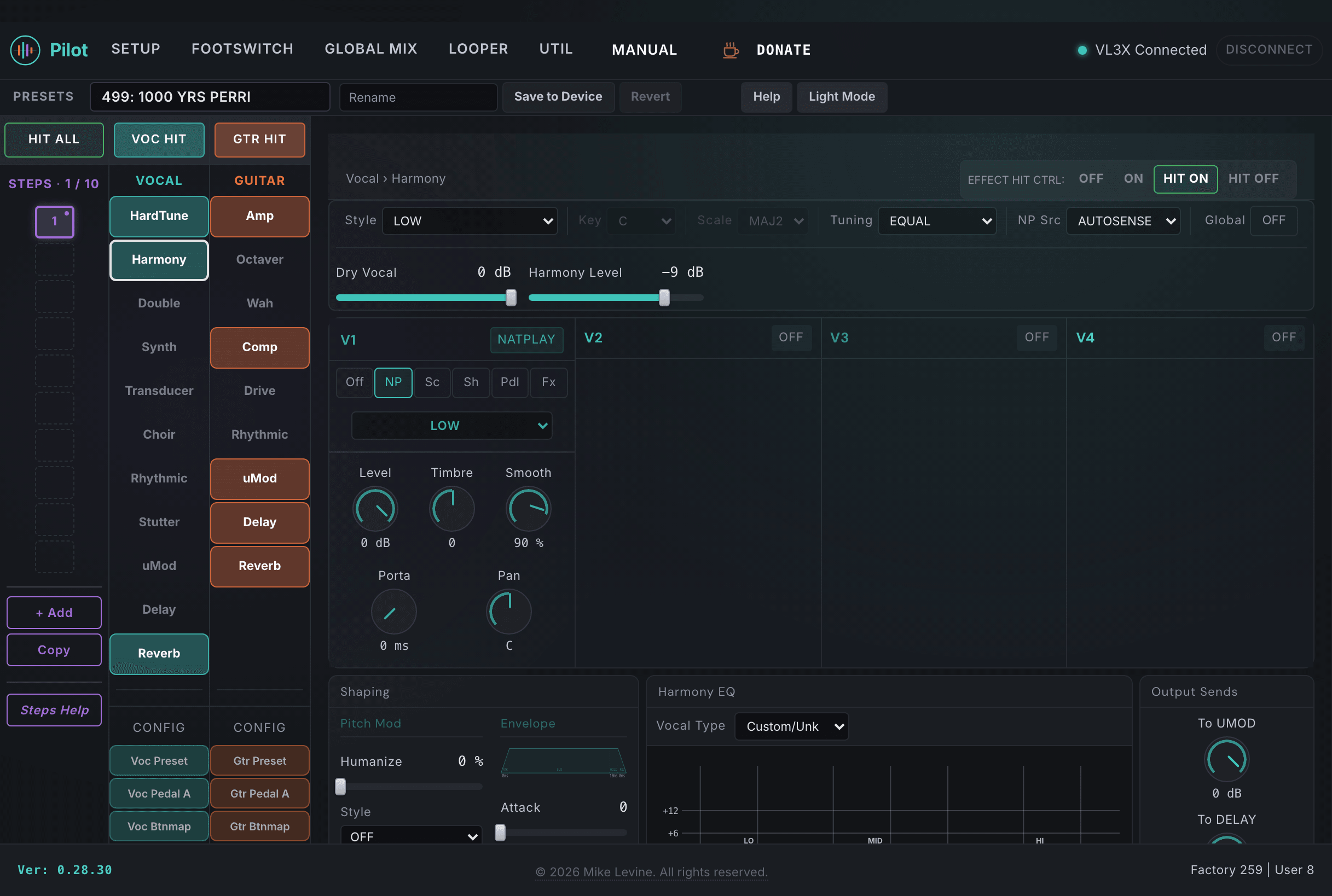
Global Harmony Settings
| Parameter | Range | What it does |
|---|---|---|
| STYLE | 0-29 (enum: harmony_style) | The global harmony preset style. Selects from predefined voice configurations optimized for different musical genres and singing styles. This sets a starting point; individual voice parameters override the defaults. |
| KEY | 0-11 (enum: key) | Musical key for scale-based harmony generation. Set this to the key of the song for correct voice leading when voices are using Scale or Shift mode. |
| SCALE | 0-6 (enum: scale) | Scale type (major, minor, pentatonic, etc.) used for scale-based harmony. Works together with KEY to determine which notes are valid harmony pitches. |
| HUMAN STYLE | 0-6 (enum: human_style) | The type of natural variation applied to voice timing and pitch to make harmonies sound more human. Different styles use different timing and pitch micro-variation patterns. |
| HUMANIZE | 0-100 | Amount of human-style variation applied. At 0, harmonies are perfectly locked to your pitch. Higher values add organic randomness. Most live patches work well at 20-50. |
| VIB STYLE | 0-7 (enum: vibrato_style) | Style of vibrato added to harmony voices. Different styles vary the rate, depth, and shape of the vibrato modulation. |
| VIBRATO | 0-100 | Amount of vibrato applied. Works with VIB STYLE to add natural pitch variation to the harmony voices. |
| NATPLAY SRC | 0-5 (enum: natplay_input) | Input source for NatPlay, the chord-following system. NatPlay can derive key and scale information from guitar chords, MIDI, or other sources. The source you select here determines how harmony notes are tracked in real time. |
| TUNING | 0-2 (enum: tuning) | Intonation reference for the harmony engine. Selects between equal temperament, just intonation, and barbershop (which uses a distinct tuning system). Barbershop is a distinct tuning system available as one of the options. |
| LEAD LEVEL | -61 to 0 dB | Level of the dry lead vocal within the Harmony block, set independently of the four harmony voices. Use this to balance how present the lead sits against the generated harmonies. |
| LEVEL | -61 to +6 dB | Master output level of the entire Harmony block (all voices together) before it reaches the mix. Trims the harmony bus up or down relative to the rest of the vocal chain. |
| HIT CONTROL | 0-3 (enum: hit_control) | Controls how the HIT button interacts with Harmony: engage, disengage, toggle, or no effect. |
| GLOBAL | On / Off | When On, this preset defers to the device-level global Harmony settings rather than the per-preset values stored here. |
Per-Voice Settings (V1-V4)
Each of the four voices has the same set of controls. V1 is the first voice; V4 is the fourth. In Pilot you'll see these grouped by voice. The table below lists the parameters per voice using the V1 naming; V2, V3, and V4 follow the same structure.
| Parameter | Range | What it does |
|---|---|---|
| MODE V1 | 0-5 (enum: harmony_mode) | How V1's pitch is determined. Six modes: OFF (voice disabled), NATURALPLAY (follows detected chords), SCALE (follows key/scale), SHIFT (fixed semitone offset from lead), PEDAL (controlled by expression pedal or MIDI), and FIXED (stays at a set pitch). This is the most important setting for each voice. |
| V1 VOICING | 0-8 | Selects the voicing variant within the voice mode. Different voicings change how the harmony note is chosen from the scale, affecting whether the note falls above or below the lead and which register it occupies. |
| V1 INTERVAL | 0-28 | Diatonic interval offset for this voice when in Interval mode. 0 is unison, higher values are larger intervals. The interval is calculated within the current key and scale. |
| V1 SHIFT | -24 to +24 | Semitone shift applied to this voice when in Shift mode. Negative values shift down, positive values shift up. Independent of key and scale. |
| V1 PEDAL | -36 to +36 | Pedal-controlled pitch offset for this voice when in Pedal mode, in semitones. The expression pedal sweeps between 0 and this value. |
| V1 FIXED | -36 to +25 | Fixed pitch target for this voice when in Fixed mode, in semitones relative to a reference. The voice stays at this pitch regardless of what note you're singing. |
| V1 PORTA | 0-200 | Portamento time for V1, in milliseconds. How fast the voice glides between notes. 0 is instant; higher values create smooth legato note-to-note transitions. Longer portamento with a slower-singing style creates a classic choral or choir feel. |
| V1 SMOOTH | 0-100 | Pitch smoothing for V1. Reduces harsh transitions between notes. Different from portamento: smoothing affects pitch tracking continuity, portamento affects note-to-note glide speed. |
| V1 GENDER | -50 to +50 | Formant shift for V1 independently of the global harmony gender. Negative is more masculine, positive is more feminine. Use per-voice gender shifts to differentiate voices and make them sound like different singers. |
| V1 LEVEL | -61 to 0 dB | Output level for V1. Set relative levels here to shape the balance between harmony voices. V1 at 0 dB and V2/V3/V4 lower gives one prominent voice with supporting voices beneath it. |
| V1 PAN | -100 to +100 | Stereo pan position for V1. -100 is hard left, +100 is hard right. Spreading voices across the stereo field creates width without muddiness, particularly effective with two or three voices. |
Envelope: Hold, Attack, Release
Harmony has a dedicated envelope that controls how quickly voices enter and exit when you sing. Pilot shows this visually as an SVG envelope diagram that updates as you adjust the values.
| Parameter | Range | What it does |
|---|---|---|
| ATTACK | 0-1000 ms | Time for harmony voices to fade in after you begin singing a note. Short attack (0-50 ms) makes voices appear immediately; longer attack lets the lead vocal establish itself before harmonies blend in. Useful for legato phrasing where you want the lead note to speak first. |
| RELEASE | 0-2000 ms | Time for harmony voices to fade out after the lead vocal signal drops. Very short release cuts immediately; longer release lets voices tail out naturally. Setting this to 200-500 ms smooths the end of phrases without leaving hanging notes. |
| HOLD RELEASE | 0-2000 ms | Sets how long the harmony voices sustain after the input signal drops below the detection threshold. |
Harmony EQ
The Harmony EQ is a three-band equalizer applied to the harmony voice bus after it splits from your lead vocal. It shapes only the generated harmony voices, not your dry vocal.
Understanding where it sits in the signal chain matters: your System VocalEQ (Setup > Tone) runs before the signal splits, so it affects both your lead vocal and all harmony voices. The Harmony EQ runs after the split, on the harmony bus only. This means the harmony voices pass through both EQs in series. If your System VocalEQ already boosts the low end for warmth on your lead, the harmony voices inherit that boost before the Harmony EQ even touches them. The Harmony EQ is where you shape harmony voices independently of the lead, compensating for the pitch range difference between your voice and the generated voices.
Vocal Type
The Vocal Type dropdown above the EQ canvas selects a voice-appropriate EQ starting point. This should be set to match the range of your harmony voices, not your own singing voice. If you are a tenor and your harmonies are in the alto or soprano range, select Alto or Soprano. If you are a soprano and most of your harmonies sit lower, select a lower range like Tenor or Baritone. For unison harmonies, select your own vocal type since the voices are singing in your range. The five options (Bass, Baritone, Tenor, Alto, Soprano) each position the low, mid, and high bands at frequencies calibrated for that vocal range. Custom/Unk leaves the EQ at whatever the preset stores.
How Not to Set It
Most factory presets ship with Harmony EQ values that are flat (all gains at zero) with frequency positions outside any useful vocal range. A flat Harmony EQ means the harmony voices get no independent shaping after the System VocalEQ, which almost never sounds right because your System VocalEQ is tuned for your lead vocal, not for voices singing in a different range. Frequencies set above the range of any vocal type are equally useless: they shape frequencies the harmony voices are not producing.
Before tweaking individual bands, select the Vocal Type that matches your harmony voices' range. This moves all three bands into the correct frequency neighborhood. From there, small gain changes of 1-3 dB are usually enough. The Harmony EQ is sensitive: large boosts or cuts quickly make harmonies sound unnatural.
| Parameter | Range | What it does |
|---|---|---|
| LOW FREQ | 0-240 | Low band center frequency for the harmony EQ. |
| LOW GAIN | -12 to +12 dB | Low band gain. Cutting lows on the harmony bus keeps voices from muddying up the mix when the lead vocal is also present. |
| Low BW.Harm | 0-32 | Low band bandwidth (Q) for the harmony EQ. |
| MID FREQ | 0-240 | Mid band center frequency for the harmony EQ. |
| MID GAIN | -12 to +12 dB | Mid band gain. A slight midrange cut (2-4 dB) on harmonies can help them sit behind the lead vocal while still being heard clearly. |
| MID BW | 0-32 | Mid band bandwidth (Q) for the harmony EQ. |
| HIGH FREQ | 0-240 | High band center frequency for the harmony EQ. |
| HIGH GAIN | -12 to +12 dB | High band gain for the harmony EQ. |
| Hi BW.Harm | 0-32 | High band bandwidth (Q) for the harmony EQ. |
Double
Double is vocal doubling: it creates copies of your lead vocal and processes them to sound like additional singers performing the same part. Where Harmony generates new pitches, Double stays at or near the lead pitch and uses timing and pitch micro-variation to create thickness and width. It's the effect that makes a single singer sound like two or three people.
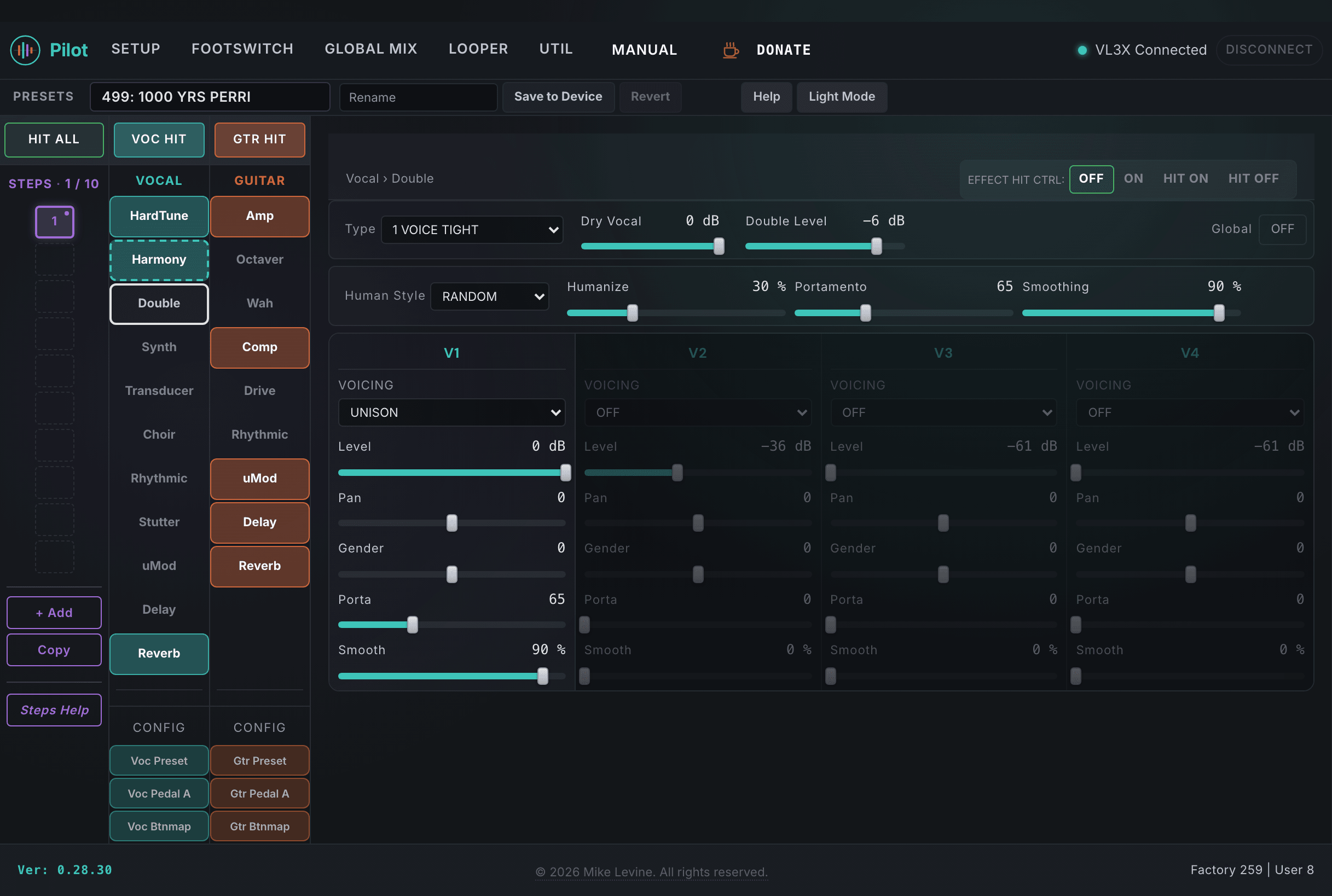
Global Double Settings
| Parameter | Range | What it does |
|---|---|---|
| TYPE | 0-11 (enum: double_style) | Selects the overall doubling style. Different styles use different combinations of timing offset, pitch micro-variation, and processing character to create anything from tight studio doubling to wide ensemble sounds. |
| HUMAN STYLE | 0-6 (enum: human_style) | Variation style applied to make the doubles sound less mechanical. Same styles as Harmony's humanize engine. |
| HUMANIZE | 0-100 | Amount of human-style variation applied to timing and pitch micro-variation. Low values give tight studio doubles; higher values sound more like separate takes from a real singer. |
| PORTAMENTO | 0-200 ms | Global portamento time applied across all double voices. Controls how smoothly the voices glide between notes. |
| SMOOTHING | 0-100 | Global pitch smoothing for all double voices. Reduces sharp pitch transitions across the double mix. |
| LEAD LEVEL | -61 to 0 dB | Level of the dry lead vocal within the Double block, set independently of the doubled voices. Trims how present the original lead is against the doubles. |
| LEVEL | -61 to +6 dB | Master output level of the entire Double block (all voices together) before it reaches the mix. |
| HIT CONTROL | 0-3 (enum: hit_control) | Controls how the HIT button interacts with Double. |
| GLOBAL | On / Off | When On, the preset defers to the device-level global Double settings. |
Per-Voice Settings (V1-V4)
| Parameter | Range | What it does |
|---|---|---|
| V1 VOICING | 0-3 (enum: double_voicing) | Voicing character for V1. Options control the tonal character and harmonic relationship of the doubled voice to the lead. |
| V1 PORTA | 0-200 ms | Per-voice portamento time for V1. Overrides the global PORTAMENTO setting for this voice specifically. |
| V1 GENDER | -50 to +50 | Formant shift for V1. Applying a small but different gender shift to each voice makes them sound like they come from different people rather than the same source. |
| V1 SMOOTH | 0-100 | Pitch smoothing for V1 specifically. |
| OctShift.V1 | -1200 to +1200 cents | Octave shift for V1, in cents. This is a very wide range: 1200 cents is one full octave. Setting this to 1200 puts V1 an octave above the lead; -1200 puts it an octave below. Useful for creating rich sub-octave doubles or high octave shimmer. |
| V1 LEVEL | -61 to 0 dB | Output level for V1. Set relative levels across the four voices to shape the balance of the doubled stack. |
| V1 PAN | -100 to +100 | Stereo pan position for V1. -100 is hard left, +100 is hard right. Panning the doubles apart is the main way Double creates stereo width. |