
Mic, EQ & Comp/Gate
Three of the Setup subcategories work together to shape your dry vocal before it hits the effects chain: Mic Control sets the input, VocalEQ shapes the frequency response, and Comp/Gate handles dynamics. Getting these right is the foundation of everything else. A noisy gate or a honky EQ follows you through every effect and every preset.
Mic Control
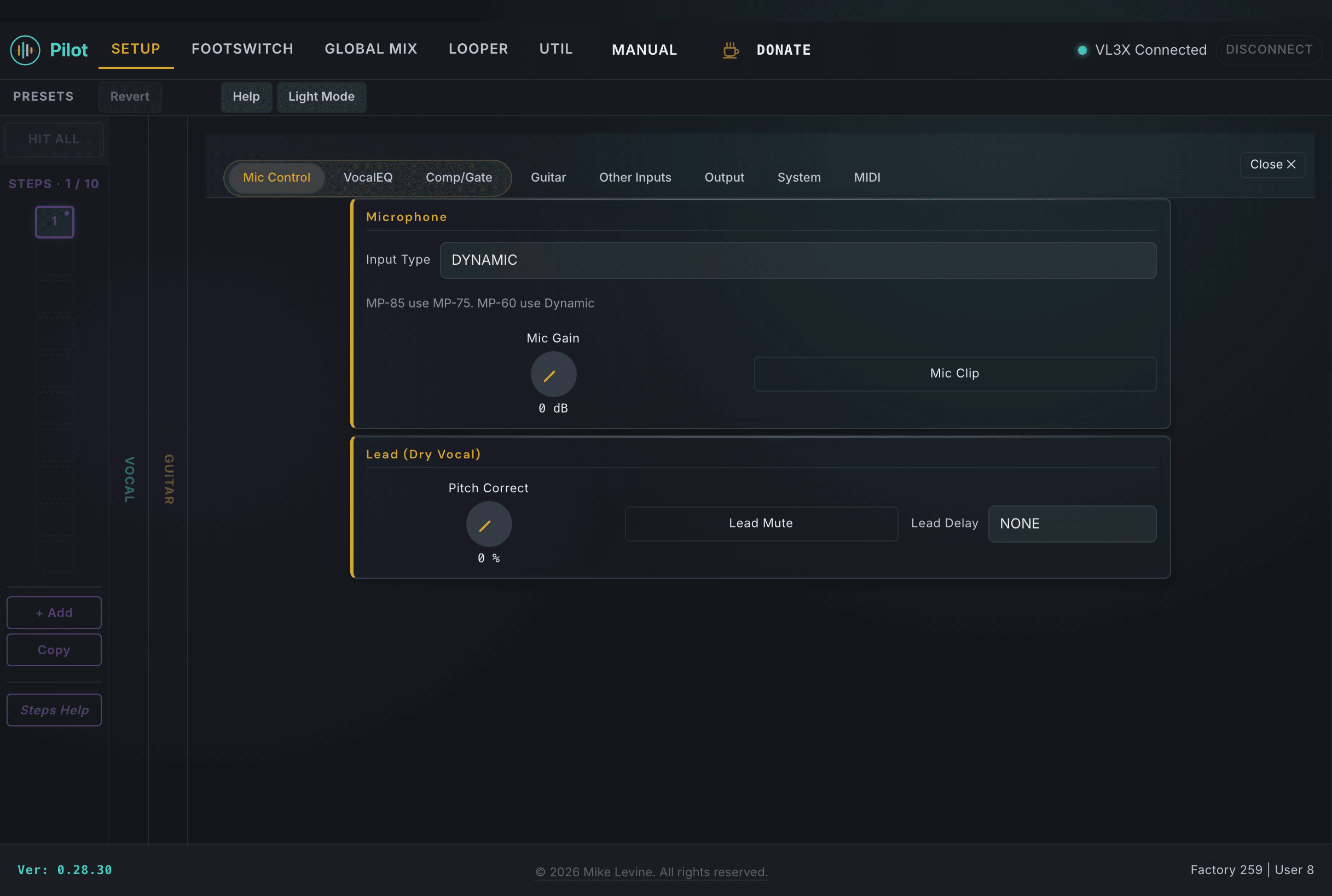
Mic Control covers the physical input side: what kind of mic you're using, how hot the preamp is, and whether the built-in clip protection is active. It also handles the dry lead vocal monitoring path and the programmable switches on compatible TC-Helicon microphones (like the MP-76).
Input and Gain
| Parameter | Range | What it does |
|---|---|---|
| INPUT TYPE | 0-4 (enum) | Selects the mic model for optimal processing. Match this to the physical microphone you're plugging in. |
| MIC GAIN | 0-66 dB | Preamp gain. Set this high enough to drive the effects chain, but back off if you're hitting the clip light. |
| MIC CLIP PROTECTION | On / Off | Automatically reduces gain when the input peaks. Good insurance for loud passages or unexpected blasts. |
| GLOBAL PITCH CORRECT | 0-100% | Global pitch correction amount for the dry lead vocal. This overrides per-preset correction strength across all presets. |
Lead Monitoring
| Parameter | Range | What it does |
|---|---|---|
| LEAD MUTE | On / Off | Mutes the dry lead vocal output while harmonies continue. Useful for live in-ear setups where you want to hear harmonies but not your own voice doubled in the mix. |
| LEAD DELAY | 3 values (enum) | Adds latency to the lead output for in-ear monitor sync. Use when your monitoring system introduces enough delay that the dry vocal sounds early. |
Mic Switch Assignments
If you use the TC-Helicon MP-76 microphone, Pilot surfaces all four switch assignment slots here. Each switch can be mapped to a performance action and set to either momentary or latching behavior.
| Parameter | Range | What it does |
|---|---|---|
| MIC SWITCH FUNCTION | 0-27 (enum) | Function assigned to the primary mic switch. Maps it to a performance action like HIT, mute, or preset change. |
| MIC SWITCH MODE | Momentary / Latch | Trigger behavior for the primary switch. Momentary fires on press and release, latching toggles state on each press. |
| MIC SW RIGHT | 0-27 (enum) | Function for the right directional switch. |
| MIC SW RIGHT MODE | Momentary / Latch | Trigger mode for the right directional switch. |
| MIC SW LEFT | 0-27 (enum) | Function for the left directional switch. |
| MIC SW LEFT MODE | Momentary / Latch | Trigger mode for the left directional switch. |
| MIC SW BOTTOM | 0-27 (enum) | Function for the bottom directional switch. |
| MIC SW BOTTOM MODE | Momentary / Latch | Trigger mode for the bottom directional switch. |
Vocal EQ
The VocalEQ section shapes your dry vocal before it reaches the effects chain. It runs at the Setup level, so every preset benefits from the same foundation. Think of it as the EQ on the channel strip before the effects rack.
EQ Modes: Manual vs Adaptive
The EQ MODE parameter switches VocalEQ between two fundamentally different operating modes:
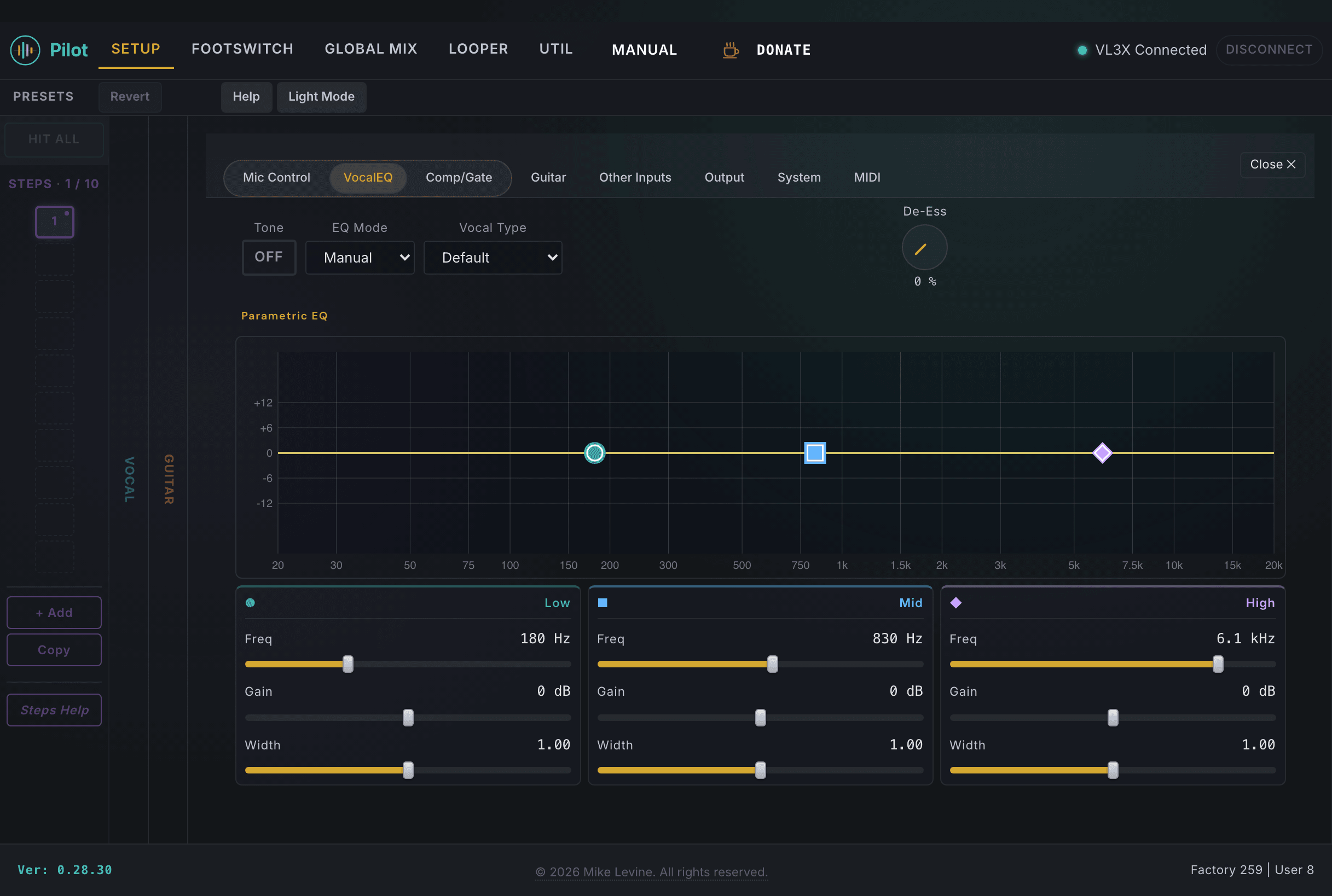
- Manual (default): You control a three-band parametric EQ directly (low shelf, parametric mid, high shelf). This is the mode where the Vocal Type selector appears, giving you voice-appropriate starting points for all nine EQ parameters. Shape and Warmth are not available in this mode.
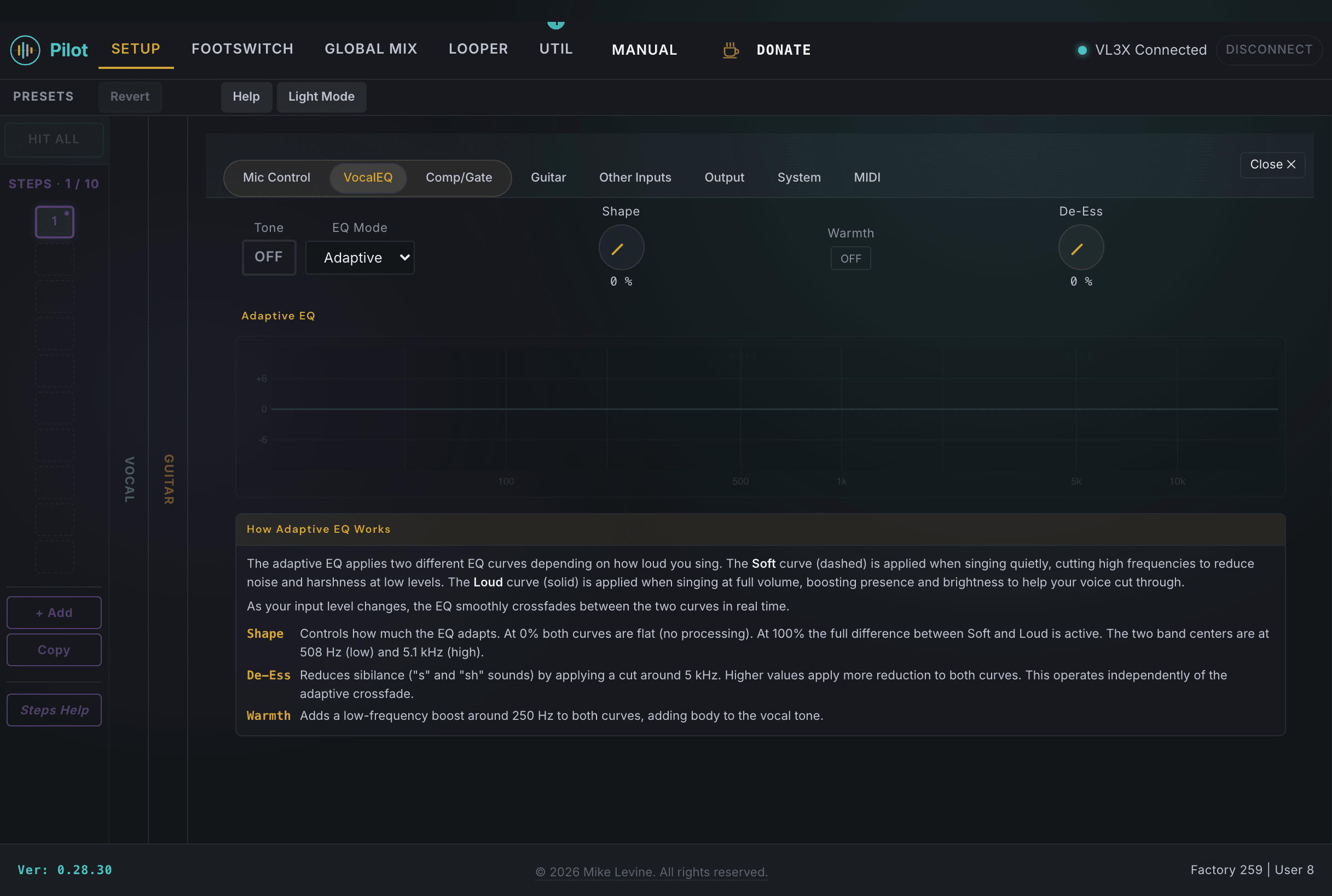
- Adaptive: The tone engine analyzes your voice and applies correction automatically. The SHAPE knob controls how aggressively it reshapes your tone, and WARMTH shifts the character. The three-band EQ and Vocal Type selector are hidden in this mode.
Vocal Type
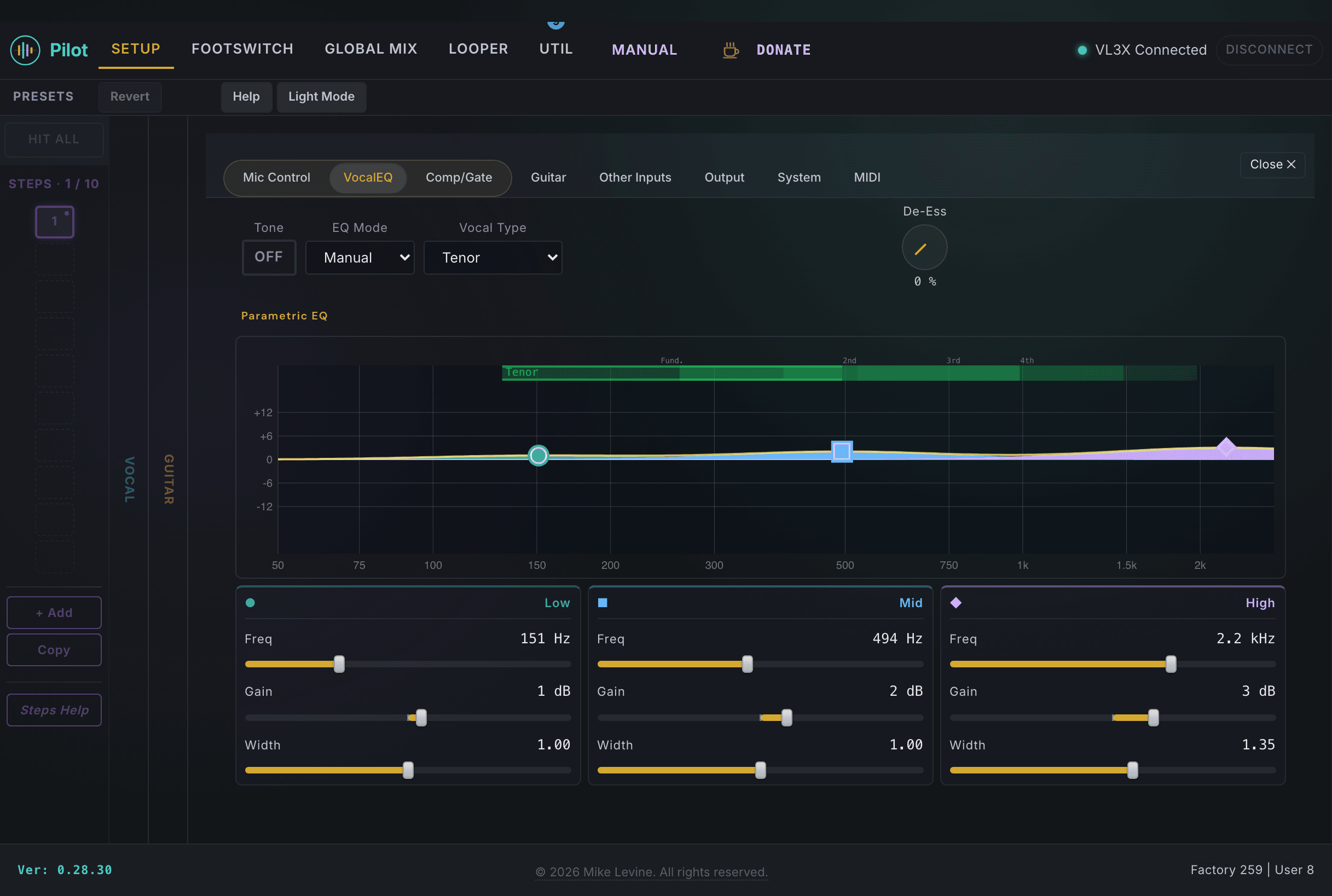
When EQ MODE is set to Manual, Pilot shows a Vocal Type selector with five singing ranges: Bass, Baritone, Tenor, Alto, and Soprano. Selecting your vocal type sets all nine EQ parameters (frequency, gain, and width for each of the three bands) to starting points tuned for your range.
This matters because different voice types have fundamentally different frequency profiles. A baritone's fundamental sits around 110-440 Hz, while a soprano's sits around 247-1047 Hz. An EQ curve that flatters a baritone will miss the mark entirely on a soprano. Setting your Vocal Type gives the three-band EQ a musically relevant starting point so you are cutting and boosting in the right frequency neighborhoods from the start, rather than guessing.
Three-Band EQ
| Parameter | Range | What it does |
|---|---|---|
| VOCAL EQ LOW FREQ | 0-240 | Center frequency for the low shelf. Sets where low-frequency shaping begins. |
| VOCAL EQ LOW GAIN | -12 to +12 dB | Boost or cut the low shelf band. Negative values reduce rumble and proximity effect. |
| VOCAL EQ LOW WIDTH | 0-32 | Q (width) of the low band. Lower values concentrate the effect around the center frequency. |
| VOCAL EQ HI FREQ | 0-240 | Center frequency for the high shelf. Sets where high-frequency shaping begins. |
| VOCAL EQ HI GAIN | -12 to +12 dB | Boost or cut the high shelf band. A slight boost adds air; cuts tame harshness from bright microphones. |
| VOCAL EQ HI WIDTH | 0-32 | Q (width) of the high band. |
| VOCAL EQ PARA FREQ | 0-240 | Center frequency for the parametric mid band. Use to target a specific resonant or problem frequency. |
| VOCAL EQ PARA GAIN | -12 to +12 dB | Boost or cut the parametric band. Narrow cuts are useful for removing a room resonance or mic coloration. |
| VOCAL EQ PARA WIDTH | 0-32 | Q of the parametric band. Higher values create a narrower, more surgical cut or boost. |
Adaptive Tone Engine and De-Esser
| Parameter | Range | What it does |
|---|---|---|
| TONE | On / Off | Enables the adaptive tone shaping engine. When on, it shapes your vocal using the SHAPE and EQ MODE settings below. |
| SHAPE | 0-100% | Adaptive tone shaping amount. Higher values apply more tonal correction toward the target response. |
| EQ MODE | 2 values (enum) | Selects between adaptive or fixed EQ response for the tone engine. |
| WARMTH | On / Off | Shifts the characteristics of the adaptive EQ. The exact behavior is firmware-dependent. |
| DE-ESS | 0-100% | De-esser amount. Reduces harshness from sibilant sounds ("s", "sh", "t") in the vocal signal. Start around 30-40% and add more only if sibilance is persistent. |
Comp/Gate (Compressor & Gate)
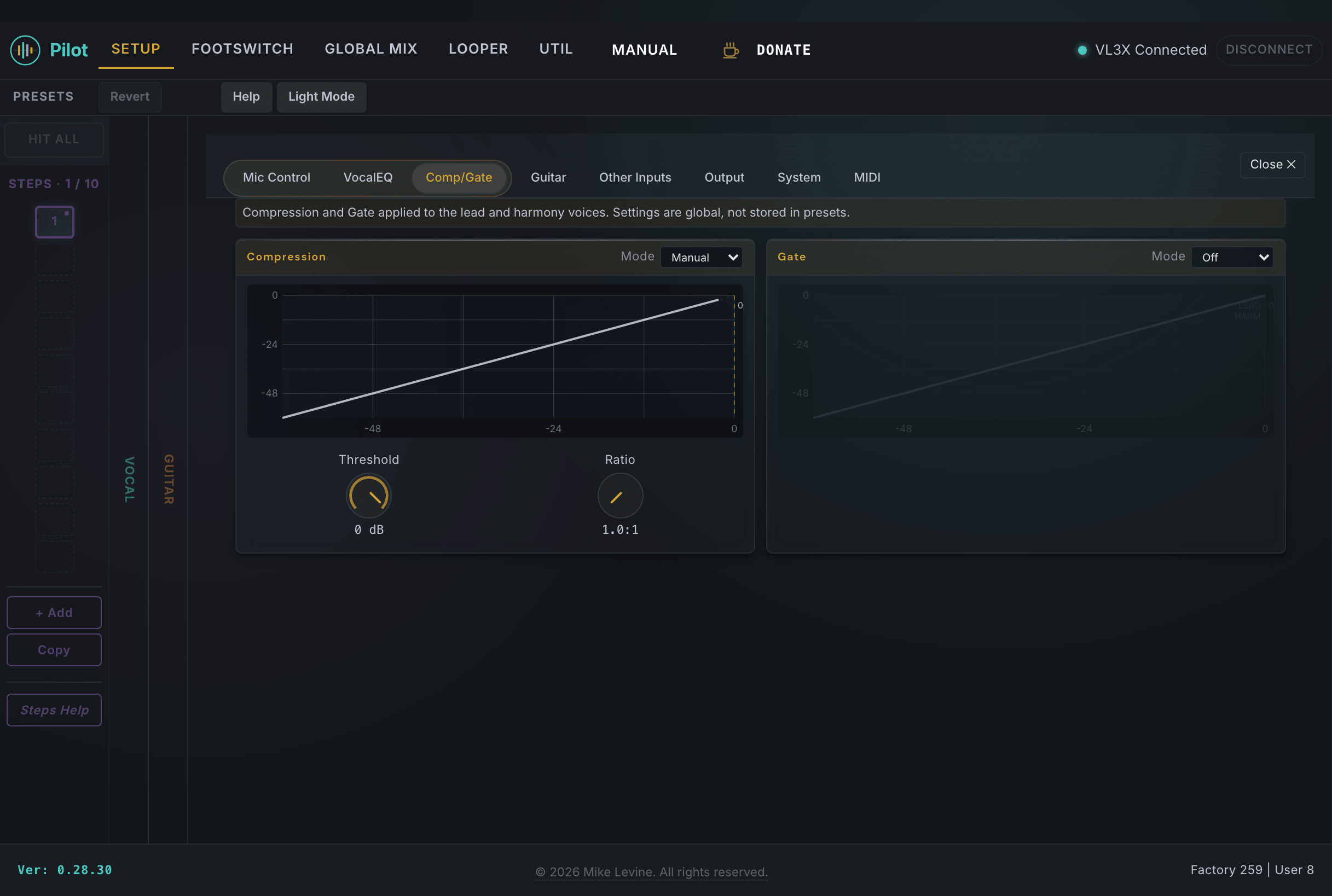
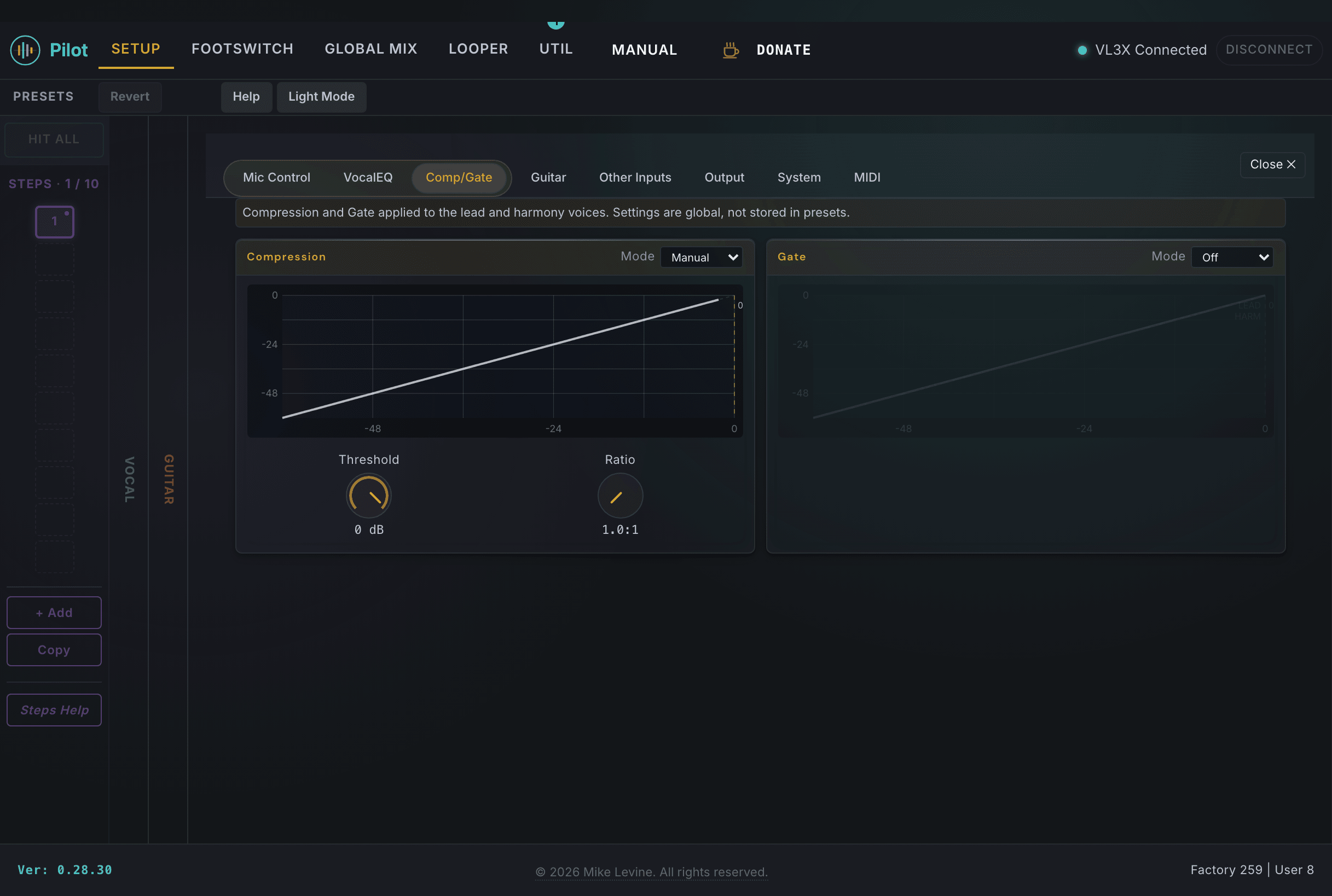
The Comp/Gate section handles dynamics: a compressor to control the dynamic range of the vocal, and a gate to reduce noise between phrases. These are global settings that apply at the Setup level, not per-preset. Getting the compressor and gate set up correctly here means you don't have to fight inconsistent volume or background noise in every preset.
Compressor
| Parameter | Range | What it does |
|---|---|---|
| COMPRESS | 0-100% | Overall compressor amount. A simpler control than threshold plus ratio: dial in the feel and use the detailed params below for fine-tuning. |
| COMPRESSION MODE | ADAPTIVE / MANUAL | In ADAPTIVE mode, the compressor adjusts its behavior automatically based on the input signal; COMPRESS controls the overall amount. In MANUAL mode, you control COMP THRESHOLD and COMP RATIO directly for precise dynamics control. |
| COMP THRESHOLD | -30 to 0 dB | Compression begins above this level. Lower values mean more of the signal gets compressed. Active in MANUAL mode. |
| COMP RATIO | 10 to 40 (1.0:1 to 4.0:1) | How much gain reduction is applied above the threshold. Active in MANUAL mode. |
Gate
| Parameter | Range | What it does |
|---|---|---|
| GATE | OFF / ADAPTIVE / MANUAL | Gate mode. OFF disables the gate entirely. ADAPTIVE adjusts gate behavior automatically. MANUAL gives you direct control over threshold, attack, and release for both lead and harmony channels independently. |
| GATE THRESHOLD | -61 to 0 dB | Signals below this level are gated out. Set it just below your singing level so it catches room noise without clipping phrases. |
| GATE LEAD ATTACK | 0-45 | How quickly the gate opens for the dry lead vocal when signal exceeds the threshold. |
| GATE LEAD RELEASE | 0-45 | How quickly the gate closes for the dry lead vocal after signal drops below the threshold. Longer release avoids chopped-off phrase endings. |
| GATE HARM ATTACK | 0-45 | Gate attack time for harmony voices. |
| GATE HARM RELEASE | 0-45 | Gate release time for harmony voices. |
| LEAD ATTEN | -61 to 0 dB | How much the dry lead vocal is attenuated when gated. Set to -61 for hard mute, or a gentler value if you want the lead to fade rather than cut. |
| WARM ATTN | -61 to 0 dB | Attenuation applied to harmony voices when gated. |