
Performance & Mix
The Footswitch and Mix categories in Pilot handle how you interact with the VL3/x live and how signals are balanced at every output. Footswitch stores the global switch assignments and expression pedal configuration for the current preset. Mix gives you a complete mixing desk: main outputs, headphone mix, effects returns, loop levels, headphone limiter, and metronome. These are system-level settings, meaning they apply globally rather than per-preset.
Footswitch
The Footswitch category does not explain what footswitches do at a hardware level (that is in your TCH manual). What it does is give you a clear, labeled interface for setting the global footswitch scenario: which physical buttons and jacks do what, in what mode, and across what input cycling behavior. The VL3/x's own screen shows these settings in a compact, abbreviated layout. Pilot spreads them out so you can see all assignments at a glance and edit them without digging through nested menus.
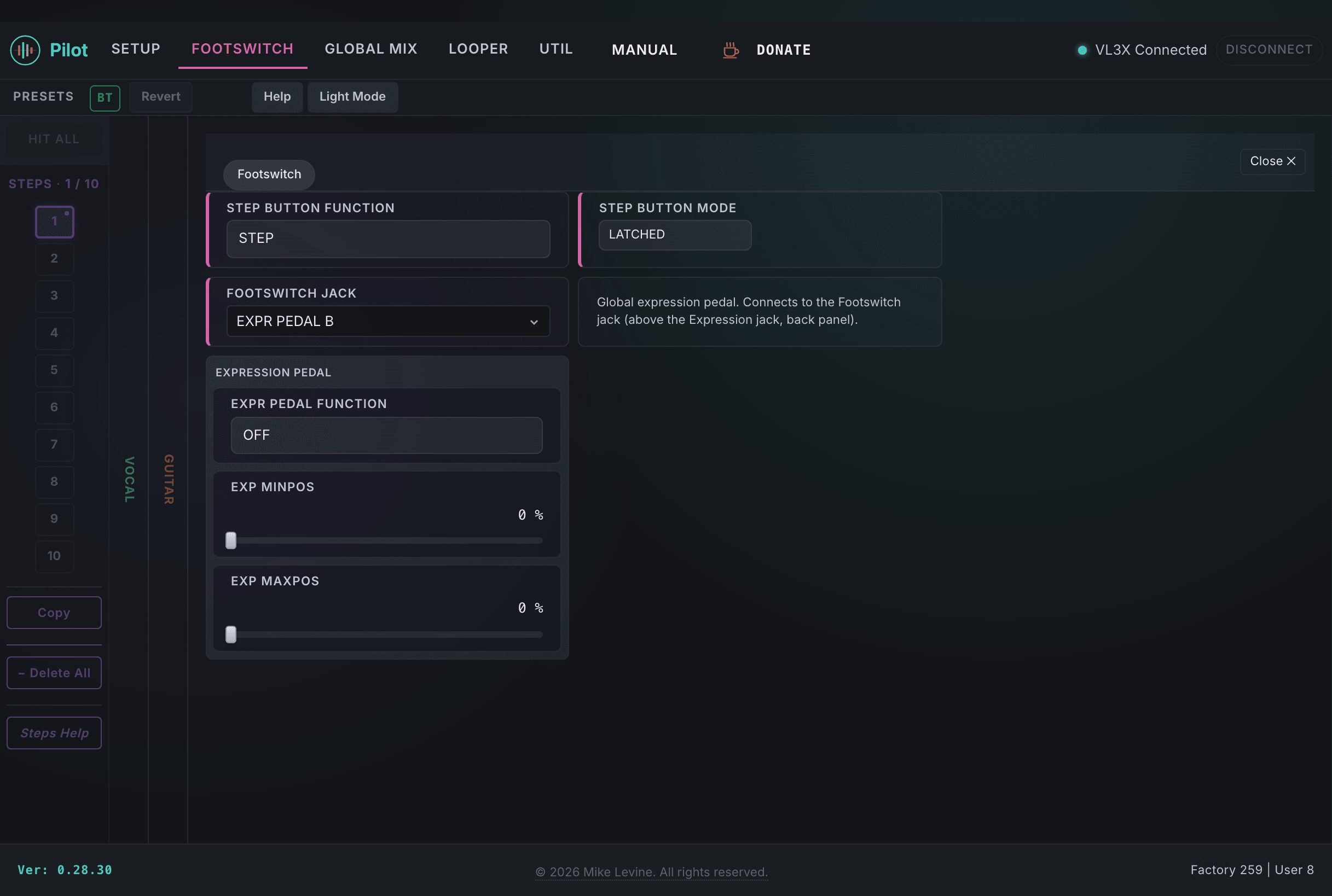
Footswitch Parameters
| Parameter | Range | What it does |
|---|---|---|
| STEP BUTTON FUNCTION | 0-36 (enum: step_button_function) | Assigns a function to the Step button. Controls what happens when you press the dedicated step-advance footswitch. 37 possible functions covering preset navigation, loop control, and effect toggling. |
| STEP BUTTON MODE | 0-1 (enum: buttonmap_mode) | Sets the trigger behavior for the Step button: Momentary (active while held) or Latching (toggles on each press). |
| FOOTSWITCH JACK | 0-2 (enum: footswitch_jack) | Determines what is plugged into the rear-panel footswitch jack: a single footswitch, a dual footswitch, or an expression pedal. This controls how the jack input is interpreted by the firmware. |
| EXP PEDAL MODE | 0-2 | Sets the expression pedal operating mode. Determines whether the pedal is treated as a continuous controller, a switch, or is disabled. |
| EXPR PEDAL FUNCTION | 0-36 (enum: expr_pedal_function_b) | The global expression pedal assignment. This is the function the pedal controls when a preset's expression pedal is set to Global. 37 possible assignments covering volume, pitch, effects depth, and more (the same list as the per-preset expression assignment, minus Smart Wah). |
| EXP MINPOS | 0-100 (%) | The pedal value at heel-down (minimum travel). Sets the floor of the expression sweep at 0% pedal position. |
| EXP MAXPOS | 0-100 (%) | The pedal value at toe-down (maximum travel). Sets the ceiling of the expression sweep at 100% pedal position. |
| SWITCH 1 FUNCTION | 0-55 (enum: switch_function) | Function assigned to external Switch 1. 56 possible functions. Switch 1 corresponds to the first button on a connected footswitch controller. |
| SWITCH 1 MODE | 0-1 (enum: buttonmap_mode) | Trigger mode for Switch 1: Momentary or Latching. |
| SWITCH 2 FUNCTION | 0-55 (enum: switch_function) | Function assigned to external Switch 2. |
| SWITCH 2 MODE | 0-1 (enum: buttonmap_mode) | Trigger mode for Switch 2. |
| SWITCH 3 FUNCTION | 0-55 (enum: switch_function) | Function assigned to external Switch 3. |
| SWITCH 3 MODE | 0-1 (enum: buttonmap_mode) | Trigger mode for Switch 3. |
| SWITCH 4 FUNCTION | 0-55 (enum: switch_function) | Function assigned to external Switch 4. |
| SWITCH 4 MODE | 0-1 (enum: buttonmap_mode) | Trigger mode for Switch 4. |
| SWITCH 5 FUNCTION | 0-55 (enum: switch_function) | Function assigned to external Switch 5. |
| SWITCH 5 MODE | 0-1 (enum: buttonmap_mode) | Trigger mode for Switch 5. |
| SWITCH 6 FUNCTION | 0-55 (enum: switch_function) | Function assigned to external Switch 6. |
| SWITCH 6 MODE | 0-1 (enum: buttonmap_mode) | Trigger mode for Switch 6. |
| LOOP INPUT CYCLE 1 | 0-4 (enum: loop_input_cycle) | Input routing for Loop Track 1 during cycling. Determines which signal feeds into Track 1 when cycling through loop inputs. |
| LOOP INPUT CYCLE 2 | 0-4 (enum: loop_input_cycle) | Input routing for Loop Track 2 during cycling. |
| LOOP INPUT CYCLE 3 | 0-5 (enum: loop_input_cycle_3) | Input routing for Loop Track 3 during cycling. Has one extra option compared to Tracks 1 and 2. |
Loop Triggers
The Loop Triggers subcategory configures a set of labeled trigger slots (A through H) plus a global scope setting. Triggers let you assign specific loop track-and-slot combinations to external footswitch inputs, so a single press can simultaneously cue a loop playback state. The layout changes conditionally based on which trigger configurations are active, so Pilot shows only the controls relevant to your current setup.
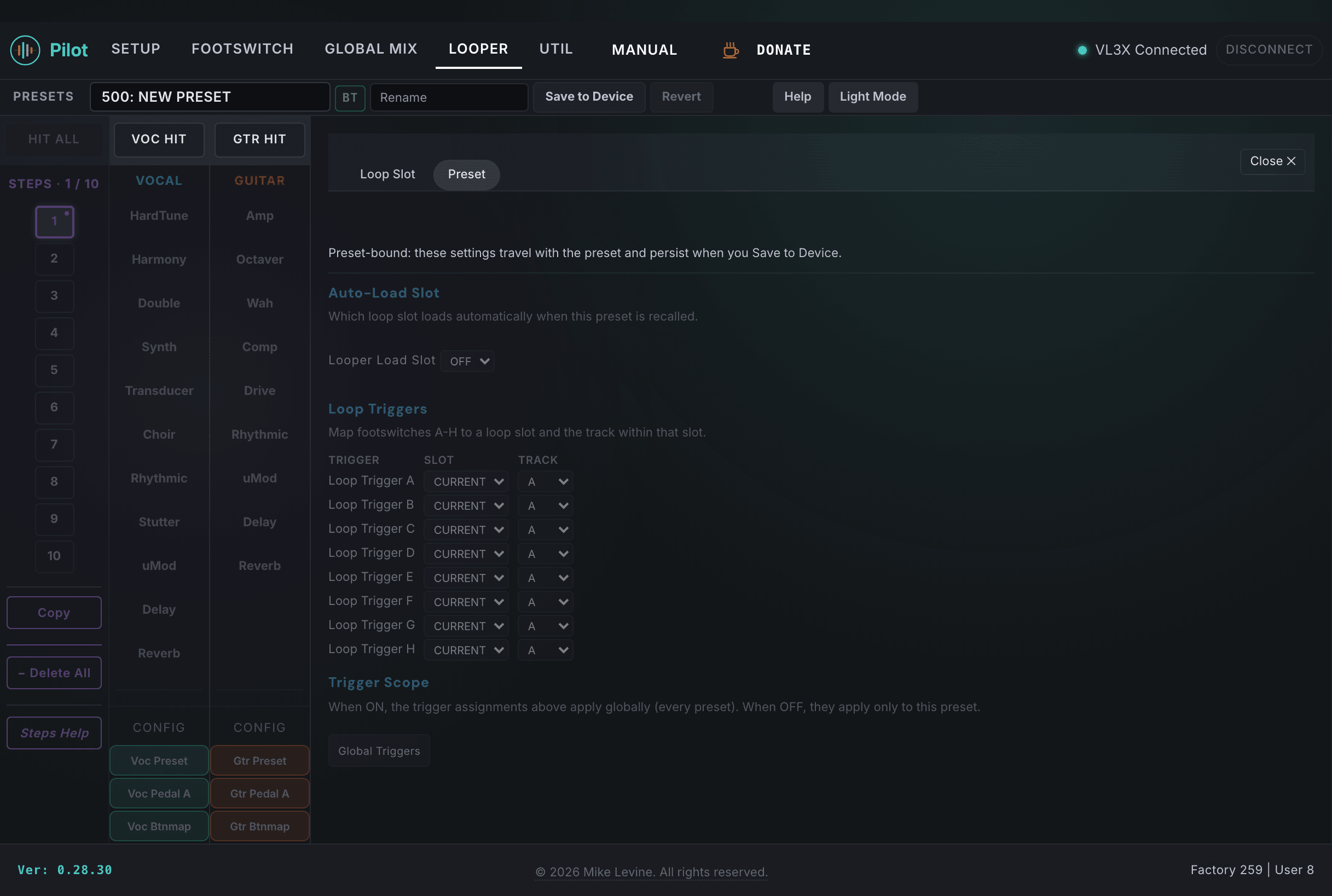
Loop Trigger Parameters
| Parameter | Range | What it does |
|---|---|---|
| TRIGGER A SLOT | 0-50 | Loop slot number assigned to Trigger A. This is which loop memory slot plays back when Trigger A fires. |
| TRIGGER A TRACK | 0-4 (enum: loop_trigger_track) | Which loop track Trigger A activates. Track assignments include individual tracks and combined outputs. |
| TRIGGER B SLOT | 0-50 | Loop slot number assigned to Trigger B. |
| TRIGGER B TRACK | 0-4 (enum: loop_trigger_track) | Which loop track Trigger B activates. |
| TRIGGER C SLOT | 0-50 | Loop slot number assigned to Trigger C. |
| TRIGGER C TRACK | 0-4 (enum: loop_trigger_track) | Which loop track Trigger C activates. |
| TRIGGER D SLOT | 0-50 | Loop slot number assigned to Trigger D. |
| TRIGGER D TRACK | 0-4 (enum: loop_trigger_track) | Which loop track Trigger D activates. |
| TRIGGER E SLOT | 0-50 | Loop slot number assigned to Trigger E. |
| TRIGGER E TRACK | 0-4 (enum: loop_trigger_track) | Which loop track Trigger E activates. |
| TRIGGER F SLOT | 0-50 | Loop slot number assigned to Trigger F. |
| TRIGGER F TRACK | 0-4 (enum: loop_trigger_track) | Which loop track Trigger F activates. |
| TRIGGER G SLOT | 0-50 | Loop slot number assigned to Trigger G. |
| TRIGGER G TRACK | 0-4 (enum: loop_trigger_track) | Which loop track Trigger G activates. |
| TRIGGER H SLOT | 0-50 | Loop slot number assigned to Trigger H. |
| TRIGGER H TRACK | 0-4 (enum: loop_trigger_track) | Which loop track Trigger H activates. |
| LOOP TRIGGER SCOPE | 0-1 (enum: loop_trigger_scope) | Whether loop triggers fire globally or are scoped to the current preset. Global scope means trigger assignments persist across preset changes; preset scope means they are local to the active preset. |
Mixing Desk
The Mix category in Pilot is a complete mixing desk for the VL3/x signal chain. Six subcategories cover every level control on the device: main output mix, headphone mix, effects send levels, loop track levels, headphone limiter (a DSP-only section), and metronome level and type. These are global settings, not per-preset.
Main Mix
Controls the overall output levels at the main XLR outputs.
| Parameter | Range | What it does |
|---|---|---|
| GUITAR | -61 to 0 dB | Guitar level in the main mix. Adjusts the guitar signal contribution to the XLR output. |
| LOOPER | -31 to 12 dB | Overall looper output level in the main mix. Affects all loop tracks together at the main output. |
| AUX | -31 to 12 dB | Auxiliary input level in the main mix. Controls how much of the rear-panel AUX input reaches the main output. |
| XLR OUT | -30 to 0 dB | Master output trim on the XLR outputs. Use this to match the level coming out of the VL3/x to your PA input. |
| METRONOME | -31 to 12 dB | Metronome level in the main mix. If you want the click in your mains (not recommended for live FOH), adjust here. |
| TRACK | -31 to 12 dB | Backing track level in the main mix. Adjusts the level of any playback track running through the device. |
| USB | -31 to 12 dB | USB audio input level in the main mix. Controls how much USB audio playback reaches the main output. |
Headphone Mix
The headphone mix is fully independent from the main output. You can have a completely different balance in your ears than what is going to the PA.
| Parameter | Range | What it does |
|---|---|---|
| GTR TRIM | -31 to 12 dB | Guitar level trim in the headphone mix. Independent from the main mix guitar level. |
| LOOP TRIM | -13 to 6 dB | Overall looper level trim in the headphone mix. |
| METRONOME | -31 to 12 dB | Metronome level in the headphone mix. This is where the click belongs for most live performers: in the ears only. |
| HEADPHONE OUT | -31 to 12 dB | Master headphone output level. This is the overall volume of the headphone output jack. |
| MAIN TRIM | -13 to 6 dB | Trim applied to the main mix signal before it enters the headphone mix. Lets you blend main and headphone-specific signals. |
| MONITOR | -31 to 12 dB | Monitor send level in the headphone mix. Controls the level of any monitor return signal reaching your headphones. |
| AUX LEVEL | -31 to 6 dB | Auxiliary input level in the headphone mix. Lets you blend backing tracks or other AUX sources into your monitor independently of the main mix. |
| TRACK LEVEL | -31 to 6 dB | Backing track level in the headphone mix. |
| USB LEVEL | -31 to 6 dB | USB audio level in the headphone mix. |
| ROOMSENSE | -31 to 12 dB | RoomSense level in the headphone mix. Controls how much of the RoomSense signal reaches your headphone output. |
Effects Mix
Controls the return level of the main effect buses into the mix.
| Parameter | Range | What it does |
|---|---|---|
| VOICES | -61 to 6 dB | Overall level of vocal effect voices (harmony, double, etc.) in the mix. Trim the wet vocal effects bus here. |
| VOC REVERB | -61 to 6 dB | Vocal reverb return level. Adjusts how much reverb is blended into the overall mix from the vocal reverb bus. |
| GTR REVERB | -61 to 6 dB | Guitar reverb return level. Same concept as vocal reverb but for the guitar reverb bus. |
Loop Mix
Controls individual loop track levels. A LEVEL, B LEVEL, and C LEVEL are DSP-only parameters: they are sent directly to the DSP engine using a sysex_id address rather than a standard preset offset. The remaining parameters use standard offsets.
| Parameter | Range | Notes |
|---|---|---|
| A LEVEL DSP | -49 to 12 dB | Loop Track A output level. DSP-only parameter (sysex_id 933). Changes are sent directly to the DSP, not stored as a preset offset. |
| B LEVEL DSP | -49 to 12 dB | Loop Track B output level. DSP-only parameter (sysex_id 935). |
| C LEVEL DSP | -49 to 12 dB | Loop Track C output level. DSP-only parameter (sysex_id 937). |
| LOOPER | -31 to 12 dB | Master looper level within the loop mix bus. |
| MAIN MET LVL | -31 to 12 dB | Metronome level in the main output as heard through the loop mix bus. |
| HP MET LVL | -31 to 12 dB | Metronome level in the headphone output as heard through the loop mix bus. |
| HP LOOP TRM | -13 to 6 dB | Headphone loop trim. Adjusts the overall loop level feeding the headphone mix from this bus. |
Limiter (DSP Only)
The Limiter subcategory is entirely DSP-only. All six parameters are sent directly to the DSP engine. These are not stored as preset offsets. The limiter protects the headphone output and RoomSense output from clipping.
| Parameter | Range | What it does |
|---|---|---|
| HP THRESHOLD DSP | -61 to 0 dB | Threshold for the headphone output limiter. Signal above this level gets clamped. Set lower for more protection; set near 0 dB to effectively bypass. |
| HP ATTACK DSP | 0-19 ms | Attack time for the headphone limiter. How quickly the limiter engages when the threshold is crossed. |
| HP RELEASE DSP | 0-19 ms | Release time for the headphone limiter. How quickly the limiter lets go after the signal drops below threshold. |
| RS THRESHOLD DSP | -61 to 0 dB | Threshold for the RoomSense limiter. Same function as HP THRESHOLD but for the RoomSense signal path. |
| RS ATTACK DSP | 0-19 ms | Attack time for the RoomSense limiter. |
| RS RELEASE DSP | 0-19 ms | Release time for the RoomSense limiter. |
Metronome
| Parameter | Range | What it does |
|---|---|---|
| METRONOME LEVEL | -100 to 0 dB | Global metronome level. This sets the starting point for the metronome before per-output level trims are applied from the Main Mix and Headphone Mix subcategories. |