System and MIDI are the highest-level settings on the VL3/x: they affect behavior across all 500 presets rather than configuring a single effect. System handles global locks, NaturalPlay source selection, display settings, and screen timeout. MIDI configures how the device responds to and transmits MIDI data for integration with controllers, sequencers, and keyboards.
Back Up First: Before changing System settings, back up your device. Navigate to Util › Transfer to save your globals and presets. These settings apply across everything, so it's worth having a restore point.
System
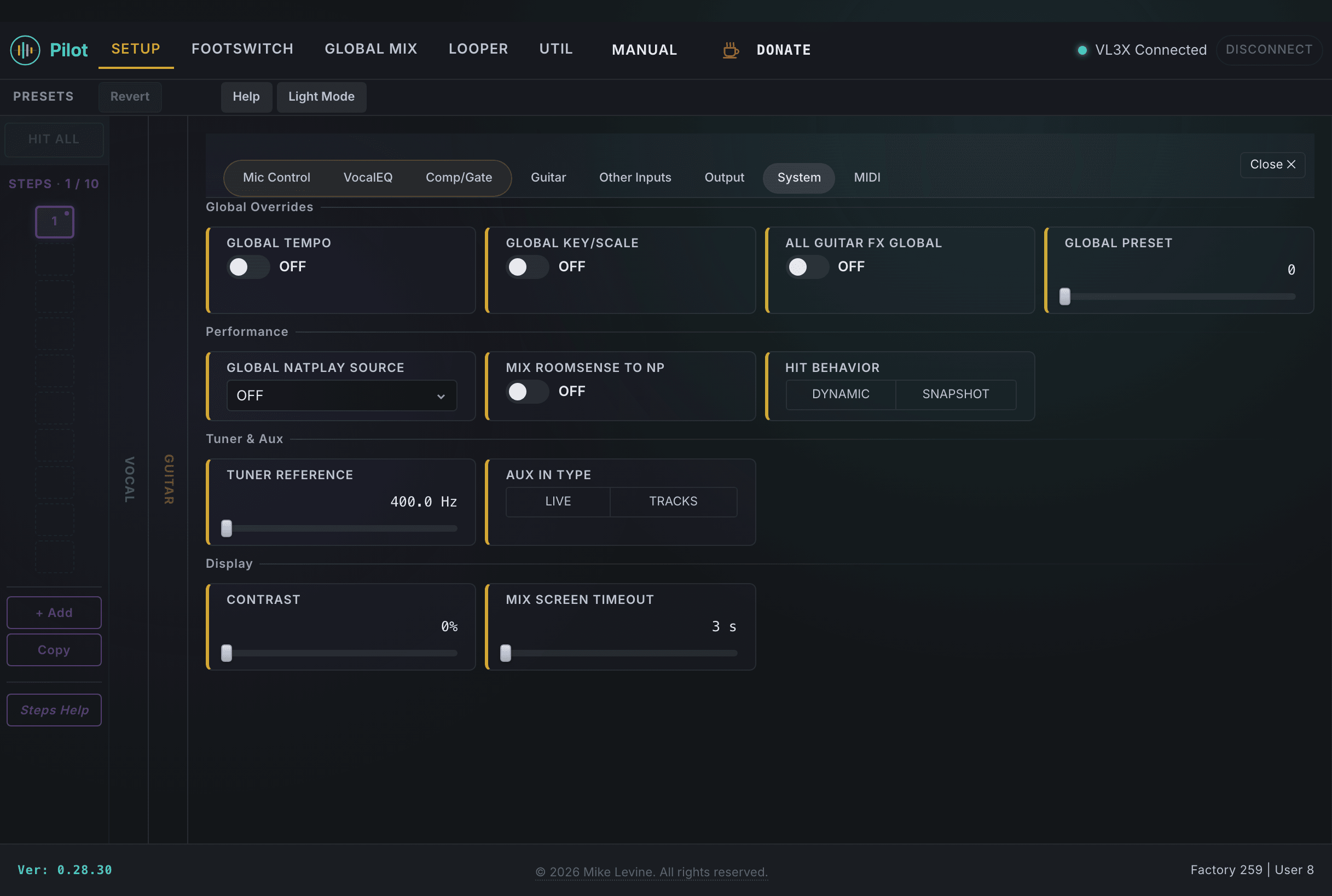
The System parameters in Pilot correspond to the VL3/x's global configuration. Most of them are toggles that lock a particular behavior across all presets, or reference values that everything else is measured against.
Warning: GLOBAL TEMPO, GLOBAL KEY/SCALE, and ALL GUITAR FX GLOBAL are device-wide overrides. Turning any of them on changes the behavior of all 500 presets immediately. If you are in the middle of a gig or recording session, make sure you understand the impact before flipping these switches.
The System view. Global locks at top, NaturalPlay source and display settings below.
Global Locks
Parameter
Range
What it does
GLOBAL TEMPO
On / Off
Locks the tempo to a single global TEMPO across all presets. When on, preset changes no longer switch the TEMPO. Useful for a live set where you want one consistent clock, but be aware that any preset with a different intended tempo will now run at the locked rate.
GLOBAL KEY/SCALE
On / Off
Locks the harmony key and scale across all presets. Overrides per-preset harmony key and scale values.
ALL GUITAR FX GLOBAL
On / Off
When on, the guitar effects chain is locked to the preset specified by GLOBAL PRESET. Switching vocal presets no longer changes the guitar sound. Some performers keep this on so they can tweak vocals without disrupting the guitar tone.
GLOBAL PRESET
0-500
The preset designated as the master/template. Any preset can pull a given effect's settings from it (Vocal or Guitar) by turning that effect's Global switch On, so you can keep one consistent reverb, delay, amp, and so on across your whole set. ALL GUITAR FX GLOBAL (above) is a separate shortcut that links every guitar effect to it at once.
NaturalPlay Source
NaturalPlay source selects the input for harmony key detection. The source selection tells the device where to listen for chord information.
Parameter
Range
What it does
GLOBAL NATPLAY SOURCE
7 values (enum)
Selects the key detection source: guitar input, MIDI, aux, or Roomsense mic. Guitar is the most common choice for singer-guitarists. MIDI works well when playing keys and singing.
MIX ROOMSENSE TO NP
On / Off
Mixes the Roomsense signal into NaturalPlay alongside the primary source. Useful in band situations where you want the key detected from the full room sound rather than just your instrument.
HIT Behavior
Parameter
Range
What it does
HIT BEHAVIOR
Dynamic / Snapshot
How the HIT button works. Dynamic mode keeps effects active while HIT is held. Snapshot mode captures the current effect state and holds it even after you release. Dynamic is more predictable in a live context; Snapshot lets you sustain a layered sound while your hands move elsewhere.
Reference and Display
Parameter
Range
What it does
TUNER REFERENCE
800-960 (A=400-480 Hz)
Tuner reference pitch. The stored value is double the A frequency: 880 = A440 (standard). Use 882 for A441, 884 for A442, and so on. Most situations call for 880; some orchestras or older recordings use a slightly different standard.
AUX IN TYPE
Live / Tracks
Sets the signal type on the 1/8-inch aux jack. Pick LIVE when a live instrument, keyboard, or another performer's mic is plugged in, so the aux is treated as another live source in your mix. Pick TRACKS when pre-recorded backing tracks come in from a phone, laptop, or tablet, so the VL3/x applies backing-track-friendly handling that keeps your vocal harmony and tracking stable.
CONTRAST
0-10
LCD screen contrast. Adjust for visibility under different stage lighting conditions. This has no effect on audio.
MIX SCREEN TIMEOUT
3-11 (3-10 sec, 11=Off)
How long the Mix screen stays visible before the device returns to the home screen. Set to 11 to disable auto-timeout entirely if you prefer the Mix screen to stay up.
Tip: TUNER REFERENCE affects only the tuner display, not the pitch of the harmonizer or pitch correction. If you're playing with an orchestra or ensemble that tunes to A442 or similar, this is the setting to change.
MIDI
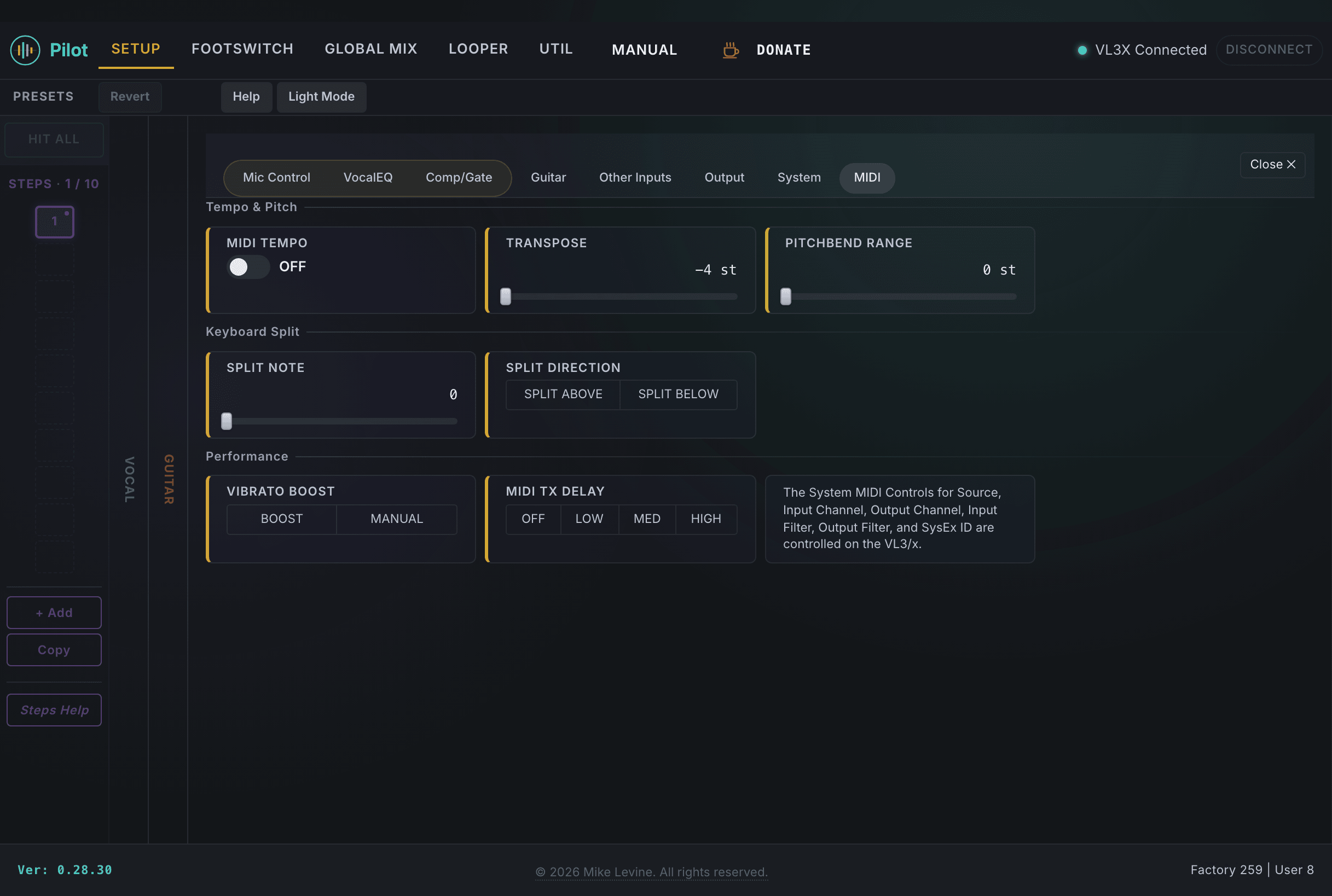
The MIDI section handles how the VL3/x interacts with other MIDI devices: tempo sync from an external clock, global pitch transposition, keyboard input handling, and transmit timing. These settings are global and apply across all presets.
The MIDI view. Seven parameters cover the full range of MIDI configuration on the VL3/x.
Warning: TRANSPOSE is a global offset applied to all vocal processing. If you enable it and then load a preset that sounds wrong, check this setting first. It's easy to leave a transposition active from a previous session and not notice until you're in the middle of a performance.
Clock and Tempo
Parameter
Range
What it does
MIDI TEMPO
On / Off
When on, the VL3/x accepts tempo from incoming MIDI clock messages. Delay times and other tempo-synced effects follow the external clock. When off, the device uses its own internal tempo.
Pitch and Transposition
Parameter
Range
What it does
TRANSPOSE
-4 to +4 semitones
Global pitch transpose for all vocal processing. Shifts all notes by the specified semitone offset. A value of +2 means every note you sing is shifted up a whole step.
PITCHBEND RANGE
0-12 semitones
How far the pitch bend wheel moves pitch when at full deflection. 2 semitones is a standard guitar-style bend; 12 semitones gives a full octave of range for keyboard players.
Keyboard Split
The keyboard split is designed for vocalists who also play a MIDI keyboard. Notes on one side of the split point control the harmonizer while notes on the other side play the keyboard's normal sound. It's a way to control harmony voices directly from MIDI notes rather than relying on NaturalPlay chord detection.
Parameter
Range
What it does
SPLIT NOTE
0-127 (MIDI note)
The note number where the keyboard splits. Notes on the harmony side directly select which harmony voices are active.
SPLIT DIRECTION
Above / Below
Which side of the split note controls harmonies. "Above" means notes higher than the split point drive the harmonizer; "Below" means notes lower than the split point do.
Tip: MIDI note 60 is middle C. A common split puts the harmony control zone on the left hand (notes below 60), leaving the right hand free to play melody or chords without accidentally triggering harmony changes.
Vibrato and Transmit
Parameter
Range
What it does
VIBRATO BOOST
Boost / Manual
Controls how vibrato is handled on harmony voices. BOOST mode automatically enhances vibrato on harmony voices. Manual mode follows the Vibrato slider setting in each preset without additional enhancement.
MIDI TX DELAY
4 values (enum)
Adds a small delay to outgoing MIDI notes from the harmony engine. Useful when driving an external synthesizer to produce harmony sounds: a slight delay can help the synth's envelope keep up with rapid melodic phrases.